Server-Side Execution Models
The Challenge
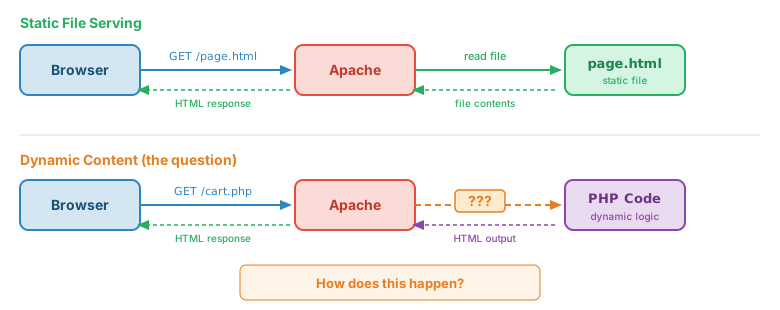
Web servers were originally designed to serve static files. When a browser requests /about.html, the server finds that file and sends it back. Simple.
But what about dynamic content? Shopping carts, user authentication, database queries? The server needs to run code to generate responses. The question is: how does that code execute?
The Execution Models
Over the decades, several approaches have emerged. Each makes different trade-offs between simplicity, performance, and resource usage.
| Model | How It Works | Examples |
|---|---|---|
| Fork-Exec CGI | Server spawns a new process for each request | C programs, Perl scripts, early web |
| Server Module | Interpreter embedded in the server process | mod_php, mod_perl |
| Application Server | Persistent process handles many requests | Node.js, Python WSGI/ASGI, Java Servlets |
| Serverless/FaaS | Cloud platform manages execution | AWS Lambda, Cloudflare Workers |
1. Fork-Exec CGI (Common Gateway Interface)
The original (1993) solution. When a request arrives for a CGI script, the web server:
- Forks a child process
- Sets up environment variables (QUERY_STRING, REQUEST_METHOD, etc.)
- Execs the program (replacing the child with the script)
- Captures stdout as the HTTP response
- Process exits when done
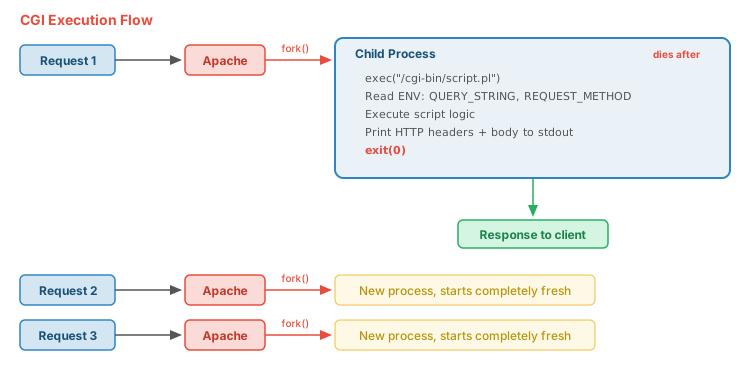
Cons: High overhead (process creation is expensive). No shared state between requests.
2. Server Module (Embedded Interpreter)
Instead of forking a new process, the interpreter runs inside the web server. Apache's mod_php is the classic example.
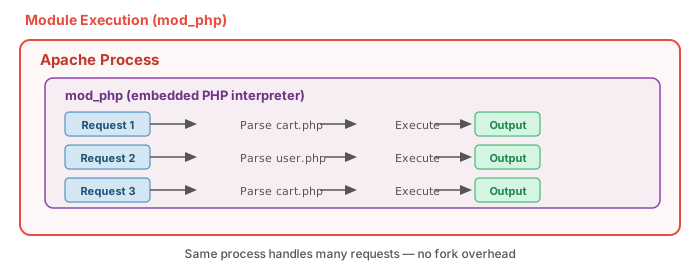
Cons: Language tied to server. Memory shared (potential security issues). Crashes can affect server.
3. Application Server (Persistent Process)
The application runs as its own long-lived process. The web server (or load balancer) proxies requests to it.
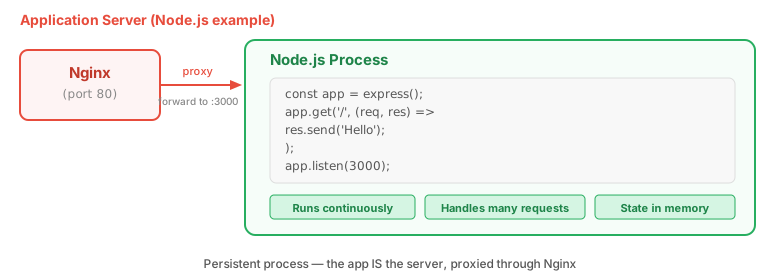
Cons: Must manage process lifecycle. Need reverse proxy for HTTPS/load balancing.
Comparison
| Aspect | CGI | Module (mod_php) | App Server (Node) |
|---|---|---|---|
| Startup per request | Full process | None | None |
| Memory isolation | Complete | Partial | None |
| State between requests | Impossible | Limited | Easy (in-memory) |
| Requests per second | Low (~100s) | High (~1000s) | Very High (~10,000s) |
| Crash impact | One request | One Apache worker | All requests |
| Deployment | Drop files | Drop files | Process manager |
Working Demos
See each execution model in action. All demos show the same basic operations implemented in different languages.
Perl - Traditional CGI
Classic fork-exec CGI using Perl scripts.
C - Compiled CGI
CGI programs compiled from C. Maximum performance for the CGI model.
PHP - Server Module
PHP running via mod_php (embedded in Apache). No fork overhead.
/cgi-bin/ for organizational consistency, they're actually handled by mod_php (the server module model), not traditional CGI fork-exec.
Historical Context
The evolution of server-side execution reflects the web's growth:
- 1993: CGI specification published. Perl becomes the "duct tape of the internet."
- 1995: PHP created, initially as CGI scripts, later as Apache module.
- 1997: mod_perl brings Perl into Apache's process space.
- 2009: Node.js introduces event-driven JavaScript server.
- 2014: AWS Lambda launches, popularizing serverless.
Each model didn't replace the previous one entirely - they coexist based on use case requirements.