State Management in Web Applications
The Fundamental Problem
HTTP is stateless by design. Each request from a browser to a server is completely independent. The server has no built-in memory of previous requests from the same client.
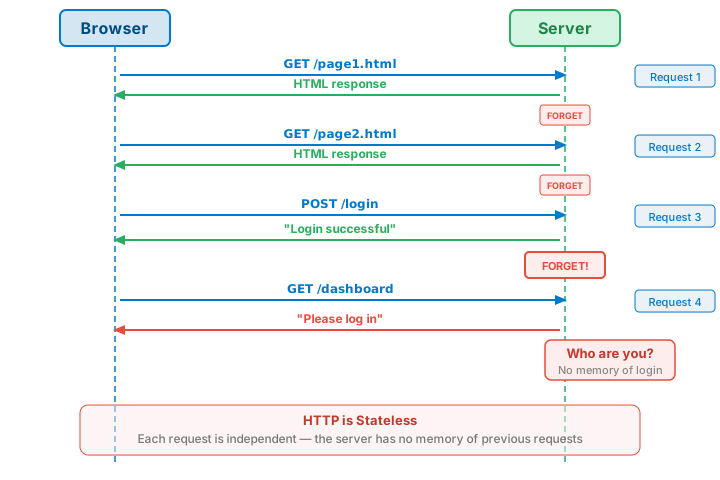
This creates a challenge: How do we build applications where users can log in, maintain shopping carts, or have personalized experiences?
Where State Can Live
We have three fundamental options for maintaining state:
1. Client-Side State
Data stored in the browser and sent with requests:
- URL Parameters - Data encoded in the URL itself (
?user=alice&page=2) - Hidden Form Fields - Data embedded in forms as invisible inputs
- Cookies - Small pieces of data the browser stores and sends with every request
- localStorage - Persistent storage accessible via JavaScript
- sessionStorage - Tab-scoped storage that clears when the tab closes
- JWT (JSON Web Tokens) - Self-contained signed tokens carrying user claims
2. Server-Side State
Data stored on the server, indexed by some identifier:
- Session Files - Data written to disk, keyed by session ID
- Databases - Structured storage (MySQL, PostgreSQL, etc.)
- In-Memory Stores - Fast caches like Redis or Memcached
3. Hybrid Approach (Most Common)
A small token stored client-side that points to server-side data:
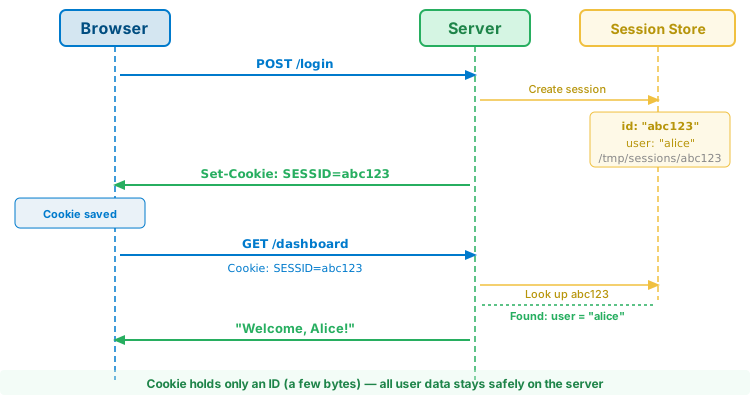
The cookie holds only an identifier (a few bytes). All actual user data stays safely on the server.
State Mechanisms Comparison
| Mechanism | Location | Persistence | Size Limit | Security |
|---|---|---|---|---|
| URL Parameters | URL (visible) | Per-request only | ~2KB | Visible in logs, history, referrer headers |
| Hidden Form Fields | HTML form | Form submission only | Unlimited | User can view/modify via DevTools |
| Cookies | Browser | Configurable (session or persistent) | ~4KB per cookie | Sent with every request; can be HTTP-only |
| localStorage | Browser | Permanent (until cleared) | ~5MB | JavaScript access only; same-origin policy |
| sessionStorage | Browser | Tab lifetime | ~5MB | JavaScript access only; per-tab isolation |
| Server Sessions | Server | Configurable | Unlimited | Only session ID exposed to client |
| JWT | Client (token) | Token lifetime | ~8KB practical | Signed but not encrypted; depends on storage |
When to Use What
URL Parameters
Best for: Shareable, bookmarkable state
- Search queries:
/search?q=web+development - Pagination:
/products?page=3 - Filters:
/catalog?category=books&sort=price
Avoid for: Sensitive data (passwords, tokens), large data sets
Cookies
Best for: Data that must be sent to the server automatically
- Session identifiers
- Authentication tokens
- User preferences (language, theme)
- Tracking identifiers
Avoid for: Large data (sent with every request)
localStorage
Best for: Persistent client-side data not needed by server
- Cached API responses
- User preferences (when server doesn't need them)
- Offline application data
Avoid for: Sensitive data (accessible to any JavaScript on the page)
sessionStorage
Best for: Temporary state within a single tab
- Form drafts
- Multi-step wizard progress
- Temporary UI state
Avoid for: Data needed across tabs or after browser closes
Server Sessions
Best for: Secure user-specific data
- User authentication state
- Shopping carts
- Any sensitive user data
Avoid for: Static data that doesn't need protection
Interactive Demos
Explore each state mechanism with hands-on examples:
- URL Parameters Demo - Pass data via query strings
- Hidden Form Fields Demo - Multi-step form wizard pattern
- Cookies Demo - Set, read, and delete cookies
- Server Sessions Demo - PHP session-based login flow
- Client Storage Demo - localStorage vs sessionStorage
- JWT Demo - Stateless token-based authentication
- Security Patterns - CSRF protection, flash messages
Security Considerations
| Mechanism | Risks | Mitigations |
|---|---|---|
| URL Parameters | Logged in server logs, browser history, referrer headers | Never put sensitive data in URLs |
| Cookies | XSS can steal cookies; CSRF can abuse them | HttpOnly flag, Secure flag, SameSite attribute |
| localStorage/sessionStorage | Any JavaScript can read it (XSS vulnerability) | Never store sensitive tokens; sanitize all inputs |
| Server Sessions | Session fixation, session hijacking | Regenerate session ID on login; use HTTPS |
| Hidden Form Fields | User can modify values via DevTools | Never trust for authorization; validate server-side |
| JWT | XSS if in localStorage; difficult to revoke | Store in httpOnly cookie; use short expiry + refresh tokens |
Decision Guide
- Sensitive auth data? → Server Sessions or JWT (in httpOnly cookie)
- Should be bookmarkable/shareable? → URL Parameters
- Part of a multi-step form? → Hidden Fields or Sessions
- Needs to persist across sessions? → Cookies or localStorage
- Tab-specific temporary data? → sessionStorage
- Stateless API authentication? → JWT