Node.js Overview
JavaScript on the Server
Node.js is a JavaScript runtime built on Chrome's V8 engine. Released in 2009, it allows you to run JavaScript outside the browser - on servers, command lines, and even embedded devices.
The key insight: Node.js IS the server. Unlike PHP which runs inside Apache, a Node.js application creates its own HTTP server and runs continuously.
The Fundamental Difference
Understanding how Node.js differs from PHP is crucial:
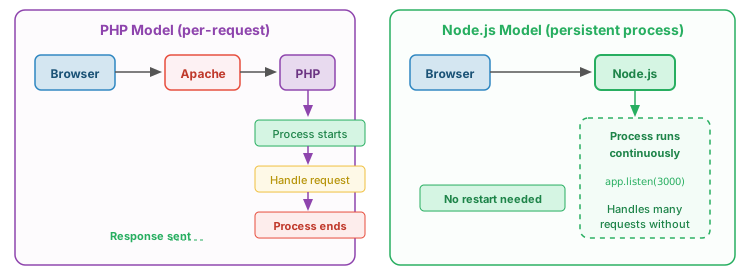
This has important implications:
- State persists: Variables stay in memory between requests (unlike PHP where everything resets)
- No cold start: The server is already running, no process spawn overhead
- Single-threaded event loop: One thread handles many concurrent connections
- You control the server: You write the code that listens for HTTP requests
Tutorial Modules
01. Hello World
Node.js fundamentals: running scripts, ES6+ features, and the event loop.
- Running JavaScript with Node
- The event loop concept
- Callbacks and async patterns
02. HTTP Server
Build a web server from scratch using Node's built-in http module.
http.createServer()- Request and response objects
- Manual routing and file serving
03. Express Basics
The Express framework: routing, middleware, and static files.
- npm and package management
- Express routing
- Serving static files
04. Form Handling
Process GET and POST data, parse request bodies.
req.queryandreq.body- Body parsing middleware
- Comparison with PHP
05. REST API
Build a simple RESTful API with CRUD operations.
- REST principles
- HTTP verbs and resources
- JSON responses
Quick Comparison: PHP vs Node.js
| Aspect | PHP | Node.js |
|---|---|---|
| Execution | Per-request (process starts/stops) | Persistent (runs continuously) |
| Server | Runs inside Apache/nginx | IS the server (creates own HTTP listener) |
| Concurrency | Multiple processes/threads | Single-threaded event loop |
| GET parameters | $_GET['name'] |
req.query.name |
| POST body | $_POST['email'] |
req.body.email |
| Sessions | Built-in ($_SESSION) |
Requires middleware (express-session) |
| Package manager | Composer | npm |
| Best for | Traditional websites, CMSs | APIs, real-time apps, microservices |
Running the Demos
cd node-tutorial/01-hello-world
node hello.js
For Express demos, install dependencies first: npm install
Node.js Quick Reference
Core Modules
const http = require('http');     // HTTP server
const fs = require('fs');         // File system
const path = require('path');     // Path utilities
const url = require('url');       // URL parsing
Basic HTTP Server
const http = require('http');

const server = http.createServer((req, res) => {
    res.writeHead(200, { 'Content-Type': 'text/plain' });
    res.end('Hello World!');
});

server.listen(3000, () => {
    console.log('Server running on http://localhost:3000');
});
Express Basics
const express = require('express');
const app = express();

app.use(express.json());                    // Parse JSON bodies
app.use(express.urlencoded({ extended: true })); // Parse form data
app.use(express.static('public'));          // Serve static files

app.get('/', (req, res) => {
    res.send('Hello World!');
});

app.get('/api/users/:id', (req, res) => {
    res.json({ id: req.params.id, name: 'User' });
});

app.listen(3000);