Data Storage & Databases
From Flat Files to Full Databases
Your REST API needs somewhere to store data. Understanding your storage options — from flat files to relational databases to document stores — is fundamental to building real web applications.
This page covers the full storage landscape: when to use each option, how to connect from Node.js and PHP, how to avoid SQL injection, and how to choose the right tool for your project.
The Storage Landscape
Data storage isn't a linear progression — it's a landscape of trade-offs. Each technology optimizes for different things: setup simplicity, query flexibility, concurrency, speed, or durability. There's no "best" option, only the right tool for a given job.
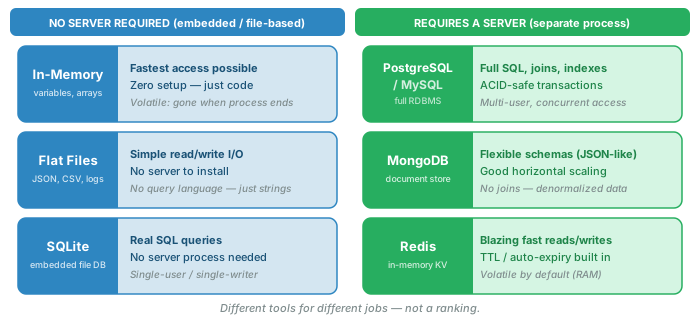
| Storage Type | Setup Complexity | Query Power | Concurrency | Best For |
|---|---|---|---|---|
| In-Memory | None | Code-level (loops, filters) | Single process only | Prototyping, caching, Node.js dev |
| Flat Files (JSON, CSV) | Minimal | Read/parse entire file | Poor — race conditions | Tutorials, config files, small datasets |
| SQLite | Low (no server) | Full SQL | Single writer at a time | Mobile apps, embedded systems, dev/test |
| PostgreSQL / MySQL | Medium (server process) | Full SQL + extensions | Excellent — ACID transactions | Production web apps, anything serious |
| MongoDB | Medium (server process) | Document queries, aggregation | Good — built for scale | Flexible schemas, rapid iteration |
| Redis | Medium (server process) | Key-value, basic structures | Excellent — single-threaded, atomic | Caching, sessions, rate limiting, queues |
Flat-File Storage
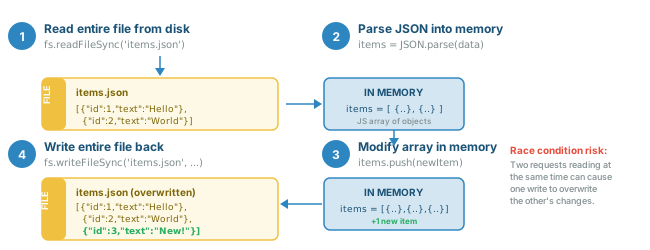
The simplest form of persistent storage: read data from a file, modify it in memory, write it back. This is exactly what our Module 05 REST tutorials do with items.json.
How It Works
Node.js Example
const fs = require('fs');
const DATA_FILE = './items.json';

// Read all items
function getItems() {
    const data = fs.readFileSync(DATA_FILE, 'utf8');
    return JSON.parse(data);
}

// Save all items
function saveItems(items) {
    fs.writeFileSync(DATA_FILE, JSON.stringify(items, null, 2));
}

// Add a new item
function addItem(newItem) {
    const items = getItems();
    newItem.id = items.length > 0 ? Math.max(...items.map(i => i.id)) + 1 : 1;
    items.push(newItem);
    saveItems(items);
    return newItem;
}
PHP Example
<?php
$dataFile = __DIR__ . '/items.json';

// Read all items
function getItems() {
    global $dataFile;
    $json = file_get_contents($dataFile);
    return json_decode($json, true) ?: [];
}

// Save all items
function saveItems($items) {
    global $dataFile;
    file_put_contents($dataFile, json_encode($items, JSON_PRETTY_PRINT));
}

// Add a new item
function addItem($newItem) {
    $items = getItems();
    $ids = array_column($items, 'id');
    $newItem['id'] = empty($ids) ? 1 : max($ids) + 1;
    $items[] = $newItem;
    saveItems($items);
    return $newItem;
}
?>
Pros and Cons
| Pros | Cons |
|---|---|
| Zero setup — no database server to install | No query language — must load entire file to find anything |
| Human-readable — open the file and see your data | Race conditions — two requests writing simultaneously corrupt data |
| Easy to debug — just look at the JSON | No indexing — searching gets slow with large datasets |
| Portable — copy one file to move all your data | No relationships — no JOINs, no foreign keys |
| Great for learning the CRUD pattern | Rewrites entire file on every change — inefficient |
Relational Databases (SQL)
Relational databases store data in tables (rows and columns), enforce relationships between tables via foreign keys, and use SQL (Structured Query Language) to create, read, update, and delete data. They've been the backbone of web applications since the 1990s.
What Makes Them "Relational"?
The "relational" in relational database doesn't mean "tables are related to each other" (though they are). It comes from the mathematical concept of a relation — a set of tuples (rows) that share the same attributes (columns). In practical terms:
- Tables define a structure (columns with types)
- Rows are individual records that conform to that structure
- Foreign keys link rows in one table to rows in another
- Constraints enforce data integrity (NOT NULL, UNIQUE, CHECK)
- ACID transactions guarantee that operations either fully succeed or fully fail
PostgreSQL as Our Primary Example
We use PostgreSQL (often called "Postgres") in this course. It's open-source, standards-compliant, and one of the most capable relational databases available. Other popular options include MySQL/MariaDB, SQLite, and Microsoft SQL Server — they all use SQL with minor dialect differences.
Defining a Table: The Stories Schema
Here's the table we'll use throughout our tutorials — a stories table for tracking work items (like a simple project management tool):
CREATE TABLE stories (
    id SERIAL PRIMARY KEY,
    title VARCHAR(200) NOT NULL,
    description TEXT,
    priority VARCHAR(10) DEFAULT 'medium',
    status VARCHAR(20) DEFAULT 'todo',
    created_at TIMESTAMP DEFAULT CURRENT_TIMESTAMP
);
Let's break down each part:
| Column | Type | Constraints | Purpose |
|---|---|---|---|
id |
SERIAL |
PRIMARY KEY |
Auto-incrementing unique identifier |
title |
VARCHAR(200) |
NOT NULL |
Story title, required, max 200 chars |
description |
TEXT |
(none — nullable) | Optional longer description |
priority |
VARCHAR(10) |
DEFAULT 'medium' |
low, medium, or high |
status |
VARCHAR(20) |
DEFAULT 'todo' |
todo, in-progress, or done |
created_at |
TIMESTAMP |
DEFAULT CURRENT_TIMESTAMP |
Auto-set when row is created |
SQL Basics Mapped to CRUD
SQL maps directly to the same CRUD operations you already know from REST:
| CRUD Operation | SQL Statement | HTTP Method | REST Endpoint |
|---|---|---|---|
| Create | INSERT INTO |
POST | /api/stories |
| Read (all) | SELECT * FROM |
GET | /api/stories |
| Read (one) | SELECT * FROM ... WHERE id = ? |
GET | /api/stories/:id |
| Update | UPDATE ... SET ... WHERE id = ? |
PUT / PATCH | /api/stories/:id |
| Delete | DELETE FROM ... WHERE id = ? |
DELETE | /api/stories/:id |
CRUD SQL Examples
-- CREATE: Insert a new story
INSERT INTO stories (title, description, priority)
VALUES ('Build login page', 'Add username/password auth', 'high')
RETURNING *;

-- READ: Get all stories
SELECT * FROM stories ORDER BY created_at DESC;

-- READ: Get one story by ID
SELECT * FROM stories WHERE id = 1;

-- READ: Filter stories
SELECT * FROM stories WHERE status = 'todo' AND priority = 'high';

-- UPDATE: Change a story's status
UPDATE stories SET status = 'in-progress' WHERE id = 1 RETURNING *;

-- DELETE: Remove a story
DELETE FROM stories WHERE id = 1 RETURNING *;
RETURNING * clause is a PostgreSQL feature that returns the affected row(s) after an INSERT, UPDATE, or DELETE. This is extremely useful in REST APIs because you can return the created/updated resource in the response without a second query.
Connecting from Code
A database sitting on a server is useless until your application can talk to it. Both Node.js and PHP use database client libraries that manage connections and send SQL queries.
Node.js: The pg Library
The pg (node-postgres) library is the standard PostgreSQL client for Node.js. It uses a connection pool to efficiently reuse database connections across requests.
const { Pool } = require('pg');

// Create a connection pool
const pool = new Pool({
    host: process.env.DB_HOST || 'localhost',
    port: process.env.DB_PORT || 5432,
    database: process.env.DB_NAME || 'cse135',
    user: process.env.DB_USER || 'postgres',
    password: process.env.DB_PASSWORD
});

// GET /api/stories - list all stories
app.get('/api/stories', async (req, res) => {
    try {
        const result = await pool.query('SELECT * FROM stories ORDER BY created_at DESC');
        res.json(result.rows);
    } catch (err) {
        console.error(err);
        res.status(500).json({ error: 'Database error' });
    }
});

// GET /api/stories/:id - get one story
app.get('/api/stories/:id', async (req, res) => {
    try {
        const result = await pool.query('SELECT * FROM stories WHERE id = $1', [req.params.id]);
        if (result.rows.length === 0) {
            return res.status(404).json({ error: 'Story not found' });
        }
        res.json(result.rows[0]);
    } catch (err) {
        console.error(err);
        res.status(500).json({ error: 'Database error' });
    }
});

// POST /api/stories - create a story
app.post('/api/stories', async (req, res) => {
    const { title, description, priority } = req.body;
    try {
        const result = await pool.query(
            'INSERT INTO stories (title, description, priority) VALUES ($1, $2, $3) RETURNING *',
            [title, description, priority]
        );
        res.status(201).json(result.rows[0]);
    } catch (err) {
        console.error(err);
        res.status(500).json({ error: 'Database error' });
    }
});
PHP: PDO (PHP Data Objects)
PDO is PHP's built-in database abstraction layer. It works with PostgreSQL, MySQL, SQLite, and many other databases through a consistent interface.
<?php
// Create a PDO connection
$host = getenv('DB_HOST') ?: 'localhost';
$port = getenv('DB_PORT') ?: '5432';
$dbname = getenv('DB_NAME') ?: 'cse135';
$user = getenv('DB_USER') ?: 'postgres';
$password = getenv('DB_PASSWORD') ?: '';

$dsn = "pgsql:host=$host;port=$port;dbname=$dbname";
$pdo = new PDO($dsn, $user, $password, [
    PDO::ATTR_ERRMODE => PDO::ERRMODE_EXCEPTION,
    PDO::ATTR_DEFAULT_FETCH_MODE => PDO::FETCH_ASSOC
]);

// GET /api/stories - list all stories
function getAllStories($pdo) {
    $stmt = $pdo->query('SELECT * FROM stories ORDER BY created_at DESC');
    return $stmt->fetchAll();
}

// GET /api/stories/:id - get one story
function getStory($pdo, $id) {
    $stmt = $pdo->prepare('SELECT * FROM stories WHERE id = :id');
    $stmt->execute(['id' => $id]);
    return $stmt->fetch();  // returns false if not found
}

// POST /api/stories - create a story
function createStory($pdo, $data) {
    $stmt = $pdo->prepare(
        'INSERT INTO stories (title, description, priority)
         VALUES (:title, :description, :priority) RETURNING *'
    );
    $stmt->execute([
        'title' => $data['title'],
        'description' => $data['description'] ?? null,
        'priority' => $data['priority'] ?? 'medium'
    ]);
    return $stmt->fetch();
}
?>
Side-by-Side Comparison
| Concept | Node.js (pg) |
PHP (PDO) |
|---|---|---|
| Install | npm install pg |
Built-in (enable pdo_pgsql extension) |
| Connection | new Pool({host, database, ...}) |
new PDO($dsn, $user, $password) |
| Simple query | pool.query('SELECT ...') |
$pdo->query('SELECT ...') |
| Parameterized | pool.query('... $1 ...', [val]) |
$stmt->execute(['id' => $val]) |
| Placeholder style | Positional: $1, $2, $3 |
Named: :id, :title or positional: ? |
| Get rows | result.rows |
$stmt->fetchAll() |
| Connection pooling | Built into Pool |
Via persistent connections or external pooler |
| Error handling | try/catch with async/await |
try/catch with PDO::ERRMODE_EXCEPTION |
process.env.DB_PASSWORD in Node.js, getenv('DB_PASSWORD') in PHP) or a .env file (excluded from version control via .gitignore). Committing credentials to Git is one of the most common security mistakes — and bots scan public repos for leaked passwords.
SQL Injection and Parameterized Queries
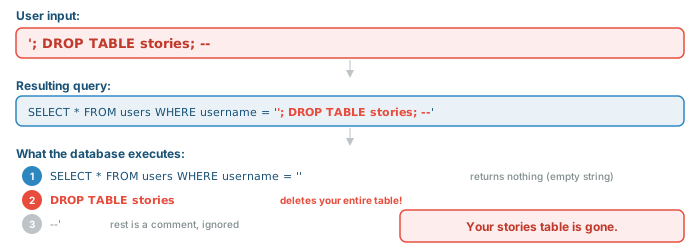
SQL injection happens when user input is inserted directly into a SQL string, allowing an attacker to modify the query's logic. It's the single most dangerous vulnerability in web applications — and the most preventable.
The Attack
Imagine you build a login form and construct the SQL query by concatenating the username:
// WRONG — vulnerable to SQL injection!
const query = "SELECT * FROM users WHERE username = '" + username + "'";
If a user enters a normal username like alice, you get a valid query:
SELECT * FROM users WHERE username = 'alice'
But what if someone enters this as their "username"?

It gets worse. An attacker could enter:
The Fix: Parameterized Queries
Parameterized queries (also called prepared statements) separate the SQL structure from the data values. The database treats parameters as data, never as SQL code — so malicious input can't change the query's logic.
WRONG vs RIGHT — Node.js
| WRONG — String Concatenation | RIGHT — Parameterized Query |
|---|---|
// NEVER do this!
const query = `SELECT * FROM stories
  WHERE id = ${req.params.id}`;
const result = await pool.query(query);

// Attacker sends: id = "1; DROP TABLE stories"
// Query becomes:
// SELECT * FROM stories WHERE id = 1;
//   DROP TABLE stories
|
// Always use parameterized queries const result = await pool.query( 'SELECT * FROM stories WHERE id = $1', [req.params.id] ); // Attacker sends: id = "1; DROP TABLE stories" // Database sees id = '1; DROP TABLE stories' // (treated as a string value, not SQL) // Result: no matching row, no damage |
WRONG vs RIGHT — PHP
| WRONG — String Concatenation | RIGHT — Prepared Statement |
|---|---|
// NEVER do this! $query = "SELECT * FROM stories WHERE id = " . $_GET['id']; $result = $pdo->query($query); // Attacker sends: ?id=1;DROP TABLE stories // Query becomes: // SELECT * FROM stories WHERE id = 1; // DROP TABLE stories |
// Always use prepared statements $stmt = $pdo->prepare( 'SELECT * FROM stories WHERE id = :id' ); $stmt->execute(['id' => $_GET['id']]); $result = $stmt->fetch(); // Attacker sends: ?id=1;DROP TABLE stories // Database sees id = '1;DROP TABLE stories' // (treated as a value, not SQL) // Result: no matching row, no damage |
How Parameterized Queries Work Under the Hood
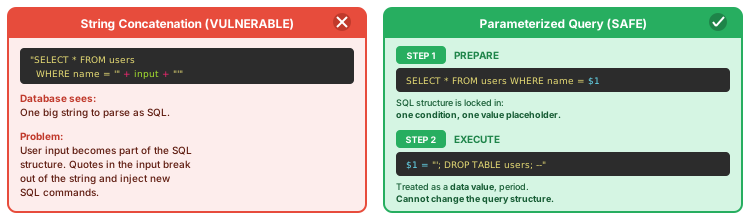
$1, $2 in Node.js with pg) or prepared statements (:name or ? in PHP with PDO). This single practice prevents the most common and dangerous web vulnerability.
NoSQL / Document Databases
"NoSQL" is a catch-all term for databases that don't use the traditional table-and-row relational model. The most common type for web development is the document database, where data is stored as flexible JSON-like documents instead of rigid table rows.
MongoDB as Example
MongoDB is the most popular document database. Instead of tables with fixed columns, you have collections of documents that can each have different structures:
// A MongoDB document (stored as BSON — binary JSON)
{
    "_id": ObjectId("507f1f77bcf86cd799439011"),
    "title": "Build login page",
    "description": "Add username/password auth",
    "priority": "high",
    "status": "todo",
    "tags": ["auth", "frontend"],        // arrays are native
    "assignee": {                          // nested objects are native
        "name": "Alice",
        "email": "alice@example.com"
    },
    "created_at": ISODate("2025-01-15T10:30:00Z")
}
SQL vs NoSQL Terminology
| SQL Concept | NoSQL Equivalent (MongoDB) |
|---|---|
| Database | Database |
| Table | Collection |
| Row | Document |
| Column | Field |
SELECT |
find() |
INSERT |
insertOne() / insertMany() |
UPDATE |
updateOne() / updateMany() |
DELETE |
deleteOne() / deleteMany() |
JOIN |
Embedded document or $lookup (aggregation) |
When NoSQL vs SQL
| Choose SQL (PostgreSQL) When | Choose NoSQL (MongoDB) When |
|---|---|
| Data has a consistent, well-defined structure | Data structure varies between records |
| You need JOINs across related data | Related data is naturally nested (embedded docs) |
| ACID transactions are critical (banking, orders) | Eventual consistency is acceptable |
| Complex queries with aggregation and filtering | Simple lookups by key or basic filters |
| Data integrity constraints are important | Schema flexibility is more important than strictness |
Brief Code Examples
Node.js with MongoDB (using the official driver):
const { MongoClient } = require('mongodb');
const client = new MongoClient(process.env.MONGO_URL || 'mongodb://localhost:27017');
const db = client.db('cse135');
const stories = db.collection('stories');

// Create
const result = await stories.insertOne({
    title: 'Build login page',
    priority: 'high',
    status: 'todo',
    created_at: new Date()
});

// Read all
const allStories = await stories.find({}).toArray();

// Read one
const story = await stories.findOne({ _id: new ObjectId(id) });

// Update
await stories.updateOne(
    { _id: new ObjectId(id) },
    { $set: { status: 'in-progress' } }
);

// Delete
await stories.deleteOne({ _id: new ObjectId(id) });
PHP with MongoDB (using the mongodb extension):
<?php
$client = new MongoDB\Client(getenv('MONGO_URL') ?: 'mongodb://localhost:27017');
$collection = $client->cse135->stories;

// Create
$result = $collection->insertOne([
    'title' => 'Build login page',
    'priority' => 'high',
    'status' => 'todo',
    'created_at' => new MongoDB\BSON\UTCDateTime()
]);

// Read all
$allStories = $collection->find()->toArray();

// Read one
$story = $collection->findOne(['_id' => new MongoDB\BSON\ObjectId($id)]);

// Update
$collection->updateOne(
    ['_id' => new MongoDB\BSON\ObjectId($id)],
    ['$set' => ['status' => 'in-progress']]
);

// Delete
$collection->deleteOne(['_id' => new MongoDB\BSON\ObjectId($id)]);
?>
ORMs and Query Builders
Writing raw SQL for every database operation works, but it's tedious and error-prone for complex applications. ORMs (Object-Relational Mappers) and query builders provide higher-level abstractions that map database rows to objects in your programming language.
What ORMs Do
- Map tables to classes and rows to objects
- Generate SQL from method calls (you write code, the ORM writes SQL)
- Handle relationships — load related data automatically (eager/lazy loading)
- Manage schema changes via migrations (version-controlled database changes)
- Abstract database differences — switch between PostgreSQL and MySQL with minimal code changes
Same Operation: Raw SQL vs ORM
| Operation | Raw SQL | ORM (Sequelize / Eloquent) |
|---|---|---|
| Get all | SELECT * FROM stories |
Story.findAll() / Story::all() |
| Get by ID | SELECT * FROM stories WHERE id = $1 |
Story.findByPk(id) / Story::find($id) |
| Create | INSERT INTO stories (title) VALUES ($1) |
Story.create({title}) / Story::create([...]) |
| Update | UPDATE stories SET status = $1 WHERE id = $2 |
story.update({status}) / $story->update([...]) |
| Delete | DELETE FROM stories WHERE id = $1 |
story.destroy() / $story->delete() |
| Filter | SELECT * FROM stories WHERE priority = $1 |
Story.findAll({where: {priority}}) / Story::where('priority', $p)->get() |
Popular ORMs and Query Builders
| Language | Tool | Type | Notes |
|---|---|---|---|
| Node.js | Sequelize | ORM (Active Record) | Most established Node.js ORM; supports PostgreSQL, MySQL, SQLite |
| Node.js | Prisma | ORM (Data Mapper-ish) | Modern, type-safe; uses its own schema language; auto-generates client |
| Node.js | Knex | Query Builder | Not a full ORM — builds SQL from JS, gives you more control |
| PHP | Eloquent | ORM (Active Record) | Part of Laravel; very expressive; models = tables |
| PHP | Doctrine | ORM (Data Mapper) | Used by Symfony; more explicit; entities are plain PHP objects |
Active Record vs Data Mapper
The two main ORM patterns differ in how tightly your objects are coupled to the database:
| Pattern | How It Works | Examples | Trade-off |
|---|---|---|---|
| Active Record | Each object knows how to save itself. story.save() writes to the DB directly. |
Sequelize, Eloquent, Rails ActiveRecord | Simple and fast to develop; harder to test in isolation |
| Data Mapper | Objects are plain data. A separate "mapper" handles persistence. Object doesn't know about the DB. | Prisma, Doctrine, Hibernate | More code upfront; cleaner separation of concerns; easier to test |
Choosing Your Storage
Here's a practical decision framework for picking the right storage for your use case:
| Use Case | Recommended Storage | Why |
|---|---|---|
| Learning CRUD / tutorials | Flat files (JSON) or in-memory | Zero setup; focus on HTTP and REST first |
| Personal project / prototype | SQLite | Real SQL with no server to manage; one file to deploy |
| Production web app | PostgreSQL | Battle-tested, ACID compliant, rich feature set, excellent ecosystem |
| Content management / CMS | PostgreSQL or MongoDB | PostgreSQL if structured; MongoDB if content types vary wildly |
| User sessions / caching | Redis | Blazing fast reads/writes; built-in TTL (expiration) for sessions |
| Analytics / event logging | Ingestion: flat files (log files) — append-only, fast, no DB overhead Analysis: PostgreSQL (or specialized: ClickHouse, TimescaleDB) |
Log files are ideal for high-speed write capture; databases with SQL aggregation shine when you need to query and analyze the collected data |
| Mobile app with offline support | SQLite (on device) + PostgreSQL (server) | SQLite works offline; sync to server when connected |
| Microservices with different data shapes | Mix — each service picks what fits | "Polyglot persistence": use the right DB for each service's needs |
Summary
| Concept | Key Points |
|---|---|
| Storage Landscape | Six main options (in-memory, flat files, SQLite, PostgreSQL/MySQL, MongoDB, Redis) — each optimizes for different trade-offs, not a linear progression |
| Flat Files | Read/write entire JSON file; zero setup; no concurrency safety; fine for tutorials, bad for production |
| Relational Databases | Tables, rows, columns; SQL for CRUD; foreign keys for relationships; ACID transactions for data integrity |
| SQL ↔ CRUD ↔ REST | INSERT=POST, SELECT=GET, UPDATE=PUT/PATCH, DELETE=DELETE — the same pattern at every layer |
| Connecting from Code | Node.js uses pg with Pool and $1 placeholders; PHP uses PDO with :name placeholders |
| SQL Injection | The #1 web vulnerability; caused by string concatenation in SQL; prevented by parameterized queries — always |
| NoSQL / MongoDB | Document databases store flexible JSON-like data; good for varied schemas; use SQL when you need JOINs and transactions |
| ORMs | Map tables to objects (Sequelize, Prisma, Eloquent, Doctrine); convenient but learn raw SQL first |
| Choosing Storage | Match the tool to the problem; PostgreSQL is the safe default for production; don't over-engineer for tutorials |