REST API Design
Representational State Transfer
REST is an architectural style for building web APIs, defined by Roy Fielding in his 2000 doctoral dissertation. The core idea is simple:
- Resources are identified by URLs (
/api/books,/api/books/42) - HTTP methods are the verbs that act on those resources (GET, POST, PUT, DELETE)
- Representations (usually JSON) are how resources are transferred between client and server
- Each request is stateless — it contains all the information the server needs
Think of it this way: URLs are nouns, HTTP methods are verbs.
CRUD and REST
REST maps the four basic data operations (CRUD) to HTTP methods:
| CRUD Operation | HTTP Method | Collection URL | Item URL |
|---|---|---|---|
| Create | POST | /api/books |
— |
| Read | GET | /api/books |
/api/books/42 |
| Update | PUT / PATCH | — | /api/books/42 |
| Delete | DELETE | — | /api/books/42 |
There are two URL patterns:
/api/resource— the collection (all books)/api/resource/:id— a specific item (book #42)
URL Design: The RESTful Spectrum
Not all API URLs are equally RESTful. URLs should name resources (nouns), not actions (verbs). Here's a spectrum from good to bad:
| URL | RESTfulness | Why |
|---|---|---|
GET /api/books/1 |
RESTful | Resource in the URL, method implies action |
GET /api/books?id=1 |
Less RESTful | Works, but ID should be in the path |
GET /api?record=books&id=1 |
Not RESTful | Resource type hidden in query params |
GET /api?id=1&action=delete |
Definitely not REST | Action in URL, wrong HTTP method for delete |
/api/getBooks or /api/deleteUser/5, you're putting the verb in the URL instead of using HTTP methods. The whole point of REST is that the HTTP method is the verb.
HTTP Status Codes
A REST API communicates results through HTTP status codes. Using the right code tells the client exactly what happened without parsing the response body.
Success Codes (2xx)
| Code | Name | When to Use |
|---|---|---|
200 |
OK | Successful GET, PUT, PATCH, or DELETE |
201 |
Created | Successful POST that created a new resource |
204 |
No Content | Successful DELETE with no response body |
Redirect Codes (3xx)
| Code | Name | When to Use |
|---|---|---|
301 |
Moved Permanently | Resource URL has changed permanently |
304 |
Not Modified | Cached version is still valid (conditional GET) |
Client Error Codes (4xx)
| Code | Name | When to Use |
|---|---|---|
400 |
Bad Request | Malformed request or invalid input data |
401 |
Unauthorized | Authentication required (not logged in) |
403 |
Forbidden | Authenticated but not allowed (wrong permissions) |
404 |
Not Found | Resource doesn't exist |
405 |
Method Not Allowed | HTTP method not supported for this URL |
409 |
Conflict | Request conflicts with current state (e.g., duplicate) |
422 |
Unprocessable Entity | Valid JSON but semantically invalid (e.g., missing required field) |
429 |
Too Many Requests | Rate limit exceeded |
Server Error Codes (5xx)
| Code | Name | When to Use |
|---|---|---|
500 |
Internal Server Error | Something broke on the server (bug, DB down, etc.) |
Status Codes by CRUD Operation
| Operation | Success | Common Errors |
|---|---|---|
| POST Create | 201 Created |
400 Bad input, 409 Conflict |
| GET Read | 200 OK |
404 Not found |
| PUT Update | 200 OK |
404 Not found, 400 Bad input |
| DELETE Delete | 200 or 204 |
404 Not found |
PUT vs PATCH
Both update a resource, but they have different semantics:
| Aspect | PUT | PATCH |
|---|---|---|
| Semantics | Full replacement — send the entire resource | Partial update — send only changed fields |
| Missing fields | Should be set to defaults or removed | Left unchanged |
| Idempotent? | Yes — same PUT twice = same result | Not guaranteed |
| Example | PUT /api/books/42{"title":"New","author":"X","year":2024} |
PATCH /api/books/42{"year":2025} |
Request and Response Formats
REST is explicitly format-agnostic — the architecture says nothing about JSON, XML, or any specific data format. Instead, it relies on the Content-Type header (what format the body is in) and the Accept header (what format the client wants back) to negotiate representations. JSON dominates modern API-to-API communication, but treating it as the only option misses one of REST's core strengths.
JSON (the most common format)
| Language | Encode (Object → JSON string) | Decode (JSON string → Object) |
|---|---|---|
| JavaScript | JSON.stringify(obj) |
JSON.parse(str) |
| PHP | json_encode($arr) |
json_decode($str, true) |
Content-Type Headers
The Content-Type header tells the server what format the request body is in. The Accept header tells the server what format the client wants back.
// Sending JSON
POST /api/books HTTP/1.1
Content-Type: application/json
Accept: application/json

{"title": "REST in Practice", "author": "Jim Webber"}
Beyond JSON: Other Input Formats
If your API only accepts JSON request bodies, you've excluded standard HTML <form> elements — which means every form needs JavaScript just to submit data. Real-world APIs often need to handle multiple input formats:
| Content-Type | When It's Used |
|---|---|
application/json |
JavaScript clients, API-to-API calls |
application/x-www-form-urlencoded |
Standard HTML form submissions (the default for <form>) |
multipart/form-data |
File uploads and mixed data — the only way to upload files via HTML forms |
Here's what form-encoded data looks like on the wire versus JSON:
// JSON (from JavaScript fetch, Postman, etc.)
POST /api/books HTTP/1.1
Content-Type: application/json

{"title": "REST in Practice", "author": "Jim Webber"}

// Form-encoded (from a standard HTML <form>)
POST /api/books HTTP/1.1
Content-Type: application/x-www-form-urlencoded

title=REST+in+Practice&author=Jim+Webber
Handling both in your API is straightforward:
// Node.js (Express) — accept JSON and form data
app.use(express.json());                   // parses application/json
app.use(express.urlencoded({extended: true})); // parses form-encoded

app.post('/api/books', (req, res) => {
  // req.body works the same regardless of input format
  const {title, author} = req.body;
});
// PHP — accept JSON and form data
if ($_SERVER['CONTENT_TYPE'] === 'application/json') {
    $data = json_decode(file_get_contents('php://input'), true);
} else {
    // PHP automatically parses form-encoded data into $_POST
    $data = $_POST;
}
application/x-www-form-urlencoded, a plain HTML form can submit data with zero JavaScript. You can then layer on JavaScript for a richer experience — but the basic functionality works without it.
Content Negotiation: Multiple Output Formats
The "Representational" in Representational State Transfer means a resource can have multiple representations. The Accept header is how the client requests a specific format, and a well-designed API responds accordingly:
| Accept Header | Use Case |
|---|---|
application/json |
JavaScript clients, SPAs, mobile apps |
text/html |
Server-side rendering, HTMX, progressive enhancement |
text/csv |
Data exports, spreadsheet-friendly downloads |
application/xml |
Legacy systems, enterprise integrations, RSS/Atom feeds |
application/pdf |
Generated reports, invoices |
Here's a simple example of Accept-header-based routing:
// Node.js (Express) — respond in the format the client wants
app.get('/api/books', (req, res) => {
  const books = getBooks();

  if (req.accepts('html')) {
    res.type('html').send(renderBooksTable(books));
  } else if (req.accepts('csv')) {
    res.type('csv').send(booksToCSV(books));
  } else {
    res.json(books);  // JSON as default fallback
  }
});
// PHP — respond based on Accept header
$books = getBooks();
$accept = $_SERVER['HTTP_ACCEPT'] ?? 'application/json';

if (str_contains($accept, 'text/html')) {
    header('Content-Type: text/html');
    echo renderBooksTable($books);
} elseif (str_contains($accept, 'text/csv')) {
    header('Content-Type: text/csv');
    echo booksToCSV($books);
} else {
    header('Content-Type: application/json');
    echo json_encode($books);
}
Accept and Content-Type headers exist for exactly this reason — use them.
Richardson Maturity Model
Leonard Richardson described a maturity model for REST APIs with four levels. Think of it as climbing an API quality pyramid:
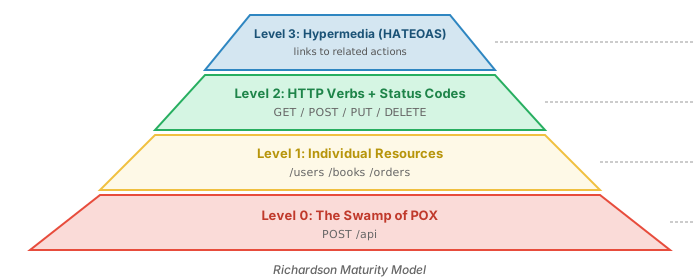
Most modern APIs aim for Level 2 and that's generally sufficient. Level 3 (HATEOAS) is the full REST ideal but adds complexity many teams don't need.
Martin Fowler's detailed explanation of the Richardson Maturity Model
HATEOAS (Hypermedia as the Engine of Application State)
At Level 3, API responses include links that tell the client what it can do next. Instead of hardcoding API URLs, the client discovers them dynamically.
Example: A book resource with HATEOAS links
{
    "id": 42,
    "title": "REST in Practice",
    "author": "Jim Webber",
    "_links": {
        "self":    { "href": "/api/books/42" },
        "update":  { "href": "/api/books/42", "method": "PUT" },
        "delete":  { "href": "/api/books/42", "method": "DELETE" },
        "author":  { "href": "/api/authors/7" },
        "reviews": { "href": "/api/books/42/reviews" }
    }
}
Real-World Example: GitHub API
The GitHub API is one of the best examples of HATEOAS in the wild. Try it yourself:
curl https://api.github.com/users/tj
The response includes URLs for repos, followers, organizations — the client never has to construct those URLs itself.
Public vs Private APIs
The design considerations change dramatically based on who's consuming your API.
| Aspect | Private API | Public API |
|---|---|---|
| Consumers | Your own front-end team | External developers worldwide |
| Breaking changes | Coordinate with your team, deploy together | You can't — people depend on the old behavior |
| Versioning | Often unnecessary | Essential: /v1/api/books, /v2/api/books |
| Documentation | Team Wiki, Slack, "Ask Senior Dev" | Published docs, OpenAPI spec, changelogs |
| HATEOAS | Rarely needed | Valuable for discoverability |
Versioning Strategies
# URL path versioning (most common)
GET /v1/api/books
GET /v2/api/books

# Header versioning
GET /api/books
Accept: application/vnd.myapi.v2+json

# Query parameter versioning
GET /api/books?version=2
URL path versioning is the most visible and widely used approach. The Open-Closed Principle applies: APIs should be open for extension but closed for modification. Once published, don't change existing behavior — add new versions instead.
HTTP Method Challenges
In theory, REST cleanly maps to HTTP methods. In practice, there are complications:
- Corporate proxies may strip or block PUT and DELETE requests
- Firewalls sometimes only allow GET and POST
- HTML forms only support GET and POST natively
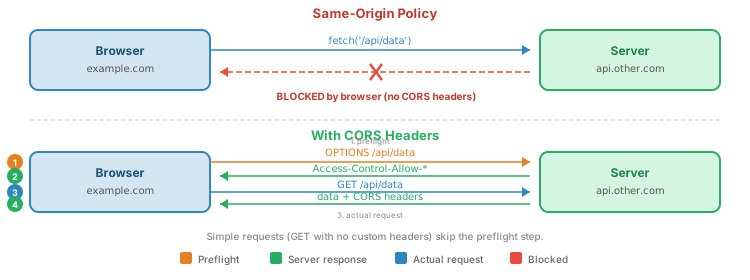
- CORS preflight adds an OPTIONS request before non-simple methods
Workarounds
| Problem | Solution |
|---|---|
| Proxy strips PUT/DELETE | Use HTTPS (proxies can't inspect encrypted traffic) |
| Firewall blocks methods | POST with X-HTTP-Method-Override: PUT header |
| HTML form limitation | Use JavaScript fetch() or hidden field _method=PUT |
| CORS preflight overhead | Handle OPTIONS in your API (return allowed methods) |
// Method override header approach
// Client sends:
POST /api/books/42 HTTP/1.1
X-HTTP-Method-Override: DELETE

// Server checks for override:
const method = req.headers['x-http-method-override'] || req.method;
API Mocking and json-server
You don't always need to build a backend before building a frontend. API mocking lets you prototype quickly:
- Frontend team can start building immediately while the backend is still in development
- Test client code without a running server
- Prototype API designs before committing to an implementation
json-server: Instant REST API from a JSON file
json-server generates a full CRUD REST API from a single JSON file. No code required.
# Install and run
npx json-server db.json
Given a db.json file:
{
    "books": [
        { "id": 1, "title": "REST in Practice", "author": "Jim Webber" },
        { "id": 2, "title": "Designing APIs", "author": "Brenda Jin" }
    ],
    "authors": [
        { "id": 1, "name": "Jim Webber" }
    ]
}
json-server automatically creates these endpoints:
| Method | URL | Action |
|---|---|---|
| GET | /books |
List all books |
| GET | /books/1 |
Get book by ID |
| POST | /books |
Create a book |
| PUT | /books/1 |
Replace a book |
| PATCH | /books/1 |
Update a book |
| DELETE | /books/1 |
Delete a book |
It even supports filtering (/books?author=Jim+Webber), pagination, and sorting. Changes persist back to the JSON file.
CORS (Cross-Origin Requests)
Browsers enforce the Same-Origin Policy: JavaScript on example.com cannot make requests to api.other.com by default. CORS (Cross-Origin Resource Sharing) is the mechanism that allows it.
CORS in Node.js (Express)
// Manual CORS middleware
app.use((req, res, next) => {
    res.header('Access-Control-Allow-Origin', '*');
    res.header('Access-Control-Allow-Methods', 'GET, POST, PUT, DELETE, PATCH');
    res.header('Access-Control-Allow-Headers', 'Content-Type, Authorization');

    // Handle preflight
    if (req.method === 'OPTIONS') {
        return res.sendStatus(200);
    }
    next();
});

// Or use the cors package:
// const cors = require('cors');
// app.use(cors());
CORS in PHP
<?php
// Set CORS headers
header('Access-Control-Allow-Origin: *');
header('Access-Control-Allow-Methods: GET, POST, PUT, DELETE, PATCH');
header('Access-Control-Allow-Headers: Content-Type, Authorization');

// Handle preflight
if ($_SERVER['REQUEST_METHOD'] === 'OPTIONS') {
    http_response_code(200);
    exit;
}
?>
* for Access-Control-Allow-Origin allows any site to call your API. For production, specify the exact origins you trust: Access-Control-Allow-Origin: https://myapp.com
Side-by-Side: Node.js vs PHP
Both languages can build REST APIs, but the implementation details differ significantly:
| Concept | Node.js (Express) | PHP |
|---|---|---|
| Get HTTP method | req.method |
$_SERVER['REQUEST_METHOD'] |
| Get URL parameter | req.params.id |
$_SERVER['PATH_INFO'] + parsing |
| Read JSON body | req.body (with middleware) |
json_decode(file_get_contents('php://input'), true) |
| Send JSON response | res.json(data) |
echo json_encode($data) |
| Set status code | res.status(201).json(data) |
http_response_code(201) |
| Routing | app.get('/api/items/:id', ...) |
Manual via PATH_INFO + switch |
| Data persistence | In-memory (process stays running) | File or DB (process restarts each request) |
| Execution model | Persistent process | Per-request |
OpenAPI (Swagger)
Once you've built a REST API, how do you describe it to other developers? You could write documentation by hand, but there's a better way: the OpenAPI Specification (OAS) — a standard, language-agnostic format for describing REST APIs.
What is OpenAPI?
- A machine-readable description of your API written in YAML or JSON
- Formerly called the Swagger Specification (Swagger donated the spec to the OpenAPI Initiative in 2015)
- Because it's machine-readable, tools can automatically generate documentation, client SDKs, server stubs, and tests from it
- Current version: OpenAPI 3.0
Design-First vs. Code-First
There are two approaches to working with OpenAPI specs:
| Approach | How It Works | Pros | Cons |
|---|---|---|---|
| Code-First | Build the API, then generate the spec from annotations/decorators in your code | Natural workflow; spec always matches code | Spec is an afterthought; API design may be messy |
| Design-First | Write the spec first, then implement to match it | Team agrees on the contract before coding; frontend and backend can work in parallel | Spec can drift from implementation if not enforced |
OpenAPI Spec Example
Here's an OpenAPI spec for our books API. It's written in YAML, describing the endpoints, parameters, request bodies, and response schemas:
openapi: 3.0.3
info:
  title: Books API
  version: 1.0.0

paths:
  /api/books:
    get:
      summary: List all books
      responses:
        '200':
          description: Array of books
          content:
            application/json:
              schema:
                type: array
                items:
                  $ref: '#/components/schemas/Book'
    post:
      summary: Create a book
      requestBody:
        required: true
        content:
          application/json:
            schema:
              $ref: '#/components/schemas/BookInput'
      responses:
        '201':
          description: Book created

  /api/books/{id}:
    get:
      summary: Get a book by ID
      parameters:
        - name: id
          in: path
          required: true
          schema:
            type: integer
      responses:
        '200':
          description: A single book
        '404':
          description: Book not found

components:
  schemas:
    Book:
      type: object
      properties:
        id:
          type: integer
        title:
          type: string
        author:
          type: string
    BookInput:
      type: object
      required: [title, author]
      properties:
        title:
          type: string
        author:
          type: string
Key fields in the spec:
openapi— the spec versioninfo— API name and versionpaths— each endpoint, its methods, parameters, and responsescomponents/schemas— reusable data models (like TypeScript types for your API)
Swagger UI: Interactive Documentation
The best part of OpenAPI is what tools do with the spec. Swagger UI renders it into interactive API documentation with live "Try it out" buttons that let you test endpoints directly from the browser.
See it in action:
- Swagger Petstore Demo — a live example of Swagger UI
- Swagger Editor — write specs with real-time preview
The Swagger Ecosystem
| Tool | What It Does |
|---|---|
| Swagger UI | Renders your spec as interactive HTML documentation |
| Swagger Editor | Browser-based editor with real-time validation and preview |
| Swagger Codegen / OpenAPI Generator | Generate client SDKs (JavaScript, Python, Java, etc.) and server stubs from your spec |
Tutorial Modules
Node.js REST API
Build a REST API with Express. In-memory CRUD with an interactive live demo.
- Express routing for REST
- Status codes and JSON responses
- Live demo
PHP REST API
Build a REST API with PHP and Apache. File-based CRUD with .htaccess routing.
- Routing via PATH_INFO
- JSON file storage
- Status codes in PHP
json-server Quick Start
Instant mock API from a JSON file. Perfect for prototyping.
- Create a
db.jsonwith your data - Run
npx json-server db.json - Full CRUD at
http://localhost:3000
API Testing In Depth
APIs are contracts — they promise that given certain inputs, they'll produce certain outputs. Testing verifies that the contract holds. Without testing, you're trusting that your code does what you think it does (it often doesn't).
Why Test APIs?
- Catch regressions — a change in one endpoint shouldn't break another
- Verify status codes — not just "does it work?" but "does it return 201 on create and 404 on missing?"
- Validate response shapes — does the JSON have the right fields and types?
- Test error handling — what happens with bad input, missing fields, or invalid IDs?
- Document behavior — tests are executable documentation of how your API works
curl (Command Line)
curl is the universal API testing tool. It's installed on virtually every system and works everywhere — from your terminal to CI pipelines to production servers.
# GET all items
curl http://localhost:3000/api/items

# GET one item
curl http://localhost:3000/api/items/1

# POST - Create
curl -X POST http://localhost:3000/api/items \
  -H "Content-Type: application/json" \
  -d '{"name": "New Item"}'

# PUT - Update
curl -X PUT http://localhost:3000/api/items/1 \
  -H "Content-Type: application/json" \
  -d '{"name": "Updated", "completed": true}'

# DELETE
curl -X DELETE http://localhost:3000/api/items/1

# See response headers too
curl -v http://localhost:3000/api/items
Useful curl Flags
| Flag | What It Does | Example |
|---|---|---|
-v |
Verbose — show request/response headers | curl -v http://localhost:3000/api/items |
-i |
Include response headers in output | curl -i http://localhost:3000/api/items |
-I |
HEAD request — headers only, no body | curl -I http://localhost:3000/api/items |
-s |
Silent — hide progress bar | curl -s http://localhost:3000/api/items | jq |
-H |
Set a request header | curl -H "Authorization: Bearer TOKEN" ... |
-d |
Send data in request body (implies POST) | curl -d '{"name":"test"}' ... |
-X |
Specify HTTP method | curl -X DELETE ... |
-L |
Follow redirects (3xx responses) | curl -L http://example.com/old-url |
-o /dev/null -w "%{http_code}" |
Show only the status code | curl -s -o /dev/null -w "%{http_code}" http://... |
fetch() (JavaScript)
// GET
const items = await fetch('/api/items').then(r => r.json());

// POST
const created = await fetch('/api/items', {
    method: 'POST',
    headers: { 'Content-Type': 'application/json' },
    body: JSON.stringify({ name: 'New Item' })
}).then(r => r.json());

// PUT
const updated = await fetch('/api/items/1', {
    method: 'PUT',
    headers: { 'Content-Type': 'application/json' },
    body: JSON.stringify({ name: 'Updated', completed: true })
}).then(r => r.json());

// DELETE
await fetch('/api/items/1', { method: 'DELETE' });
HTTPie: A Modern curl Alternative
HTTPie is a command-line HTTP client designed for humans. It gives you colored output, JSON formatting by default, and a more intuitive syntax.
# Install
pip install httpie    # or: brew install httpie

# GET (no flags needed!)
http GET localhost:3000/api/items

# POST (JSON is the default format)
http POST localhost:3000/api/items name="New Item"

# PUT
http PUT localhost:3000/api/items/1 name="Updated" completed:=true

# DELETE
http DELETE localhost:3000/api/items/1

# Compare: curl vs HTTPie
# curl:  curl -X POST -H "Content-Type: application/json" -d '{"name":"test"}' http://...
# httpie: http POST localhost:3000/api/items name="test"
= for string values and := for non-string JSON values (numbers, booleans, arrays). So completed:=true sends the JSON boolean true, not the string "true".
Postman and Insomnia
Postman and Insomnia are GUI tools for building, organizing, and automating API requests. They're especially useful when:
- Exploring unfamiliar APIs — visually browse endpoints, see response shapes
- Team collaboration — share collections of requests with your team
- Managing environments — switch between dev/staging/prod URLs with one click
- Running test suites — write assertions on responses and run them automatically
Key features of these tools:
| Feature | What It Does |
|---|---|
| Collections | Organize requests into groups (e.g., "Books API", "Auth endpoints") |
| Environments | Variables like {{base_url}} that change per environment (localhost vs production) |
| Tests | Write JavaScript assertions: pm.response.to.have.status(200) |
| History | Every request you've sent is saved and replayable |
Browser DevTools: The Network Tab
Often overlooked: your browser already has a built-in API testing tool. Open DevTools (F12) and click the Network tab to see every HTTP request the page makes.
- Filter by Fetch/XHR to see only API calls (hides images, scripts, CSS)
- Click a request to inspect its headers, request body, and response body
- Timing shows how long the request took and where time was spent
- Copy as curl (right-click a request) generates a curl command you can paste into your terminal
- Replay — right-click to re-send a request without refreshing the page
Automated API Testing
Manual testing (curl, Postman) is great for development, but automated tests catch regressions every time your code changes. Here's a quick example using supertest (Node.js):
const request = require('supertest');
const app = require('./app');

test('GET /api/items returns 200 and an array', async () => {
    const res = await request(app).get('/api/items');
    expect(res.status).toBe(200);
    expect(res.body).toBeInstanceOf(Array);
});

test('POST /api/items creates an item', async () => {
    const res = await request(app)
        .post('/api/items')
        .send({ name: 'Test Item' })
        .set('Content-Type', 'application/json');
    expect(res.status).toBe(201);
    expect(res.body.name).toBe('Test Item');
});

test('GET /api/items/999 returns 404', async () => {
    const res = await request(app).get('/api/items/999');
    expect(res.status).toBe(404);
});
In PHP, you'd use PHPUnit with HTTP client libraries to achieve the same pattern.
API Testing Checklist
- Happy path — correct input produces expected output
- Error cases — missing fields, invalid IDs, wrong data types
- Status codes — not just 200; verify 201 on create, 400 on bad input, 404 on missing, etc.
- Response shape — correct JSON structure, expected fields present
- Edge cases — empty collections, very long strings, special characters, zero/negative IDs
- Auth (if applicable) — no token → 401, wrong permissions → 403
- Idempotency — can you safely retry the same request? (GET and PUT should be safe)
Beyond REST: Considerations and Alternatives
REST is the dominant architectural style for web APIs, and for good reason — it's simple, well-understood, and leverages HTTP naturally. But it's not perfect for every situation. Understanding where REST struggles helps you make informed choices.
When REST Isn't Enough
REST maps beautifully to straightforward CRUD on resources. But some patterns don't fit the "resources + HTTP verbs" model cleanly:
| Problem | Why REST Struggles |
|---|---|
| Batch operations | Update 100 items at once? REST says make 100 PUT requests. That's 100 round trips. |
| Complex queries | Filter by 10 fields, aggregate, join across resources? Query strings get unwieldy fast. |
| Real-time data | REST is request-response (pull), not push. You need WebSockets or Server-Sent Events for live updates. |
| Non-CRUD actions | "Send email", "run report", "transfer funds" — these are actions, not resources. What's the URL? What's the HTTP method? |
The Microservices Coordination Problem
REST works well between a client and a server. But in a microservices architecture where services call each other via REST, problems compound:
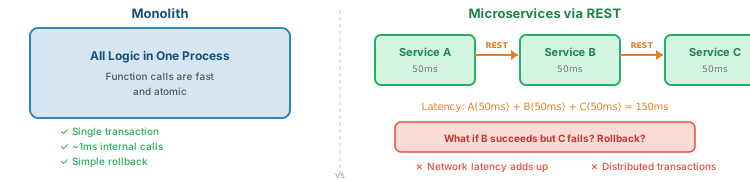
- Latency compounds — each HTTP round trip adds 50-100ms. Chain 3 services and you're at 150-300ms before any real work happens.
- Distributed transactions are hard — if Service B succeeds but Service C fails, how do you undo B's changes?
- Error cascading — if Service C is down, B fails, which makes A fail. One failure takes down everything.
Over-fetching and Under-fetching
REST endpoints return fixed data shapes. This creates two common problems:
Over-fetching: GET /api/users/1 returns all 50 fields (name, email, address, preferences, history...), but the client only needs the name and avatar. Wasted bandwidth.
Under-fetching: To render a user profile page, you need:
GET /api/users/1           # user info
GET /api/users/1/posts     # their posts
GET /api/users/1/followers # follower count
GET /api/users/1/settings  # display preferences
That's 4 separate HTTP requests before you can render anything. On a slow mobile connection, that's painful.
These two problems are a key motivation for GraphQL.
GraphQL
GraphQL (created by Facebook, 2015) takes a different approach: one endpoint, and the client specifies exactly what data it needs.
# GraphQL query - client asks for exactly what it needs
query {
  user(id: 1) {
    name
    avatar
    posts {
      title
      commentCount
    }
    followerCount
  }
}

# Response - exactly what was requested, nothing more
{
  "data": {
    "user": {
      "name": "Alice",
      "avatar": "/img/alice.jpg",
      "posts": [
        { "title": "My First Post", "commentCount": 5 },
        { "title": "GraphQL is neat", "commentCount": 12 }
      ],
      "followerCount": 142
    }
  }
}
One request replaces the 4 REST requests above, and returns exactly the fields the client needs — no over-fetching.
Trade-offs:
- More complex server implementation (resolvers, schema definition)
- HTTP caching doesn't work as naturally (everything is POST to one URL)
- Steeper learning curve than REST
- Can introduce performance issues if clients write deeply nested queries
gRPC (Remote Procedure Call)
While REST models everything as resources and GraphQL models everything as queries, gRPC (Google RPC) takes a third approach: call functions on a remote server as if they were local.
- Uses Protocol Buffers (protobuf) — a binary format that's smaller and faster than JSON
- Runs over HTTP/2, enabling multiplexing and streaming
- Strongly typed — you define your service interface in a
.protofile, and code is generated for any language - Excellent for service-to-service communication in microservice architectures
Trade-offs:
- Not browser-friendly (browsers can't make gRPC calls directly; you need a proxy like gRPC-Web)
- Binary format is harder to debug (you can't just
curlit and read the response) - Steeper setup and tooling requirements
Comparison: REST vs GraphQL vs gRPC
| Aspect | REST | GraphQL | gRPC |
|---|---|---|---|
| Protocol | HTTP (any method) | HTTP (POST to one endpoint) | HTTP/2 |
| Data format | JSON (text) | JSON (text) | Protocol Buffers (binary) |
| Endpoints | Many (/users, /posts) |
One (/graphql) |
Per service/method |
| Best for | CRUD, public APIs, simple apps | Complex UIs, mobile apps | Service-to-service, streaming |
| HTTP caching | Works great (GET is cacheable) | Custom caching needed | Not typically used |
| Learning curve | Low | Medium | Higher |
| Browser support | Native (fetch, XHR) | Native (it's just POST) | Needs proxy (gRPC-Web) |
| Debugging | Easy (curl, browser DevTools) | Moderate (specialized tools) | Harder (binary format) |
Practical Advice
Be skeptical of: "We should use [X] because Netflix/Google/Facebook uses it." Those companies have scale problems most teams will never encounter. Choose your tools based on your problems, not theirs.
Summary
| Concept | Key Points |
|---|---|
| REST | Resources identified by URLs, manipulated via HTTP methods, transferred as JSON |
| URL Design | Nouns in URLs (/api/books/42), verbs in HTTP methods |
| CRUD Mapping | POST=Create, GET=Read, PUT/PATCH=Update, DELETE=Delete |
| Status Codes | 200 OK, 201 Created, 204 No Content, 400/404 client errors, 500 server error |
| PUT vs PATCH | PUT replaces entire resource; PATCH updates specific fields |
| Maturity Model | Level 0 (one URL) → Level 1 (resources) → Level 2 (verbs) → Level 3 (HATEOAS) |
| CORS | Required for cross-origin requests; server sends Access-Control-Allow-* headers |
| Content Type | Content-Type and Accept headers enable format negotiation; JSON is common but REST supports form data, HTML, CSV, XML, and more |
| OpenAPI | YAML/JSON spec for describing APIs; enables auto-generated docs (Swagger UI) and client/server code |
| API Testing | curl and HTTPie for CLI, Postman/Insomnia for GUI, supertest/PHPUnit for automation; test happy paths, errors, and edge cases |
| Beyond REST | GraphQL for flexible client-driven queries, gRPC for fast service-to-service communication; start with REST, evolve when needed |