MVC (Model-View-Controller)
Separating Concerns in Web Applications
MVC (Model-View-Controller) is the most common pattern for organizing web applications. It separates data, presentation, and logic — making applications easier to understand, test, and modify.
What is MVC?
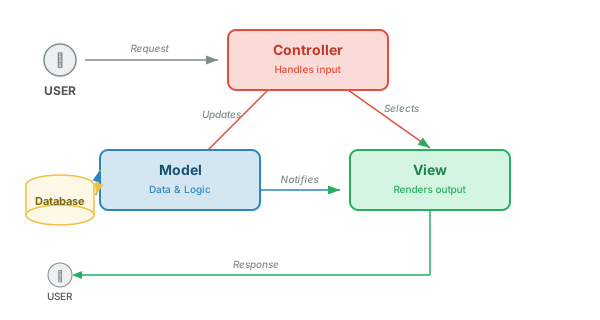
MVC divides an application into three interconnected components, each with a distinct responsibility:
- Model — manages data and business logic. It knows how to read from and write to the database, validate data, and enforce business rules. The Model has no knowledge of how data is displayed.
- View — handles presentation. It takes data from the Model and renders it into HTML, JSON, or whatever format the client needs. The View has no knowledge of how data is stored.
- Controller — handles user input and coordinates the flow. It receives requests, asks the Model for data or tells it to update, then passes the result to the View. The Controller is the traffic cop.
Why Separate Concerns?
To understand why MVC matters, consider what happens without it. Here's a single PHP file that handles routing, database queries, and HTML rendering all in one place:
Without MVC: Everything in One File
<?php
// routing, database, and HTML all mixed together
$pdo = new PDO('pgsql:host=localhost;dbname=app', 'user', 'pass');

if ($_SERVER['REQUEST_METHOD'] === 'GET') {
    $stmt = $pdo->query('SELECT * FROM users');
    $users = $stmt->fetchAll(PDO::FETCH_ASSOC);
    ?>
    <!DOCTYPE html>
    <html>
    <head><title>Users</title></head>
    <body>
        <h1>User List</h1>
        <table>
        <?php foreach ($users as $user): ?>
            <tr>
                <td><?= htmlspecialchars($user['name']) ?></td>
                <td><?= htmlspecialchars($user['email']) ?></td>
            </tr>
        <?php endforeach; ?>
        </table>
    </body>
    </html>
    <?php
} elseif ($_SERVER['REQUEST_METHOD'] === 'POST') {
    $name = $_POST['name'];
    $email = $_POST['email'];
    $stmt = $pdo->prepare('INSERT INTO users (name, email) VALUES (?, ?)');
    $stmt->execute([$name, $email]);
    header('Location: /users.php');
}
?>
This works for a small script, but it becomes unmanageable as the application grows. Every file mixes SQL, HTML, and routing logic together. Now consider the same logic split into Model, View, and Controller:
With MVC: Separated Responsibilities
// ── models/User.php ──
class User {
    private $pdo;

    public function __construct($pdo) {
        $this->pdo = $pdo;
    }

    public function getAll() {
        $stmt = $this->pdo->query('SELECT * FROM users');
        return $stmt->fetchAll(PDO::FETCH_ASSOC);
    }

    public function create($name, $email) {
        $stmt = $this->pdo->prepare('INSERT INTO users (name, email) VALUES (?, ?)');
        return $stmt->execute([$name, $email]);
    }
}
// ── views/users/index.php ──
<!DOCTYPE html>
<html>
<head><title>Users</title></head>
<body>
    <h1>User List</h1>
    <table>
    <?php foreach ($users as $user): ?>
        <tr>
            <td><?= htmlspecialchars($user['name']) ?></td>
            <td><?= htmlspecialchars($user['email']) ?></td>
        </tr>
    <?php endforeach; ?>
    </table>
</body>
</html>
// ── controllers/UserController.php ──
class UserController {
    private $userModel;

    public function __construct($userModel) {
        $this->userModel = $userModel;
    }

    public function index() {
        $users = $this->userModel->getAll();
        require 'views/users/index.php';  // $users is available in the view
    }

    public function store() {
        $this->userModel->create($_POST['name'], $_POST['email']);
        header('Location: /users');
    }
}
The same functionality, but now each piece has one job. The benefits compound as the application grows:
| Benefit | How MVC Helps |
|---|---|
| Testability | You can test the Model (data logic) without rendering HTML, and test the View without a database. Each piece is testable in isolation. |
| Team Workflow | A frontend developer can work on Views while a backend developer works on Models. They don't step on each other's code. |
| Reusability | The same Model can serve an HTML view, a JSON API, and a CSV export. The same View template can display data from different Controllers. |
| Maintainability | Need to change how users are displayed? Edit the View. Need to change the database schema? Edit the Model. Neither change affects the other. |
Server-Side MVC
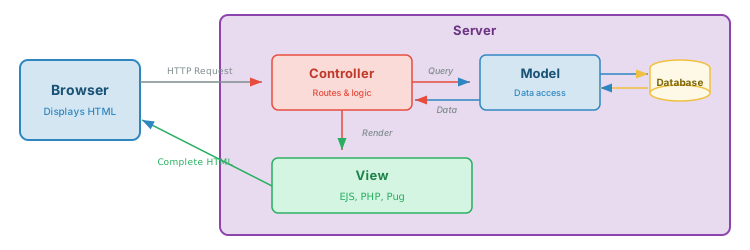
In server-side MVC, the server does all the work: it processes the request, fetches data, renders HTML, and sends a complete page to the browser. The browser's job is simply to display what it receives.
Step-by-Step Flow
- Browser sends request — user clicks a link or submits a form, sending an HTTP request (e.g.,
GET /users) - Router dispatches to Controller — the routing layer matches the URL pattern and calls the appropriate controller method
- Controller asks Model for data — the controller calls model methods like
User.getAll()orUser.findById(id) - Model queries database — the model executes SQL queries, processes results, and returns structured data to the controller
- Controller passes data to View — the controller selects the appropriate template and passes the model data to it
- View renders HTML — the template engine combines the data with HTML markup, producing a complete page that is sent back to the browser
File Structure
# Node.js with EJS
project/
├── app.js                  # Entry point, sets up Express
├── routes/
│   └── users.js            # URL → controller mapping
├── controllers/
│   └── userController.js   # Handles request/response logic
├── models/
│   └── User.js             # Data access & business rules
└── views/
    └── users/
        ├── index.ejs       # List all users
        ├── show.ejs        # Single user detail
        └── form.ejs        # Create/edit form
# PHP (manual MVC)
project/
├── index.php               # Front controller (routes all requests)
├── .htaccess               # Rewrites all URLs to index.php
├── controllers/
│   └── UserController.php  # Handles request/response logic
├── models/
│   └── User.php            # Data access & business rules
└── views/
    └── users/
        ├── index.php       # List all users
        ├── show.php        # Single user detail
        └── form.php        # Create/edit form
Key characteristic: The browser receives complete HTML pages. There is no client-side rendering — the server does everything. When the user clicks a link, the browser makes a full page request and the server sends back a complete new page.
When to Use Server-Side MVC
- Content-heavy sites — blogs, documentation, e-commerce product pages
- SEO-critical applications — search engines can index the HTML directly
- Progressive enhancement — the app works without JavaScript enabled
- Simple CRUD applications — admin panels, internal tools, form-based workflows
- Fast initial load — no JavaScript bundle to download before seeing content
Frameworks
| Framework | Language | Template Engine |
|---|---|---|
| Express + EJS | Node.js | EJS, Pug, Handlebars |
| Laravel | PHP | Blade |
| Rails | Ruby | ERB, Haml |
| Django | Python | Django Templates, Jinja2 |
Client-Side MVC (SPA Pattern)
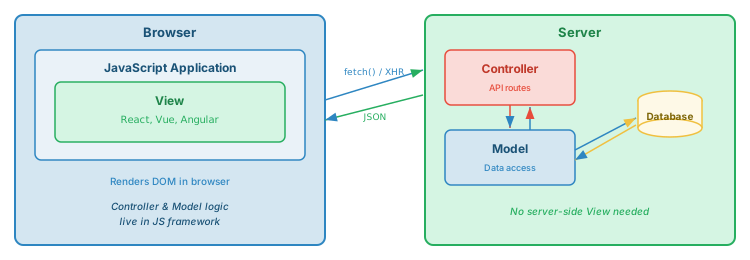
In client-side MVC (also called the Single-Page Application or SPA pattern), the server acts purely as a data API. It sends JSON, and the browser's JavaScript takes full responsibility for rendering the user interface.
Step-by-Step Flow
- Browser loads a minimal HTML shell — the initial page is mostly empty, with a
<script>tag that loads the JavaScript application bundle - JavaScript app initializes — the framework (React, Vue, Angular) boots up and takes control of the page
- App makes API request — the JavaScript calls
fetch('/api/users')to request data from the server - Server Controller processes request — the server receives the request, calls the Model, and returns JSON data
- Model queries database — the model fetches data and returns it; the controller sends it as a JSON response
- JavaScript renders the DOM — the client-side View receives the JSON and builds/updates the HTML in the browser using DOM manipulation
Key characteristic: The server returns JSON data only. The client-side JavaScript is responsible for all rendering. Navigation between "pages" happens entirely in the browser without full page reloads.
When to Use Client-Side MVC
- Highly interactive UIs — real-time dashboards, collaborative editors, chat applications
- Desktop-like experiences — apps where constant page reloads would feel jarring (e.g., email clients, project management tools)
- Offline-capable applications — SPAs can cache data locally and sync when reconnected
- Separate frontend/backend teams — the API contract (REST endpoints) is the only shared interface
Frameworks
| Framework | Approach |
|---|---|
| React | Component-based, virtual DOM |
| Vue | Reactive data binding, single-file components |
| Angular | Full framework with dependency injection, RxJS |
Adaptable / Hybrid MVC (Progressive Enhancement)
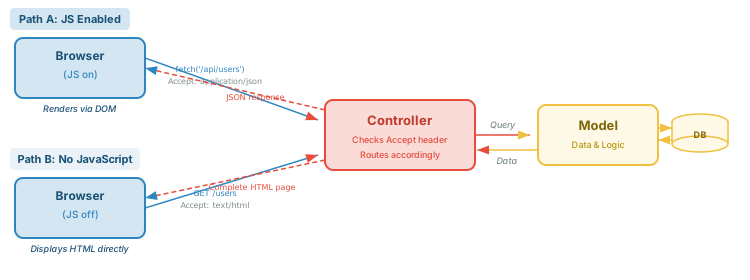
What if your application could work both ways? Serve complete HTML pages for browsers (and users with JavaScript disabled), but return JSON for JavaScript-powered clients? This is the adaptable MVC approach — the same controller handles both scenarios.
Detection: How Does the Controller Know?
The controller inspects the request's Accept header (or the X-Requested-With header) to determine what format to respond with. This is the same content negotiation mechanism we covered in the REST overview.
Node.js (Express) Example
// Express controller that adapts its response format
app.get('/users', async (req, res) => {
    const users = await User.getAll();

    if (req.accepts('html')) {
        // Browser request → render full HTML page
        res.render('users/index', { users });
    } else {
        // API / fetch() request → return JSON
        res.json(users);
    }
});

app.post('/users', async (req, res) => {
    const user = await User.create(req.body);

    if (req.accepts('html')) {
        // Form submission → redirect to user list
        res.redirect('/users');
    } else {
        // API call → return created user as JSON
        res.status(201).json(user);
    }
});
PHP Example
<?php
// PHP controller that adapts its response format
$users = $userModel->getAll();

$accept = $_SERVER['HTTP_ACCEPT'] ?? 'text/html';
$isAjax = ($_SERVER['HTTP_X_REQUESTED_WITH'] ?? '') === 'XMLHttpRequest';

if ($isAjax || str_contains($accept, 'application/json')) {
    // JavaScript client → return JSON
    header('Content-Type: application/json');
    echo json_encode($users);
} else {
    // Browser → render full HTML page
    require 'views/users/index.php';
}
?>
REST is the API, Not the Backend
A common misconception is that REST and MVC are competing patterns. They're not — they operate at different layers. REST defines how clients talk to your server (the API interface). MVC defines how your server is organized internally (the code structure).
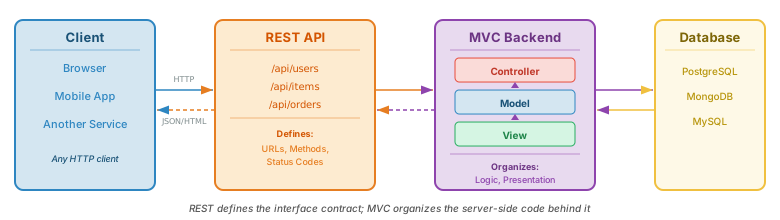
Think of it this way:
- REST is like the menu at a restaurant — it defines what you can order and how to ask for it
- MVC is the kitchen organization — how the chefs, prep cooks, and plating stations are arranged to fulfill those orders
You can have REST without MVC (a single-file API script), MVC without REST (a server-rendered app with no API), or both together (which is the most common real-world pattern).
MVC in Popular Frameworks
Every major web framework organizes code using MVC (or something very close to it). The concepts are the same; only the file names and conventions differ:
| Framework | Routes | Controller | Model | View / Template |
|---|---|---|---|---|
| Express (Node.js) | routes/ |
controllers/ |
models/ |
views/ |
| Laravel (PHP) | routes/ |
app/Http/ |
app/Models/ |
resources/views/ |
| Django (Python) | urls.py |
views.py |
models.py |
templates/ |
| Rails (Ruby) | config/ |
app/controllers/ |
app/models/ |
app/views/ |
views.py is the Controller, and its templates/ folder holds the Views.
Building a CRUD App
The best way to understand MVC is to build something with it. In the tutorials below, we'll build a complete CRUD application for managing User Stories — a common entity in project management. Each user story has a title, description, status, and priority.
We'll start by setting up the database (PostgreSQL), then build the same application three different ways: server-side MVC, client-side MVC (SPA), and an adaptable approach that combines both.
Module 06: Database Setup
Set up PostgreSQL, create tables for user stories, and learn SQL fundamentals for CRUD operations.
- PostgreSQL installation & configuration
- CREATE TABLE, INSERT, SELECT, UPDATE, DELETE
- Connecting from Node.js and PHP
Module 07: Server-Side MVC
Build a full CRUD app with server-rendered HTML pages. Forms submit data, controllers process it, views render the result.
- Model, View, Controller file structure
- Server-rendered forms and lists
- POST/Redirect/GET pattern
PHP Demo
Module 08: Client-Side MVC
Build the same CRUD app as a SPA. The server provides a JSON API, and JavaScript renders everything in the browser.
- REST API serves JSON only
- Vanilla JS fetch() for CRUD
- Client-side DOM rendering
Node.js Demo PHP Demo
Summary
| Concept | Key Points |
|---|---|
| MVC | A pattern that separates an application into Model (data), View (presentation), and Controller (logic/flow). Not tied to any framework or language. |
| Model | Manages data and business rules. Knows how to talk to the database. Has no knowledge of how data is displayed. |
| View | Renders output (HTML, JSON, etc.). Takes data from the Model and formats it for the client. Has no knowledge of data storage. |
| Controller | Receives user input, coordinates the Model and View. The "traffic cop" that routes requests to the right code. |
| Server-Side MVC | Server renders complete HTML pages. Browser just displays them. Best for content sites, SEO, and progressive enhancement. Frameworks: Express+EJS, Laravel, Django, Rails. |
| Client-Side MVC | Server sends JSON, client JavaScript renders the UI. Best for highly interactive apps. Frameworks: React, Vue, Angular. Requires JS to function. |
| Adaptable MVC | Same controller serves HTML or JSON based on the Accept header. Progressive enhancement: works without JS, enhanced with it. |
| REST vs MVC | REST defines the external API interface (URLs, methods, status codes). MVC organizes internal server code. They are complementary, not competing. |
| ORMs | Object-Relational Mappers let Models interact with the database using objects instead of raw SQL. Examples: Sequelize (Node.js), Eloquent (Laravel), Django ORM, ActiveRecord (Rails). |