HTTP Fundamentals
The Protocol of the Web
HTTP (Hypertext Transfer Protocol) is the foundation of all data communication on the World Wide Web. Every time you load a page, submit a form, or call an API, HTTP is the protocol carrying your request to a server and bringing back the response.
Tim Berners-Lee created the Web in 1989 around three pillars:
- HTTP — the protocol (how to communicate)
- HTML — the markup language (what to display)
- URLs — the addressing system (where things are)
Understanding HTTP isn't optional — it's the language your browser, your server, and every API you'll ever build all speak.
1. What is HTTP?
HTTP is an application-layer protocol that follows a client-server model. A client (usually a browser) sends a request, and a server sends back a response. That's it — every interaction on the web is a variation of this pattern.
Key characteristics:
- Client-server: One side requests, the other responds. The server never initiates contact.
- Stateless: Each request is independent. The server doesn't remember previous requests — every request must contain all the information the server needs to process it.
- Text-based (HTTP/1.x): Request and response messages are human-readable text (HTTP/2+ uses binary framing, but the semantics are the same).
- Runs on TCP (or QUIC): HTTP sits on top of a reliable transport layer. HTTP/1.x and HTTP/2 use TCP; HTTP/3 uses QUIC (which runs on UDP).
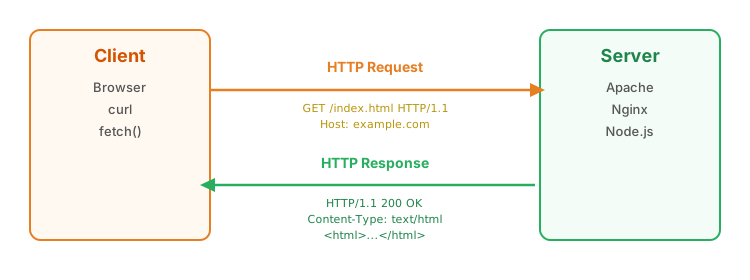
HTTP vs HTTPS: HTTPS is HTTP with a TLS (Transport Layer Security) encryption layer. The protocol semantics are identical — HTTPS just encrypts the data in transit so it can't be intercepted or tampered with. We cover TLS in detail in section 17.
2. HTTP Versions
HTTP has evolved significantly since its inception, but the core request-response semantics have remained remarkably stable. Each version primarily improved performance, not the fundamental protocol model.
| Version | Year | Key Features | Connection Model |
|---|---|---|---|
| HTTP/0.9 | 1991 | GET only, no headers, HTML only | One request per connection |
| HTTP/1.0 | 1996 | Headers, status codes, POST, Content-Type | One request per connection (default) |
| HTTP/1.1 | 1997 | Persistent connections, chunked transfer, Host header required, pipelining | Keep-alive (reuse connections) |
| HTTP/2 | 2015 | Binary framing, multiplexing, header compression (HPACK), server push | Single connection, multiplexed streams |
| HTTP/3 | 2022 | QUIC transport (UDP-based), eliminates head-of-line blocking, faster handshakes | QUIC connection with multiplexed streams |
The key evolution:
- HTTP/1.0: Open connection → send request → get response → close connection. Every request requires a new TCP handshake.
- HTTP/1.1: Connections stay open (
Connection: keep-alive), so multiple requests can reuse the same TCP connection. But requests are still processed sequentially — one at a time per connection. - HTTP/2: Multiple requests and responses can fly over a single connection simultaneously (multiplexing). No more opening 6 parallel connections to the same server.
- HTTP/3: Replaces TCP with QUIC, eliminating the head-of-line blocking problem where one lost packet stalls all streams on a TCP connection.
3. The Request-Response Cycle
Every HTTP interaction follows the same pattern: the client sends a request, the server sends back a response. Both the request and response follow the "Law of Three" — they each have three parts:
| Part | Request | Response |
|---|---|---|
| 1. Start line | Request line: GET /page HTTP/1.1 |
Status line: HTTP/1.1 200 OK |
| 2. Headers | Request headers (Host, Accept, etc.) | Response headers (Content-Type, etc.) |
| 3. Body | Optional (POST, PUT, PATCH) | Optional (HTML, JSON, image, etc.) |
Annotated GET Request and Response
── Request ─────────────────────────────────────────
GET /api/books HTTP/1.1          ← Request line: METHOD PATH VERSION
Host: example.com               ← Required in HTTP/1.1
Accept: application/json         ← Client wants JSON back
User-Agent: Mozilla/5.0          ← Identifies the client
                                 ← Blank line (end of headers, no body for GET)

── Response ────────────────────────────────────────
HTTP/1.1 200 OK                  ← Status line: VERSION STATUS_CODE REASON
Content-Type: application/json   ← Server is sending JSON
Content-Length: 82               ← Size of the body in bytes
                                 ← Blank line (end of headers)
[{"id":1,"title":"HTTP Guide"},{"id":2,"title":"REST in Practice"}]
Annotated POST Request and Response
── Request ─────────────────────────────────────────
POST /api/books HTTP/1.1         ← POST = "create something"
Host: example.com
Content-Type: application/json   ← Telling the server: "body is JSON"
Content-Length: 48

{"title": "New Book", "author": "Jane Doe"}   ← Request body

── Response ────────────────────────────────────────
HTTP/1.1 201 Created             ← 201 = "resource was created"
Content-Type: application/json
Location: /api/books/3           ← URL of the newly created resource
Content-Length: 61

{"id": 3, "title": "New Book", "author": "Jane Doe"}
What Happens When You Type a URL
When you type https://example.com/page in your browser and press Enter, here's the full sequence:
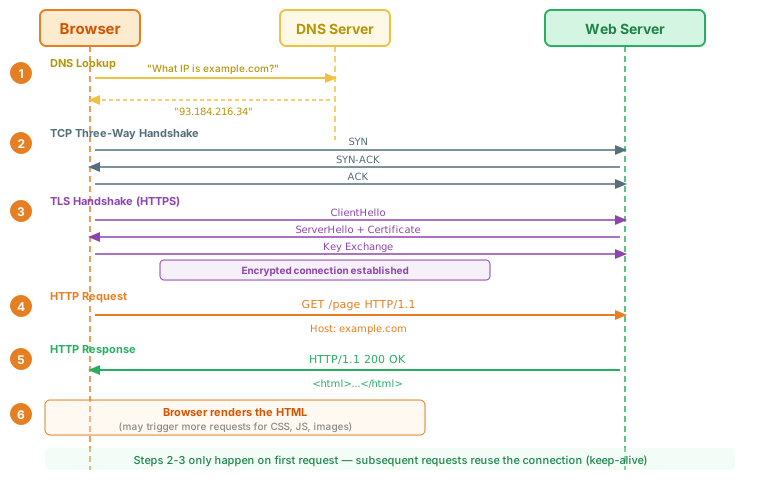
Steps 2 and 3 (TCP + TLS) only happen for the first request. Subsequent requests to the same server reuse the existing connection (HTTP/1.1 keep-alive).
4. HTTP Request Structure
Every HTTP request has a strict structure: a request line, zero or more headers, a blank line, and an optional body.
┌─ Request Line ────────────────────────────────────┐
POST /api/books HTTP/1.1
└───────────────────────────────────────────────────┘
┌─ Headers ─────────────────────────────────────────┐
Host: example.com
Content-Type: application/json
Content-Length: 48
Accept: application/json
Authorization: Bearer eyJhbGci...
└───────────────────────────────────────────────────┘
                                    ← BLANK LINE (CRLF) — separates headers from body
┌─ Body ────────────────────────────────────────────┐
{"title": "New Book", "author": "Jane Doe"}
└───────────────────────────────────────────────────┘
The Request Line
The first line of every request has exactly three parts: METHOD /path HTTP/version
- Method: What action to perform (GET, POST, PUT, DELETE, etc.)
- Request target: The path of the resource (
/api/books,/index.html) - HTTP version: Almost always
HTTP/1.1
Headers
Headers are key-value pairs (Name: value) that provide metadata about the request. The Host header is the only one required in HTTP/1.1 — it tells the server which website you're requesting (since one server can host multiple domains).
The Body
The body carries the data being sent to the server. It's present in POST, PUT, and PATCH requests, but absent in GET, DELETE, and HEAD requests.
\r\n) that tells the parser "headers are done, body starts next." Omit it and the request is malformed.
5. HTTP Response Structure
Responses follow the same three-part structure: a status line, headers, and an optional body.
200 OK — HTML Response
HTTP/1.1 200 OK
Content-Type: text/html; charset=UTF-8
Content-Length: 137

<!DOCTYPE html>
<html>
<head><title>Example</title></head>
<body><h1>Hello, World!</h1></body>
</html>
201 Created — JSON Response with Location
HTTP/1.1 201 Created
Content-Type: application/json
Location: /api/books/42
Content-Length: 58

{"id": 42, "title": "HTTP Guide", "author": "Jane Doe"}
404 Not Found — JSON Error
HTTP/1.1 404 Not Found
Content-Type: application/json
Content-Length: 42

{"error": "Not Found", "message": "No book with ID 999"}
Note how the Content-Type header tells the client how to interpret the body. A 404 can return HTML (for browsers) or JSON (for APIs) — the status code and body format are independent.
6. HTTP Methods
HTTP defines several request methods (sometimes called "verbs") that indicate the desired action on a resource. Each method has specific semantics defined by the HTTP specification.
| Method | Purpose | Has Body? | Safe? | Idempotent? | Cacheable? |
|---|---|---|---|---|---|
| GET | Retrieve a resource | No | Yes | Yes | Yes |
| POST | Submit data / create a resource | Yes | No | No | No |
| PUT | Replace a resource entirely | Yes | No | Yes | No |
| PATCH | Partially modify a resource | Yes | No | No | No |
| DELETE | Remove a resource | Optional | No | Yes | No |
| HEAD | Same as GET but no response body | No | Yes | Yes | Yes |
| Describe communication options | Optional | Yes | Yes | No |
Less common methods:
- TRACE: Echoes the received request back to the client (used for debugging; usually disabled for security).
- CONNECT: Establishes a tunnel through a proxy (used by HTTPS through HTTP proxies).
The most important thing to remember: methods have semantics. GET means "read," POST means "create/submit," PUT means "replace," DELETE means "remove." Using them correctly makes your API predictable and allows infrastructure (caches, proxies, browsers) to optimize accordingly.
7. Method Properties: Safety and Idempotency
Two important properties define how HTTP methods behave — and understanding them helps you build reliable systems.
Safe = The method does not modify the resource. Calling it has no side effects. A safe request is purely a "read" operation.
Idempotent = Calling the method once has the same effect as calling it multiple times. The result doesn't change if you repeat the request.
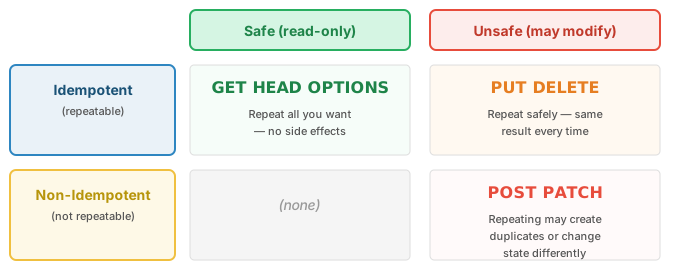
Why This Matters
- Caching: Only safe methods (GET, HEAD) can be cached by default. Caching a POST response would be dangerous.
- Retries: If a request times out, is it safe to retry? For idempotent methods (GET, PUT, DELETE) — yes. For POST — you might create a duplicate.
- Prefetching: Browsers and search engines may prefetch links (sending GET requests) before users click them. If GET has side effects, unexpected things happen.
GET /api/users/5/delete. Since GET is defined as safe, browsers, crawlers, and prefetch mechanisms will call it freely. Google's web crawler once infamously deleted data from an application that used GET for deletions.
8. HTTP Status Codes
Status codes are three-digit numbers in the response that tell the client what happened. They're grouped into five categories by their first digit:
| Category | Range | Meaning |
|---|---|---|
| 1xx | 100–199 | Informational — request received, processing continues |
| 2xx | 200–299 | Success — the request was received, understood, and accepted |
| 3xx | 300–399 | Redirection — further action needed to complete the request |
| 4xx | 400–499 | Client Error — the request has a problem (your fault) |
| 5xx | 500–599 | Server Error — the server failed to fulfill a valid request (server's fault) |
1xx Informational
| Code | Name | Meaning |
|---|---|---|
100 |
Continue | Server received the headers; client should send the body. Used with Expect: 100-continue to avoid sending a large body the server will reject. |
101 |
Switching Protocols | Server is switching to the protocol the client requested (e.g., upgrading from HTTP to WebSocket). |
103 |
Early Hints | Server sends preliminary headers (like Link) so the browser can start preloading resources while the final response is still being prepared. |
2xx Success
| Code | Name | Meaning |
|---|---|---|
200 |
OK | The request succeeded. The most common status code. |
201 |
Created | A new resource was created (typically from POST). Response should include a Location header with the URL of the new resource. |
204 |
No Content | Success, but there's no response body (common for DELETE). |
206 |
Partial Content | Server is delivering only part of the resource (used for range requests, e.g., resuming a download or streaming video). |
3xx Redirection
| Code | Name | Meaning |
|---|---|---|
301 |
Moved Permanently | Resource has a new permanent URL. Browsers and search engines update their links. Warning: may change POST to GET on redirect. |
302 |
Found | Temporary redirect. Warning: historically changed POST to GET (like 301). |
303 |
See Other | Redirect after POST — client should GET the new URL. Explicitly designed to change method to GET. |
304 |
Not Modified | Cached version is still valid. Server sends no body — use your cached copy. (See section 12 on caching.) |
307 |
Temporary Redirect | Like 302, but guarantees the method won't change. A POST stays a POST. |
308 |
Permanent Redirect | Like 301, but guarantees the method won't change. A POST stays a POST. |
4xx Client Errors
| Code | Name | Meaning |
|---|---|---|
400 |
Bad Request | Malformed request syntax, invalid input, or missing required data. |
401 |
Unauthorized | Authentication is required and was not provided or is invalid. The server should include a WWW-Authenticate header. |
403 |
Forbidden | The server understood the request but refuses to authorize it. Authentication won't help — you don't have permission. |
404 |
Not Found | The requested resource does not exist. |
405 |
Method Not Allowed | The HTTP method is not supported for this URL (e.g., DELETE on a read-only resource). Response should include an Allow header listing valid methods. |
409 |
Conflict | Request conflicts with the current state of the resource (e.g., trying to create a resource that already exists). |
410 |
Gone | The resource existed but has been permanently removed. Unlike 404, this is intentional and permanent. |
422 |
Unprocessable Entity | The request is syntactically valid (well-formed JSON) but semantically invalid (e.g., missing a required field, invalid email format). |
429 |
Too Many Requests | Rate limit exceeded. Response should include a Retry-After header. |
- 401 Unauthorized: "I don't know who you are." You haven't logged in, or your credentials are invalid. Fix: authenticate.
- 403 Forbidden: "I know who you are, but you can't do this." You're logged in but lack permission. Re-authenticating won't help.
5xx Server Errors
| Code | Name | Meaning |
|---|---|---|
500 |
Internal Server Error | Generic server-side failure. Something went wrong that wasn't the client's fault. |
502 |
Bad Gateway | A proxy/gateway received an invalid response from the upstream server. |
503 |
Service Unavailable | Server is temporarily overloaded or under maintenance. Should include a Retry-After header. |
504 |
Gateway Timeout | A proxy/gateway didn't receive a timely response from the upstream server. |
9. HTTP Headers
Headers carry metadata about the request or response. They follow the format Name: value and are case-insensitive (though conventionally written in Title-Case or lowercase).
Headers fall into four broad categories:
| Category | Description | Key Headers |
|---|---|---|
| Request Headers | Sent by the client; describe the request or the client | Host, Accept, User-Agent, Authorization, Cookie, Referer |
| Response Headers | Sent by the server; describe the response or the server | Server, Set-Cookie, WWW-Authenticate, Location, Access-Control-* |
| Representation Headers | Describe the body's format and encoding (can appear in both) | Content-Type, Content-Length, Content-Encoding, Content-Language |
| General Headers | Apply to the message as a whole, not tied to request or response | Cache-Control, Connection, Date, Transfer-Encoding |
Common Request Headers
| Header | Purpose | Example |
|---|---|---|
Host |
Which domain the request is for (required in HTTP/1.1) | Host: example.com |
Accept |
What content types the client can handle | Accept: application/json, text/html |
User-Agent |
Identifies the client software | User-Agent: Mozilla/5.0 ... |
Authorization |
Credentials for authentication | Authorization: Bearer eyJhbG... |
Cookie |
Sends stored cookies back to the server | Cookie: session_id=abc123 |
Referer |
URL of the page that linked to this request | Referer: https://example.com/page |
Accept-Encoding |
Compression algorithms the client supports | Accept-Encoding: gzip, deflate, br |
Common Response Headers
| Header | Purpose | Example |
|---|---|---|
Content-Type |
The format of the response body | Content-Type: application/json; charset=utf-8 |
Content-Length |
Size of the response body in bytes | Content-Length: 348 |
Location |
URL for redirects or newly created resources | Location: /api/books/42 |
Set-Cookie |
Sets a cookie on the client | Set-Cookie: session=abc; HttpOnly; Secure |
Cache-Control |
Caching directives for the response | Cache-Control: max-age=3600 |
Server |
Identifies the server software | Server: nginx/1.24 |
Referrer-Policy header uses the correct spelling, making the inconsistency permanent.
10. Content Negotiation
Content negotiation is the HTTP mechanism that lets a client and server agree on the best format for the response. The client uses Accept headers to say what it wants; the server picks the best match from what it can provide.
The Accept Headers
| Header | Negotiates | Example |
|---|---|---|
Accept |
Content type (format) | Accept: text/html, application/json |
Accept-Language |
Language | Accept-Language: en-US, fr;q=0.5 |
Accept-Encoding |
Compression | Accept-Encoding: gzip, br |
Accept-Charset |
Character encoding (rarely used now — UTF-8 dominates) | Accept-Charset: utf-8 |
Quality Values (q parameter)
Clients can express preferences using the q parameter (quality value), ranging from 0 (not acceptable) to 1 (most preferred, the default):
Accept: text/html, application/json;q=0.9, text/plain;q=0.5

# This means:
#   text/html      → q=1.0 (most preferred, default when q is omitted)
#   application/json → q=0.9 (acceptable, slightly less preferred)
#   text/plain     → q=0.5 (acceptable but not great)
Content Negotiation in Action
── Request ─────────────────────────────────────────
GET /api/books/42 HTTP/1.1
Host: example.com
Accept: application/json;q=1.0, text/html;q=0.8

── Response (server chooses JSON) ───────────────────
HTTP/1.1 200 OK
Content-Type: application/json
Vary: Accept

{"id": 42, "title": "HTTP Guide", "author": "Jane Doe"}
The Vary Header
When a server returns different content based on request headers (like Accept), it must include a Vary header in the response. This tells caches: "the response depends on these request headers — don't serve a cached JSON response to a client that wants HTML."
Vary: Accept              # Response varies by content type
Vary: Accept-Encoding     # Response varies by compression
Vary: Accept, Accept-Language  # Response varies by both
11. Sending Data
There are two fundamental ways to send data in HTTP: in the URL (query strings) or in the request body.
Query Strings
Data appended to the URL after a ?, with key-value pairs separated by &:
GET /api/books?author=Jane+Doe&year=2024&sort=title HTTP/1.1
Query strings are used with GET requests for filtering, searching, and pagination. Special characters must be percent-encoded (also called URL encoding):
| Character | Encoded | Character | Encoded |
|---|---|---|---|
| Space | %20 or + |
& |
%26 |
= |
%3D |
? |
%3F |
/ |
%2F |
# |
%23 |
@ |
%40 |
% |
%25 |
- Browser address bar and history
- Server logs
- The
Refererheader when you click a link - Proxy logs and network monitoring tools
Request Body Formats
POST, PUT, and PATCH requests carry data in the body. The Content-Type header tells the server which format to expect:
| Format | Content-Type | Use Case | Supports Files? | Supports Nesting? |
|---|---|---|---|---|
| Form-encoded | application/x-www-form-urlencoded |
HTML form submissions (default) | No | No |
| Multipart | multipart/form-data |
File uploads, mixed data | Yes | Limited |
| JSON | application/json |
APIs, JavaScript clients | No (use base64) | Yes |
What Each Format Looks Like
# Form-encoded (default for HTML <form>)
POST /submit HTTP/1.1
Content-Type: application/x-www-form-urlencoded

name=Jane+Doe&email=jane%40example.com&age=30

# Multipart (for file uploads)
POST /upload HTTP/1.1
Content-Type: multipart/form-data; boundary=----FormBoundary

------FormBoundary
Content-Disposition: form-data; name="name"

Jane Doe
------FormBoundary
Content-Disposition: form-data; name="avatar"; filename="photo.jpg"
Content-Type: image/jpeg

[binary file data]
------FormBoundary--

# JSON (for APIs)
POST /api/users HTTP/1.1
Content-Type: application/json

{"name": "Jane Doe", "email": "jane@example.com", "age": 30}
When to use each:
- Form-encoded: Standard HTML forms without file uploads. Simple, lightweight, universally supported.
- Multipart: Any form with file uploads (
<input type="file">). Also used when mixing text fields and binary data. - JSON: API-to-API communication, JavaScript
fetch()calls, mobile apps. Supports nested data structures.
12. HTTP Caching
Caching stores copies of responses so they can be reused without contacting the server again. Done right, caching dramatically reduces latency and server load. Done wrong, users see stale data.
Where Caching Happens
- Browser cache: Your browser caches responses locally. Fastest, closest to the user.
- CDN / Reverse proxy: Services like Cloudflare, Nginx, or Varnish cache responses at the edge, close to users worldwide.
- Shared proxy: Corporate or ISP proxies that cache responses for multiple users.
Cache-Control Directives
The Cache-Control header is the primary way to control caching behavior:
| Directive | Meaning |
|---|---|
public |
Any cache (browser, CDN, proxy) can store this response. |
private |
Only the browser can cache it — not CDNs or shared proxies (e.g., user-specific data). |
no-cache |
Cache can store the response, but must revalidate with the server before using it. |
no-store |
Do not cache at all. Every request goes to the server. Use for sensitive data. |
max-age=N |
Response is fresh for N seconds. After that, the cache must revalidate. |
s-maxage=N |
Like max-age but only for shared caches (CDNs, proxies). Overrides max-age for those caches. |
must-revalidate |
Once stale, the cache must not serve the response without revalidating (no serving stale content while offline). |
immutable |
The response will never change (used for versioned assets like app.v3.js). |
no-cache means "you may cache it, but check with the server before using it." If you truly want no caching at all, use no-store.
Validation: ETag and Last-Modified
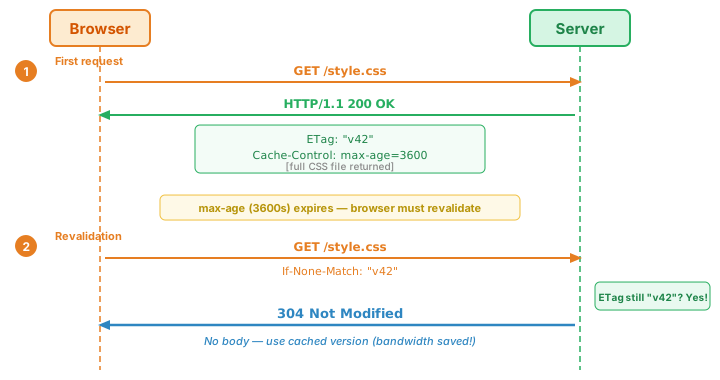
When a cached response expires, the browser doesn't re-download the whole thing. Instead, it asks the server: "has this changed?" This is called conditional request or validation:
| Mechanism | Server Sends | Browser Sends (on revalidation) |
|---|---|---|
| ETag | ETag: "abc123" |
If-None-Match: "abc123" |
| Last-Modified | Last-Modified: Wed, 01 Jan 2025 00:00:00 GMT |
If-Modified-Since: Wed, 01 Jan 2025 00:00:00 GMT |
If the resource hasn't changed, the server responds with 304 Not Modified (no body) — saving bandwidth.
The 304 Not Modified Flow
13. Cookies and State Management
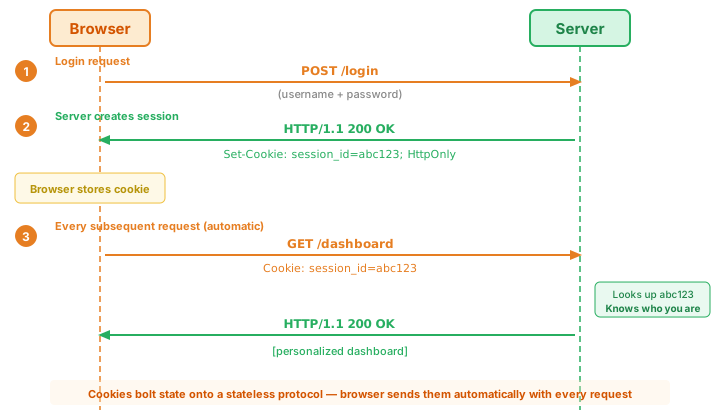
HTTP is stateless — the server doesn't inherently remember anything between requests. Cookies are the mechanism that bolt state onto a stateless protocol. The server sends a Set-Cookie header, and the browser stores it and sends it back with every subsequent request to that domain.
How Cookies Work
Cookie Attributes
| Attribute | Purpose | Example |
|---|---|---|
Domain |
Which domain(s) receive the cookie | Domain=example.com (includes subdomains) |
Path |
URL path prefix that must match | Path=/api |
Secure |
Only send over HTTPS | Secure |
HttpOnly |
Not accessible via JavaScript (document.cookie) |
HttpOnly |
SameSite |
Controls cross-site sending | SameSite=Strict, Lax, or None |
Max-Age |
Seconds until the cookie expires | Max-Age=86400 (24 hours) |
Expires |
Absolute expiration date | Expires=Thu, 01 Jan 2026 00:00:00 GMT |
SameSite Values
| Value | Cross-Site Requests | Use Case |
|---|---|---|
Strict |
Never sent cross-site | Banking, sensitive actions |
Lax |
Sent on top-level navigations (clicking a link) but not on embedded requests (images, iframes, fetch) | General use (default in modern browsers) |
None |
Always sent (requires Secure) |
Third-party integrations, embedded widgets |
Sessions vs Tokens
| Approach | How It Works | State Stored | Best For |
|---|---|---|---|
| Server-side sessions | Cookie holds a session ID; server stores session data in memory/DB | On the server | Traditional web apps, single-server deployments |
| Tokens (JWT) | Token contains user data (encoded + signed); no server-side storage needed | In the token itself | APIs, microservices, mobile apps |
HttpOnly— prevents JavaScript from reading the cookie (blocks XSS attacks)Secure— only sent over HTTPSSameSite=Lax(orStrict) — prevents CSRF attacks
Set-Cookie: session=abc123; HttpOnly; Secure; SameSite=Lax; Max-Age=86400
14. CORS (Cross-Origin Resource Sharing)
Browsers enforce the Same-Origin Policy: JavaScript running on one origin cannot read responses from a different origin. Two URLs have the same origin only if they share the same scheme, host, and port.
| URL A | URL B | Same Origin? | Why |
|---|---|---|---|
https://example.com/a |
https://example.com/b |
Yes | Same scheme, host, port |
https://example.com |
http://example.com |
No | Different scheme (https vs http) |
https://example.com |
https://api.example.com |
No | Different host (subdomain counts) |
https://example.com |
https://example.com:8080 |
No | Different port |
CORS is the mechanism that lets a server opt in to allowing cross-origin requests. The server sends specific headers that tell the browser: "requests from this origin are allowed."
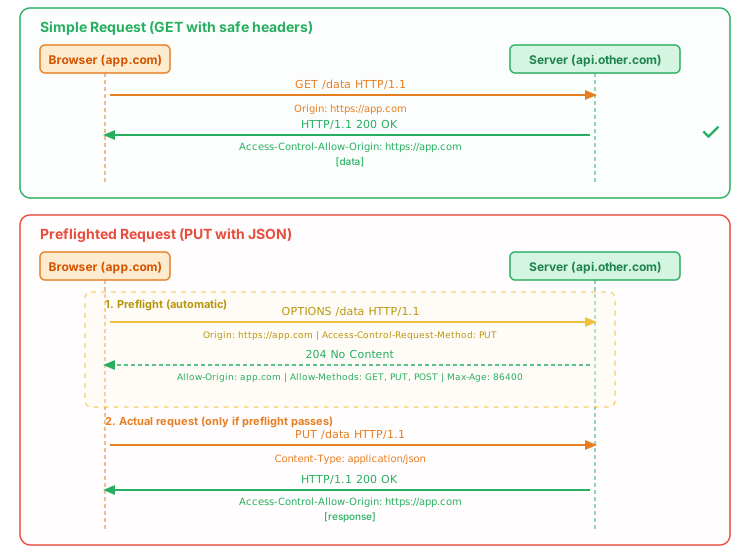
Simple Requests vs Preflight Requests
Browsers classify cross-origin requests into two categories:
Simple requests (no preflight) — must meet all of these:
- Method is GET, HEAD, or POST
- Only "safe" headers (Accept, Accept-Language, Content-Language, Content-Type)
- Content-Type is one of:
text/plain,multipart/form-data, orapplication/x-www-form-urlencoded
Preflighted requests — anything else (PUT, DELETE, custom headers, application/json, etc.). The browser sends an OPTIONS request first to ask the server for permission.
CORS Headers
| Header | Direction | Purpose |
|---|---|---|
Origin |
Request | The origin making the request |
Access-Control-Allow-Origin |
Response | Which origins are allowed (* = any, or a specific origin) |
Access-Control-Allow-Methods |
Response (preflight) | Which HTTP methods are allowed |
Access-Control-Allow-Headers |
Response (preflight) | Which request headers are allowed |
Access-Control-Allow-Credentials |
Response | Whether cookies/auth headers are allowed (true) |
Access-Control-Max-Age |
Response (preflight) | How long (seconds) to cache the preflight result |
Access-Control-Allow-Credentials: true and the client must use credentials: 'include' in the fetch options. Importantly, when credentials are involved, Access-Control-Allow-Origin cannot be * — it must specify the exact origin.
15. HTTP Authentication
HTTP has a built-in authentication framework based on challenge-response. When a client requests a protected resource, the server responds with 401 Unauthorized and a WWW-Authenticate header that tells the client how to authenticate.
── Request (no credentials) ────────────────────────
GET /api/admin HTTP/1.1
Host: example.com

── Response (challenge) ────────────────────────────
HTTP/1.1 401 Unauthorized
WWW-Authenticate: Basic realm="Admin Area"

── Request (with credentials) ──────────────────────
GET /api/admin HTTP/1.1
Host: example.com
Authorization: Basic dXNlcjpwYXNzd29yZA==

── Response (authorized) ───────────────────────────
HTTP/1.1 200 OK
Content-Type: application/json

{"admin": true, "users": [...]}
Authentication Methods Compared
| Method | How It Works | Pros | Cons |
|---|---|---|---|
| Basic Auth | Base64-encoded username:password in every request |
Simple, built into HTTP, supported everywhere | Credentials sent with every request; base64 is encoding, not encryption |
| Bearer Token / JWT | Token in Authorization: Bearer <token> header |
Stateless, scalable, can contain user data (JWT) | Token management (expiration, revocation), size can be large |
| API Key | Key in header (X-API-Key), query param, or cookie |
Simple, easy to provision and revoke | No standard; if in query string, visible in logs |
| Cookie Session | Session ID in cookie; server stores session data | Browser handles automatically, HttpOnly for security | Requires server-side state, vulnerable to CSRF without SameSite |
dXNlcjpwYXNzd29yZA== decodes to user:password. Anyone who intercepts the request can read the credentials. Never use Basic Auth without HTTPS. Even with HTTPS, prefer token-based authentication for APIs.
Cookie Sessions vs Token-Based Auth
| Aspect | Cookie Sessions | Token-Based (JWT) |
|---|---|---|
| State | Server stores session data | Token contains all data (stateless) |
| Sent how | Automatically by browser (Cookie header) | Manually in code (Authorization header) |
| Cross-domain | Complex (CORS + SameSite issues) | Easy (just include the header) |
| Revocation | Easy (delete session from server) | Harder (token is valid until it expires) |
| Best for | Traditional web apps (server-rendered) | APIs, SPAs, mobile apps, microservices |
16. Security Headers
Beyond authentication, HTTP response headers can instruct browsers to enable additional security protections. These headers are a defense-in-depth layer — they won't fix insecure code, but they make attacks harder.
| Header | Purpose | Example Value |
|---|---|---|
Strict-Transport-Security (HSTS) |
Forces HTTPS for all future requests to this domain | max-age=31536000; includeSubDomains |
Content-Security-Policy (CSP) |
Controls which resources (scripts, styles, images) the page can load | default-src 'self'; script-src 'self' |
X-Content-Type-Options |
Prevents browsers from MIME-sniffing (guessing content type) | nosniff |
X-Frame-Options |
Prevents the page from being embedded in an iframe (blocks clickjacking) | DENY or SAMEORIGIN |
Referrer-Policy |
Controls how much URL information is sent in the Referer header |
strict-origin-when-cross-origin |
Permissions-Policy |
Controls which browser features (camera, mic, geolocation) the page can use | camera=(), microphone=(), geolocation=() |
A Production-Ready Security Header Set
# Nginx configuration example
add_header Strict-Transport-Security "max-age=31536000; includeSubDomains" always;
add_header Content-Security-Policy "default-src 'self'; script-src 'self'" always;
add_header X-Content-Type-Options "nosniff" always;
add_header X-Frame-Options "DENY" always;
add_header Referrer-Policy "strict-origin-when-cross-origin" always;
add_header Permissions-Policy "camera=(), microphone=(), geolocation=()" always;
17. HTTPS and TLS
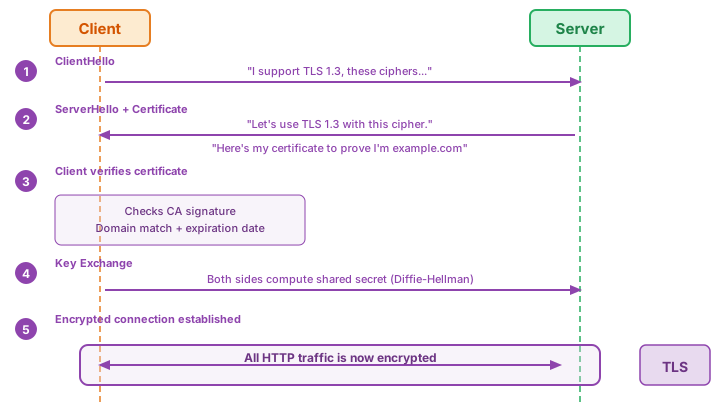
HTTPS is simply HTTP with a TLS (Transport Layer Security) layer underneath. It provides three guarantees:
- Encryption: Data is encrypted in transit — eavesdroppers can't read it.
- Integrity: Data can't be modified or corrupted in transit without detection.
- Authentication: The server proves its identity via a certificate — you're talking to the real server, not an impersonator.
The TLS Handshake (Simplified)
Certificates and Certificate Authorities
A TLS certificate binds a domain name to a public key. It's issued and signed by a Certificate Authority (CA) — a trusted third party that verifies you own the domain.
- Let's Encrypt: Free, automated certificates. Made HTTPS accessible to everyone. Used by the majority of websites today.
- Certificate chain: Your certificate is signed by an intermediate CA, which is signed by a root CA. Browsers trust a built-in list of root CAs.
- Certificates expire (typically 90 days for Let's Encrypt) and must be renewed — usually automated via ACME protocol.
Why HTTPS Everywhere
- Security: Prevents eavesdropping, tampering, and impersonation.
- Privacy: ISPs and network operators can't see what pages you visit (they can see the domain but not the full URL or content).
- Required for modern features: Service workers, geolocation, camera/mic access, HTTP/2, and many other browser APIs require HTTPS.
- SEO: Google ranks HTTPS sites higher than HTTP.
- Trust indicators: Browsers show warnings for HTTP sites ("Not Secure").
18. Observing HTTP in Practice
Understanding HTTP theory is important, but seeing HTTP in action makes it concrete. There are two primary tools for observing HTTP traffic: your browser's DevTools and the curl command-line tool.
Browser DevTools: Network Tab
Open DevTools (F12 or Cmd+Option+I on Mac) and click the Network tab. You'll see every HTTP request the page makes in real-time:
- Filter by type: Click "Fetch/XHR" to see only API calls, hiding images, scripts, and stylesheets.
- Click any request to inspect its headers (request and response), timing, and response body.
- Right-click → "Copy as curl" generates a curl command you can paste into your terminal to replay the exact same request.
- Timing breakdown shows where time was spent: DNS lookup, TCP connection, TLS handshake, server processing (TTFB), content download.
- Preserve log: Check this box to keep requests visible across page navigations (essential for debugging redirects).
curl: The Universal HTTP Tool
curl is installed on virtually every system and is the standard tool for making HTTP requests from the command line.
| Flag | What It Does | Example |
|---|---|---|
-v |
Verbose — show full request and response headers | curl -v https://example.com |
-i |
Include response headers in output | curl -i https://example.com |
-I |
HEAD request — show headers only, no body | curl -I https://example.com |
-H |
Add a custom request header | curl -H "Accept: application/json" ... |
-d |
Send data in the body (implies POST) | curl -d '{"name":"test"}' ... |
-X |
Specify the HTTP method | curl -X DELETE ... |
-L |
Follow redirects (3xx) | curl -L http://example.com/old |
Practical curl Walkthrough
Using curl -v shows the complete HTTP conversation. Lines starting with > are the request; lines starting with < are the response:
$ curl -v https://httpbin.org/get

* Trying 34.227.213.82:443...
* Connected to httpbin.org port 443
* TLS handshake completed (TLS 1.3)

> GET /get HTTP/2                    ← Request line
> Host: httpbin.org                  ← Required host header
> User-Agent: curl/8.4.0             ← curl identifies itself
> Accept: */*                        ← Accept anything
>                                    ← Blank line (end of headers)

< HTTP/2 200                          ← Status line
< content-type: application/json      ← Response is JSON
< content-length: 256                 ← Body size
< access-control-allow-origin: *      ← CORS: allow all origins
<                                     ← Blank line
{
  "args": {},
  "headers": {
    "Accept": "*/*",
    "Host": "httpbin.org",
    "User-Agent": "curl/8.4.0"
  },
  "url": "https://httpbin.org/get"
}
Summary
| Concept | Key Points |
|---|---|
| What is HTTP | Application-layer, client-server, stateless, request-response protocol that powers the web |
| HTTP Versions | 0.9 → 1.0 → 1.1 (keep-alive) → 2 (multiplexing) → 3 (QUIC). Same semantics, better performance |
| Request-Response | Three parts each: start line, headers, body. DNS → TCP → TLS → HTTP request → response → render |
| Request Structure | METHOD /path HTTP/1.1, headers, blank line, optional body |
| Response Structure | HTTP/1.1 STATUS REASON, headers, blank line, optional body |
| HTTP Methods | GET (read), POST (create), PUT (replace), PATCH (partial update), DELETE (remove), HEAD, OPTIONS |
| Safety & Idempotency | Safe = no side effects (GET, HEAD). Idempotent = repeatable (GET, PUT, DELETE). POST is neither. |
| Status Codes | 1xx info, 2xx success, 3xx redirect, 4xx client error, 5xx server error |
| Headers | Request, response, representation, and general headers. Host is required in HTTP/1.1. |
| Content Negotiation | Accept headers + quality values let client and server agree on format. Vary header for caching. |
| Sending Data | Query strings (GET), form-encoded, multipart (files), JSON (APIs). Never put secrets in URLs. |
| Caching | Cache-Control directives, ETag/If-None-Match validation, 304 Not Modified. no-cache ≠ don't cache. |
| Cookies | Set-Cookie/Cookie mechanism for state. Use HttpOnly + Secure + SameSite for security. |
| CORS | Same-Origin Policy enforced by browsers. CORS headers let servers opt in to cross-origin access. |
| Authentication | Basic Auth (encoding, not encryption), Bearer tokens/JWT (stateless), API keys, cookie sessions |
| Security Headers | HSTS, CSP, X-Content-Type-Options, X-Frame-Options, Referrer-Policy, Permissions-Policy |
| HTTPS/TLS | Encryption + integrity + authentication. TLS handshake, certificates, Let's Encrypt. HTTPS ≠ site is safe. |
| Observing HTTP | DevTools Network tab for browsers, curl -v for command line. "Copy as curl" bridges both. |