URL Fundamentals
The Addressing System of the Web
A URL (Uniform Resource Locator) is a standardized address that points to a resource on the web. Every time you click a link, type an address in your browser, or call an API, you're using a URL.
Tim Berners-Lee invented URLs in 1990 as part of the three pillars of the World Wide Web:
- HTTP — the protocol (how to communicate)
- HTML — the markup language (what to display)
- URLs — the addressing system (where things are)
Without URLs, there would be no way to link documents together — and without links, there would be no Web.
1. What is a URL?
A URL is a standardized address that tells your browser (or any client) exactly where a resource lives and how to retrieve it. It answers two questions: where is it? and how do I get there?
But URL is just one type of a broader concept. Let's clarify the terminology:
- URI (Uniform Resource Identifier) — the umbrella term for any string that identifies a resource. Every URL and every URN is a URI.
- URL (Uniform Resource Locator) — a URI that tells you how to get the resource (includes a scheme like
https://). This is what we use on the web. - URN (Uniform Resource Name) — a URI that names a resource without telling you how to access it (e.g.,
urn:isbn:978-0-13-468599-1).
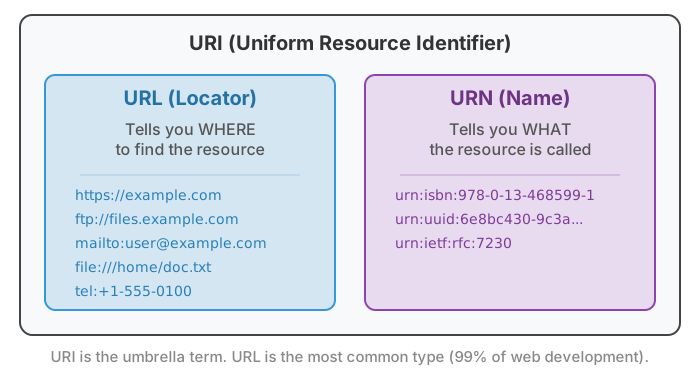
urn:isbn:978-0-13-468599-1 identifies a book but doesn't tell you where to download it), but in practice, you'll work with URLs 99% of the time.
2. URL Anatomy: The Five Components
Every URL can be broken down into up to five components. Here's a complete URL with all five parts:
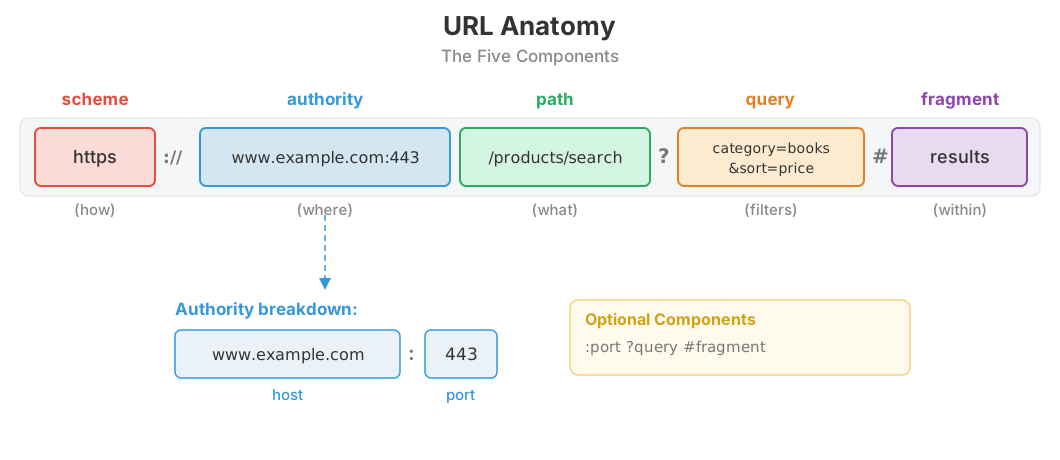
| Component | Separator | Required? | Example |
|---|---|---|---|
| Scheme | :// (after) |
Yes | https |
| Authority | // (before) |
Yes (for web URLs) | www.example.com:443 |
| Path | / (segments) |
Yes (at least /) |
/products/search |
| Query | ? (before), & (between pairs) |
No | category=books&sort=price |
| Fragment | # (before) |
No | results |
Most URLs you encounter won't have all five parts. A simple URL like https://example.com/about has just scheme, authority, and path. The query and fragment are optional and used only when needed.
3. Scheme (Protocol)
The scheme is the first part of a URL and tells the client how to retrieve the resource — what protocol to use. It appears before the :// separator.
Web Schemes
| Scheme | Purpose | Example |
|---|---|---|
https |
Secure HTTP (encrypted) | https://example.com/page |
http |
Unencrypted HTTP | http://example.com/page |
wss |
Secure WebSocket | wss://example.com/socket |
Communication Schemes
| Scheme | Purpose | Example |
|---|---|---|
mailto |
Email composition (with optional parameters) | mailto:support@example.com?subject=Help |
tel |
Phone call (use international format) | tel:+1-555-123-4567 |
sms |
SMS message | sms:+15551234567?body=Hi%20there |
Other Schemes
| Scheme | Purpose | Example |
|---|---|---|
ftp |
File Transfer Protocol (legacy) | ftp://files.example.com/pub/ |
file |
Local filesystem | file:///Users/jane/index.html |
data |
Inline data (see section 10) | data:text/plain,Hello%20World |
geo |
Geographic coordinates | geo:37.7749,-122.4194 |
App-specific schemes: Applications can register their own schemes for deep linking: slack://, spotify://, vscode://, zoommtg://. These open the native app directly from a browser link.
http:// for new websites.
4. Authority: Host and Port
The authority component tells the client which server to connect to. It consists of a host (required) and an optional port number.
Host
The host can be a domain name (example.com) or an IP address (93.184.216.34). Domain names are what humans use; IP addresses are what computers use. DNS (Domain Name System) translates between them.
Subdomains add hierarchy before the main domain:
www.example.com— the traditional web subdomainapi.example.com— API serverblog.example.com— blog subdomainmail.example.com— mail server
Port
The port specifies which service on the server to connect to. Each scheme has a default port, so you usually don't need to specify it.
| Scheme | Default Port | With Port | Without Port (same thing) |
|---|---|---|---|
http |
80 | http://example.com:80/page |
http://example.com/page |
https |
443 | https://example.com:443/page |
https://example.com/page |
ftp |
21 | ftp://files.example.com:21/ |
ftp://files.example.com/ |
You only need to specify the port when it's not the default — for example, a development server running on port 3000: http://localhost:3000.
example.com, your browser first asks a DNS server "What IP address is example.com?" and gets back something like 93.184.216.34. Only then can the browser connect. This lookup is cached, so it only happens occasionally.
5. Path
The path identifies which resource on the server you're requesting. It follows the authority and uses / to separate hierarchical segments — similar to a filesystem directory structure.
/                           ← root (home page)
/about                      ← about page
/products/shoes             ← shoes within products
/products/shoes/running     ← running shoes within shoes
/api/v2/users/42            ← user 42 in API version 2
Case Sensitivity
Domain names are case-insensitive (Example.COM = example.com), but paths are case-sensitive on most servers:
- Linux/Unix servers:
/Aboutand/aboutare different resources - Windows servers (IIS):
/Aboutand/aboutare the same
Trailing Slash Conventions
/products/(with trailing slash) — traditionally implies a directory or collection/products(without trailing slash) — traditionally implies a file or resource
In practice, most web servers and frameworks treat both the same. But be consistent — having both versions serve different content confuses search engines and users.
File Extensions
Early web URLs included file extensions (.html, .php, .asp). Modern best practice is to omit them — Tim Berners-Lee himself argues that file extensions in URLs are a mistake because they expose implementation details and make URLs fragile if you change technologies.
/About.html will return a 404 if the file is actually /about.html. This is a common source of bugs when developing on macOS (case-insensitive) and deploying to Linux (case-sensitive). Always use lowercase paths.
6. Query String
The query string begins with ? and contains key-value pairs separated by &. It's how you pass additional parameters to the server — for search, filtering, sorting, and pagination.
# Search
https://example.com/search?q=javascript+tutorials

# Filtering
https://shop.example.com/products?category=electronics&brand=sony&price_max=500

# Pagination
https://api.example.com/posts?page=3&limit=20

# Sorting
https://example.com/products?sort=price&order=asc

# Tracking (UTM parameters)
https://example.com/sale?utm_source=twitter&utm_medium=social&utm_campaign=summer
Common Query String Patterns
| Use Case | Example |
|---|---|
| Search | ?q=search+terms |
| Filtering | ?category=books&author=Doe |
| Pagination | ?page=2&per_page=25 |
| Sorting | ?sort=date&order=desc |
| Tracking | ?utm_source=google&utm_medium=cpc |
| Multiple values | ?color=red&color=blue |
Query strings are used with GET requests. The data is visible in the URL, which means it shows up in browser history, server logs, and the Referer header when you navigate away.
7. Fragment Identifier
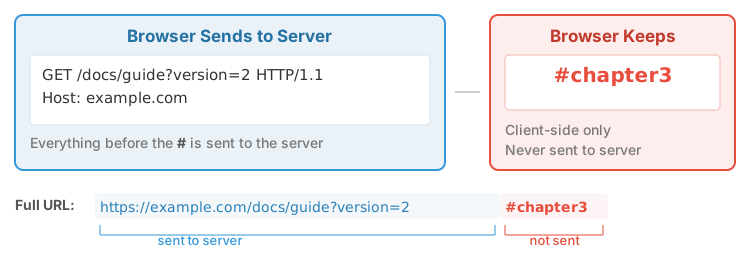
The fragment starts with # and points to a specific location within a resource. The critical fact about fragments: they are never sent to the server.
Uses of Fragments
- Page sections:
#introduction,#chapter3— scrolls to an element with thatid - Tab content:
#settings,#profile— show a specific tab - SPA routing:
#/users/42— hash-based routing in single-page apps (changing the hash doesn't trigger a page reload)
Because fragments are handled entirely by the browser, changing the fragment doesn't cause a new request to the server. This is why early single-page applications used hash-based routing — it let them update the URL without reloading the page.
8. Absolute vs Relative URLs
An absolute URL contains the full address including the scheme: https://example.com/images/logo.png. A relative URL is a partial address that gets resolved against the current document's URL.
Types of Relative URLs
| Type | Example | Meaning |
|---|---|---|
| Same directory | page.html |
File in the current directory |
| Child directory | images/photo.jpg |
File in a subdirectory |
| Parent directory | ../styles/main.css |
Go up one level, then into styles/ |
| Root-relative | /images/logo.png |
Relative to the site root |
URL Resolution Examples
Given a base URL of https://example.com/blog/posts/article.html:
| Relative URL | Resolved Absolute URL |
|---|---|
other.html |
https://example.com/blog/posts/other.html |
images/photo.jpg |
https://example.com/blog/posts/images/photo.jpg |
../about.html |
https://example.com/blog/about.html |
../../contact.html |
https://example.com/contact.html |
/styles/main.css |
https://example.com/styles/main.css |
//cdn.example.com/lib.js |
https://cdn.example.com/lib.js |
The <base> Tag
HTML provides a <base> tag that changes the base URL for all relative URLs on the page:
<head>
    <base href="https://cdn.example.com/assets/">
</head>
<body>
    <!-- This image resolves to https://cdn.example.com/assets/logo.png -->
    <img src="logo.png">
</body>
Gotcha: <base> affects all relative URLs on the page, including links and fragment references. A link to #section will navigate to the base URL plus #section, not the current page. Use <base> sparingly.
Protocol-Relative URLs
URLs starting with // (like //cdn.example.com/lib.js) inherit the scheme from the current page. These were popular when sites supported both HTTP and HTTPS, but now that HTTPS is the standard, they're unnecessary.
https://. Protocol-relative URLs were a transitional pattern. Now that HTTPS is universal, they add complexity with no benefit — and they break when opening HTML files locally via file://.
Best Practices
- Root-relative (
/images/logo.png) for site-wide assets — works from any page depth - Document-relative (
../styles/main.css) for resources that move with the document - Absolute (
https://cdn.example.com/lib.js) for external resources
9. URL Encoding (Percent-Encoding)
URLs can only contain a limited set of ASCII characters. Any other characters — spaces, special symbols, international characters — must be percent-encoded: converted to their UTF-8 byte values and represented as %XX sequences.
How It Works
Character Categories
Unreserved characters (never need encoding):
A-Z a-z 0-9 - _ . ~
Reserved characters (have special meaning in URLs; encode only when used as data):
: / ? # [ ] @ ! $ & ' ( ) * + , ; =
Everything else (must always be encoded):
Spaces, < > { } | \ ^ ` ", and all non-ASCII characters
Common Encodings
| Character | Encoded | Character | Encoded |
|---|---|---|---|
| Space | %20 |
# |
%23 |
! |
%21 |
% |
%25 |
& |
%26 |
+ |
%2B |
= |
%3D |
? |
%3F |
/ |
%2F |
@ |
%40 |
JavaScript Encoding Functions
| Function | Purpose | Preserves | Use For |
|---|---|---|---|
encodeURIComponent() |
Encode a single value | A-Z a-z 0-9 - _ . ~ ! ' ( ) * |
Query parameter values, path segments |
encodeURI() |
Encode a full URL | All of the above plus : / ? # [ ] @ ! $ & ' ( ) * + , ; = |
Complete URLs (preserves structure) |
// encodeURIComponent — for individual values
const query = encodeURIComponent('cats & dogs');
// → "cats%20%26%20dogs"
const url = `/search?q=${query}`;
// → "/search?q=cats%20%26%20dogs"

// encodeURI — for complete URLs
const fullUrl = encodeURI('https://example.com/path with spaces/page');
// → "https://example.com/path%20with%20spaces/page"
// Note: the :// and / are preserved
The Space Problem: %20 vs +
Spaces can be encoded two ways:
%20— standard percent-encoding (used in paths and most contexts)+— only valid in query strings ofapplication/x-www-form-urlencodeddata (HTML form submissions)
When in doubt, use %20. It's always correct.
International Characters
Non-ASCII characters are encoded as their UTF-8 byte sequences:
| Character | UTF-8 Bytes | Encoded |
|---|---|---|
| é (e-acute) | C3 A9 | %C3%A9 |
| ñ (n-tilde) | C3 B1 | %C3%B1 |
| 中 (Chinese) | E4 B8 AD | %E4%B8%AD |
encodeURIComponent() for values, never build URLs by string concatenation. Common mistakes include double encoding (encoding an already-encoded string), using encodeURI() where encodeURIComponent() is needed (which fails to encode & and = in values), and manually replacing spaces with +. Use the URL API (section 15) for building URLs programmatically.
10. Data URIs
Data URIs embed resource content directly in the URL itself, using the data: scheme. Instead of fetching a file from a server, the data is included inline. This eliminates the HTTP request entirely.
Syntax
data:[mediatype][;base64],data

# Examples:
data:text/plain,Hello%20World
data:text/html,<h1>Hello</h1>
data:image/svg+xml,<svg xmlns="http://www.w3.org/2000/svg">...</svg>
data:image/png;base64,iVBORw0KGgoAAAANSUhEUg...
Common MIME Types for Data URIs
| Type | MIME Type | Typical Use |
|---|---|---|
| Plain text | text/plain |
Simple text content |
| HTML | text/html |
Inline HTML documents, iframes |
| SVG | image/svg+xml |
Inline vector graphics (icons, logos) |
| PNG | image/png |
Small raster images (base64-encoded) |
| JPEG | image/jpeg |
Inline photos (base64-encoded) |
| JSON | application/json |
Inline data |
When to Use Data URIs
- Use for: Small icons, critical above-the-fold images, CSS backgrounds for tiny images, favicons
- Don't use for: Large images (base64 adds ~33% size), resources that benefit from caching (data URIs can't be cached independently), resources shared across pages
Base64 encoding increases the data size by approximately 33%. A 3 KB icon becomes ~4 KB as a data URI. For small resources where eliminating the HTTP request overhead is worth the size increase, data URIs make sense. For anything larger, a separate file with proper caching is better.
data:text/html URI can contain JavaScript. Content Security Policy (CSP) headers can restrict data URIs — for example, img-src 'self' blocks data URI images. Be cautious when constructing data URIs from user input.
11. URLs and State Management
HTTP is stateless — each request is independent. Yet URLs can carry state, making them one of the oldest and most powerful state management mechanisms on the web.
State in Query Parameters
Query parameters make state shareable and bookmarkable. When a user searches, filters, or navigates, encoding that state in the URL means they can share the exact view with someone else.
# These URLs capture application state:
https://shop.example.com/products?category=shoes&size=10&color=black&sort=price
https://maps.google.com/maps?q=San+Francisco&zoom=12
https://github.com/search?q=javascript&type=repositories&language=TypeScript
The History API
Modern browsers provide the History API, which lets JavaScript update the URL without triggering a page reload:
// pushState — adds a new entry to browser history
history.pushState({page: 2}, '', '/products?page=2');

// replaceState — replaces the current history entry
history.replaceState({}, '', '/products?sort=price');

// The user sees the URL change, but no request is made to the server
Hash Routing vs History API Routing
| Aspect | Hash Routing (#/path) |
History API (/path) |
|---|---|---|
| URL appearance | example.com/#/users/42 |
example.com/users/42 |
| Server request | Only loads index.html once |
Server must handle all routes (return index.html) |
| Server config | None needed | Requires catch-all route / URL rewriting |
| SEO | Poor (fragments not sent to server) | Good (real URLs, crawlable) |
| Modern usage | Legacy SPAs | Standard for modern frameworks |
What Belongs in URLs vs What Doesn't
- Put in URLs: Search terms, filter criteria, pagination, sort order, selected tab/view — anything a user should be able to share or bookmark
- Don't put in URLs: User preferences, authentication tokens, temporary UI state (modal open/closed), shopping cart contents
12. URL Security
URLs are user-controllable input. Any part of a URL — path, query parameters, fragments — can be manipulated by an attacker. Never trust URLs without validation.
Common URL-Based Attacks
| Attack | How It Works | Prevention |
|---|---|---|
| Parameter manipulation | Changing ?user_id=42 to ?user_id=1 to access another user's data (Insecure Direct Object Reference) |
Server-side authorization checks on every request |
| Open redirect | /login?redirect=https://evil.com — after login, user is redirected to attacker's site |
Whitelist allowed redirect domains; use relative URLs only |
| Path traversal | /files/../../etc/passwd — escape the intended directory to access system files |
Normalize paths; reject .. sequences; use a whitelist of allowed directories |
| XSS via URLs | Reflected XSS: /search?q=<script>alert(1)</script> — if the query is rendered unescaped in the page |
Always HTML-escape user input before rendering; use Content Security Policy |
| javascript: scheme | <a href="javascript:stealCookies()"> — if user-provided URLs are used in href attributes |
Only allow http: and https: schemes in user-provided URLs |
| URL phishing | Lookalike domains (g00gle.com), subdomain abuse (login.example.com.evil.com), homograph attacks (Cyrillic "а" looks like Latin "a") |
User awareness; browser warnings; domain monitoring |
URL Validation
// Safe URL validation in JavaScript
function isSafeUrl(input) {
    try {
        const url = new URL(input);
        // Only allow http and https schemes
        return ['http:', 'https:'].includes(url.protocol);
    } catch {
        return false;  // Not a valid URL
    }
}

// Safe redirect validation
function isSafeRedirect(redirectUrl) {
    try {
        const url = new URL(redirectUrl, window.location.origin);
        // Only allow same-origin redirects
        return url.origin === window.location.origin;
    } catch {
        return false;
    }
}
Sensitive Data in URLs
URLs are exposed in many places you might not expect:
- Browser history — anyone with access to the device can see them
- Server logs — access logs record full URLs (including query strings)
- Referer header — when you click a link, the full URL of the current page is sent to the next site
- Proxy logs — corporate proxies and network monitors log URLs
- Browser bookmarks — bookmarked URLs may be synced to cloud services
Authorization, Cookie) or request bodies for sensitive data. If a token must be in a URL temporarily (e.g., password reset links), make it single-use and short-lived.
13. Cool URIs Don't Change
In 1998, Tim Berners-Lee wrote an influential essay with a simple thesis: good URLs should last forever.
"What makes a cool URI? A cool URI is one which does not change. What sorts of URI change? URIs don't change: people change them."
— Tim Berners-Lee, Cool URIs Don't Change (1998)
Link Rot Is Real
Studies show that approximately 25% of links in academic papers are dead within 7 years. The average half-life of a web page URL is about 2 years. Every broken link is a broken promise.
What Causes URLs to Break
- Technology in the URL:
/page.aspbreaks when you switch from ASP to PHP - Organizational structure:
/marketing/campaigns/breaks when you reorganize departments - Date-based with reclassification: Moving a blog post from one category to another
- File extensions:
.html→.php→ no extension - Server migration: New CMS, new URL patterns
Design Principles for Lasting URLs
| Bad URL (Why) | Good URL (Why) |
|---|---|
/cgi-bin/display.pl?id=42(exposes technology) |
/articles/42(technology-independent) |
/~smith/papers/paper1.html(tied to a person) |
/research/machine-learning(topic-based) |
/docs/v2.3.1/api.aspx(version + extension) |
/docs/api(stable, versionless) |
/node_modules/express/index.js(internal structure) |
/api/users(semantic meaning) |
/Marketing/Q4-2024/Campaign_Report.pdf(org structure + date) |
/reports/campaign-q4-2024(flat, descriptive) |
When URLs Must Change: Redirects
- 301 Moved Permanently: The URL has a new permanent home. Browsers, search engines, and bookmarks update automatically.
- 410 Gone: The resource has been intentionally and permanently removed. More honest than a 404.
- Archive rather than delete: If content is outdated, add a notice rather than removing it.
14. URLs as Interface
Jakob Nielsen observed that URLs are part of the user interface. Users read them, edit them, share them, and judge trustworthiness by them. A good URL is readable, predictable, and hackable.
Readable
- Use real words, not IDs or codes:
/products/running-shoesnot/p/RS-42X - Use hyphens to separate words:
/blog/url-design-tipsnot/blog/url_design_tips - Use lowercase exclusively:
/about-usnot/About-Us - Keep URLs concise: every segment should add meaning
Predictable
Users should be able to guess URLs based on consistent patterns:
| Expected Pattern | URL |
|---|---|
| About page | /about |
| Contact page | /contact |
| Blog index | /blog |
| Product listing | /products |
| Login page | /login |
| Search | /search?q=term |
| Help / Documentation | /help or /docs |
Hackable
Users should be able to navigate by editing the URL:
- Remove the last segment to go "up":
/products/shoes/running→/products/shoes→/products - Change a parameter to explore:
/search?q=python→/search?q=javascript - Guess related pages: if
/blogexists,/aboutprobably does too
URL Design Patterns
| Pattern | Example |
|---|---|
| REST API | /api/users, /api/users/42, /api/users/42/posts |
| Blog | /blog, /blog/2024/url-design |
| Documentation | /docs/getting-started, /docs/api/authentication |
| Search & filter | /products?category=shoes&color=red&sort=price |
15. The URL API in JavaScript
Modern JavaScript provides a built-in URL class for parsing, constructing, and manipulating URLs. It handles encoding, validation, and edge cases that string manipulation gets wrong.
URL Constructor
// Parse an absolute URL
const url = new URL('https://example.com:8080/api/users?role=admin&active=true#table');

// Parse a relative URL against a base
const relative = new URL('/api/books', 'https://example.com');
// → https://example.com/api/books
URL Properties
| Property | Value (for the URL above) |
|---|---|
url.href |
https://example.com:8080/api/users?role=admin&active=true#table |
url.protocol |
https: |
url.hostname |
example.com |
url.port |
8080 |
url.pathname |
/api/users |
url.search |
?role=admin&active=true |
url.searchParams |
URLSearchParams object |
url.hash |
#table |
url.origin |
https://example.com:8080 |
URLSearchParams
const url = new URL('https://example.com/search');

// Build query parameters
url.searchParams.set('q', 'javascript tutorials');
url.searchParams.set('page', '1');
url.searchParams.set('sort', 'relevance');

console.log(url.href);
// → "https://example.com/search?q=javascript+tutorials&page=1&sort=relevance"

// Read parameters
url.searchParams.get('q');         // "javascript tutorials"
url.searchParams.has('sort');      // true

// Modify parameters
url.searchParams.set('page', '2');
url.searchParams.delete('sort');
url.searchParams.append('filter', 'free');

// Iterate
for (const [key, value] of url.searchParams) {
    console.log(`${key}: ${value}`);
}
URL Validation
// URL.canParse() — check if a string is a valid URL (no try/catch needed)
URL.canParse('https://example.com');        // true
URL.canParse('not a url');                  // false
URL.canParse('/path', 'https://base.com');  // true (valid relative URL)
Common Patterns
// Get query parameters from current page
const params = new URL(window.location.href).searchParams;
const search = params.get('q');

// Build an API URL safely
function buildApiUrl(endpoint, params) {
    const url = new URL(endpoint, 'https://api.example.com');
    for (const [key, value] of Object.entries(params)) {
        url.searchParams.set(key, value);
    }
    return url.href;
}

buildApiUrl('/users', { role: 'admin', active: 'true' });
// → "https://api.example.com/users?role=admin&active=true"

// Safe redirect
function safeRedirect(targetUrl) {
    const url = new URL(targetUrl, window.location.origin);
    if (url.origin !== window.location.origin) {
        throw new Error('Cross-origin redirect blocked');
    }
    window.location.href = url.href;
}
16. Summary
| Concept | Key Points |
|---|---|
| What is a URL | A standardized address for web resources. URI is the umbrella term; URL is the most common type (tells you how to get there). |
| URL Anatomy | Five components: scheme (how), authority (where), path (what), query (filters), fragment (within). Only fragment is never sent to the server. |
| Scheme | Identifies the protocol: https, http, mailto, tel, ftp, data, plus app-specific schemes. Always use HTTPS. |
| Authority | Host (domain or IP) + optional port. Default ports: HTTP=80, HTTPS=443. DNS resolves domains to IPs. |
| Path | Hierarchical structure identifying the resource. Case-sensitive on Linux. Avoid file extensions. Use lowercase. |
| Query String | Key-value pairs after ?, separated by &. Used for search, filtering, pagination, tracking. Visible everywhere — never put secrets in them. |
| Fragment | Starts with #, handled entirely by the browser, never sent to the server. Used for page sections and SPA routing. |
| Absolute vs Relative | Absolute = full URL with scheme. Relative = resolved against current document. Use root-relative for assets, absolute for external. |
| URL Encoding | Percent-encoding converts special/international characters to %XX. Use encodeURIComponent() for values, never build URLs by hand. |
| Data URIs | Embed small resources inline with data: scheme. Eliminates HTTP requests but adds ~33% size (base64). Good for small icons, bad for large images. |
| URLs and State | Query parameters make state shareable/bookmarkable. History API updates URLs without reload. If users should share it, put it in the URL. |
| URL Security | URLs are user input — validate everything. Defend against parameter manipulation, open redirects, path traversal, XSS, and phishing. Never put sensitive data in URLs. |
| Cool URIs Don't Change | Good URLs last forever. Omit technology, org structure, and file extensions. When URLs must change, use 301 redirects and maintain them forever. |
| URLs as Interface | URLs are UI: make them readable, predictable, and hackable. The Phone Test: can you read it aloud? |
| URL API | new URL() for parsing, URLSearchParams for query manipulation, URL.canParse() for validation. Always prefer the API over string manipulation. |