Web Servers Overview
The Gatekeepers of the Web
Web servers are the gatekeepers between clients and your application. They handle HTTP, serve files, route requests, terminate TLS, and forward traffic to application servers.
Understanding web servers is essential for deploying, debugging, and securing any web application. Before your code ever runs, the web server has already:
- Terminated TLS — decrypted the HTTPS connection
- Parsed the request — extracted the method, path, headers, and body
- Routed the request — matched the URL to a handler or file
- Checked access control — verified IP, rate limits, and permissions
- Logged the request — recorded who asked for what
- Applied compression — prepared to gzip the response
1. What is a Web Server?
A web server is software that listens for HTTP requests and sends responses. It's the process on a machine that binds to a network port, waits for incoming connections, reads the HTTP request, processes it, and writes back an HTTP response.
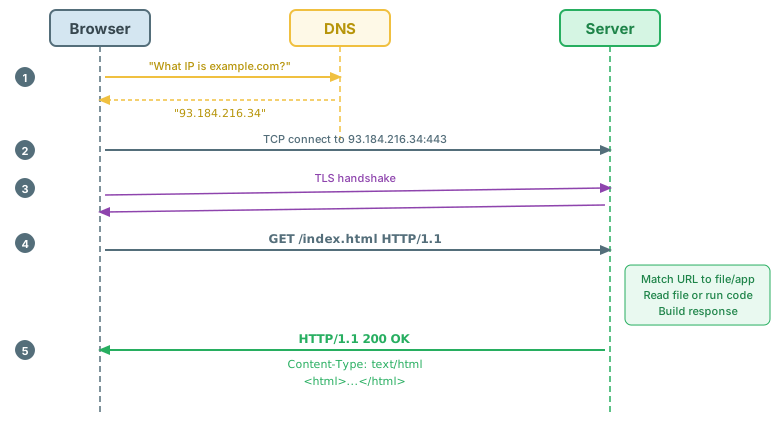
Ports and Privileges
Web servers listen on specific ports. The port number determines which service handles the connection:
- Port 80 — HTTP (default, unencrypted)
- Port 443 — HTTPS (default, encrypted)
- Port 8080, 3000, 5000 — common development ports
Ports below 1024 are privileged ports — only the root user (or a process with the right capabilities) can bind to them. This is why Nginx and Apache start as root, then drop privileges to an unprivileged user (www-data or nginx) after binding.
Static vs Dynamic Content
| Aspect | Static Content | Dynamic Content |
|---|---|---|
| Generated by | Read directly from filesystem | Generated by application code at request time |
| Examples | HTML files, CSS, JavaScript, images, fonts | API responses, search results, user dashboards |
| Cacheability | Highly cacheable (content doesn't change) | Depends on content (user-specific data can't be cached publicly) |
| Server load | Minimal (just read and send a file) | Higher (run code, query database, build response) |
| Best served by | Web server (Nginx, Apache) or CDN | Application server (Node.js, PHP, Python) |
2. Common Web Servers
Four web servers dominate the landscape, each with distinct architectures and strengths:
| Server | Architecture | Config Style | Strengths | Best For |
|---|---|---|---|---|
| Apache | Process/thread MPMs | .htaccess + httpd.conf |
Modules ecosystem, per-directory config | Traditional hosting, shared hosting |
| Nginx | Event-driven | nginx.conf declarative blocks |
High concurrency, reverse proxy | Modern deployments, load balancing |
| Node.js | Event loop (single-threaded) | Programmatic JavaScript | Full-stack JS, custom logic | API servers, real-time apps |
| Caddy | Event-driven | Caddyfile (minimal) | Automatic HTTPS, zero-config TLS | Simple deployments, personal projects |
Nginx and Apache dominate market share for traditional web serving. Node.js is common as an application server behind a proxy. Caddy is growing rapidly for its simplicity and automatic HTTPS.
3. Server Architecture Patterns
The fundamental challenge for any web server is concurrency: how to handle thousands of simultaneous connections. Three architectural patterns have emerged, each with distinct trade-offs.
Process-per-Request (Apache Prefork)
The master process forks a child process for each incoming request. Each child handles one request at a time in complete isolation.
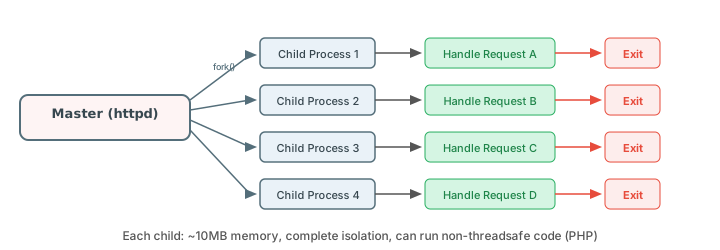
- Pros: Complete isolation between requests; supports non-threadsafe code (like early PHP); one crash doesn't affect others
- Cons: ~10MB memory per process; slow to spawn; doesn't scale well past a few hundred connections
Thread-per-Request (Apache Worker/Event MPM)
Uses threads within processes — multiple threads share the same process memory, reducing overhead.
- Pros: ~1MB per thread (vs ~10MB per process); faster context switching; better memory efficiency
- Cons: Shared memory introduces race conditions; code must be thread-safe; debugging is harder
Event-Driven (Nginx, Node.js)
A single thread uses an event loop with non-blocking I/O to handle many connections simultaneously. Instead of waiting for I/O to complete, the server registers a callback and moves to the next connection.
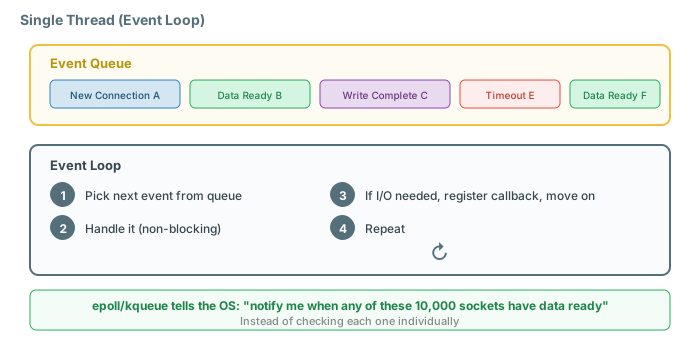
- Pros: Handles 10,000+ connections with minimal memory; no thread/process overhead per connection
- Cons: One blocking call stalls everything; CPU-heavy work blocks all connections; programming model requires async thinking
Architecture Comparison
| Architecture | Memory per 10K connections | Isolation | Blocking tolerance | Example |
|---|---|---|---|---|
| Process-per-request | ~100 GB | Complete | High (each process independent) | Apache prefork |
| Thread-per-request | ~10 GB | Partial (shared memory) | High (each thread independent) | Apache worker |
| Event-driven | ~100 MB | None (single thread) | Zero (one block stalls all) | Nginx, Node.js |
The C10K Problem: In 1999, Dan Kegel posed the challenge: how do you handle 10,000 simultaneous connections on a single server? The process-per-request model couldn't do it. Event-driven architecture, enabled by OS features like epoll (Linux) and kqueue (BSD/macOS), was the answer. Today, Nginx routinely handles hundreds of thousands of connections.
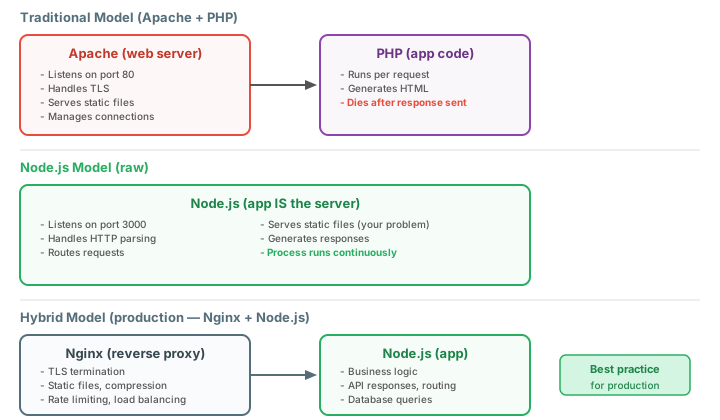
The hybrid approach: In practice, you combine both. Nginx (event-driven) handles static files, TLS, and connection management, then proxies dynamic requests to Node.js or PHP-FPM (which handle application logic). Each layer does what it's best at.
fs.readFileSync() in a request handler.
4. Configuration: Virtual Hosts
Web server configuration is declarative: you describe what you want, not how to do it. The server interprets your configuration and handles the implementation details.
Virtual Hosting
Virtual hosting lets one server handle multiple domains. When a request arrives, the server reads the Host header to determine which site to serve.
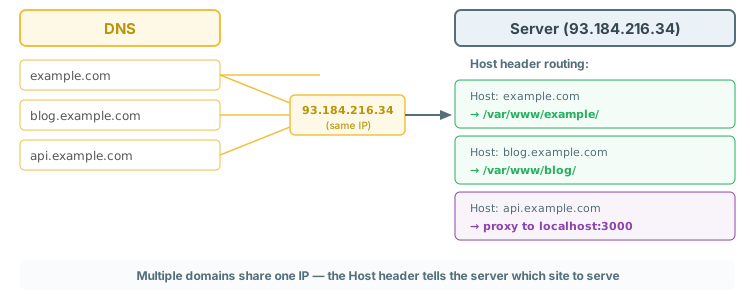
Nginx vs Apache Configuration
# Nginx server block
server {
    listen 80;
    server_name example.com www.example.com;
    root /var/www/example/public_html;
    index index.html index.htm;
}

# Apache VirtualHost
<VirtualHost *:80>
    ServerName example.com
    ServerAlias www.example.com
    DocumentRoot /var/www/example/public_html
    DirectoryIndex index.html index.htm
</VirtualHost>
Document Root Conventions
| Convention | Path | Used By |
|---|---|---|
| Debian/Ubuntu | /var/www/html/ |
Apache, Nginx default |
| RHEL/CentOS | /usr/share/nginx/html/ |
Nginx default |
| Per-site | /var/www/site-name/public_html/ |
Multi-site hosting |
| Development | ~/projects/my-app/public/ |
Local development |
MIME Types
The server uses the file extension to set the Content-Type response header, which tells the browser how to handle the file:
| Extension | MIME Type | Content-Type Header |
|---|---|---|
.html |
text/html | Content-Type: text/html; charset=UTF-8 |
.css |
text/css | Content-Type: text/css |
.js |
application/javascript | Content-Type: application/javascript |
.json |
application/json | Content-Type: application/json |
.png |
image/png | Content-Type: image/png |
.svg |
image/svg+xml | Content-Type: image/svg+xml |
nginx -s reload applies configuration changes without dropping active connections. Restarting (systemctl restart nginx) kills all current requests. In production, this difference matters — a restart during peak traffic drops every active download, WebSocket connection, and in-flight API call.
5. Routing and URL Handling
When a request arrives, the server must match the URL to a response. This matching algorithm differs between servers but follows a priority order.
Nginx Location Matching
Nginx checks location blocks in a specific priority order:
# Priority 1: Exact match (=)
location = /favicon.ico {
    log_not_found off;           # Stop logging 404s for favicon
}

# Priority 2: Preferential prefix (^~)
location ^~ /static/ {
    root /var/www/assets;        # Don't check regex after this match
}

# Priority 3: Regex match (~ case-sensitive, ~* case-insensitive)
location ~* \.(jpg|png|gif|css|js)$ {
    expires 30d;                 # Cache static assets
}

# Priority 4: Prefix match (longest wins)
location /api/ {
    proxy_pass http://backend;   # Forward API requests
}

location / {
    try_files $uri $uri/ /index.html;  # SPA fallback
}
Redirects
Redirects tell the client to request a different URL. The two main types have very different implications:
- 301 Moved Permanently: Browsers and search engines update their records. Use when a URL has permanently moved. SEO value transfers to the new URL.
- 302 Found (Temporary): The client should continue using the original URL. Use for maintenance pages or A/B testing.
# Nginx redirects
server {
    listen 80;
    server_name example.com;
    return 301 https://example.com$request_uri;     # HTTP → HTTPS
}

# Apache redirects
Redirect 301 /old-page /new-page
RedirectMatch 301 ^/blog/(.*)$ /articles/$1
URL Rewriting and Clean URLs
Rewrites transform the URL internally — the client never sees the real path. Redirects send a new URL back to the client.
# Nginx: Clean URLs — /products/42 internally serves /products.php?id=42
location /products/ {
    try_files $uri $uri/ /products.php?id=$uri;
}

# SPA routing — serve index.html for all routes, let JavaScript handle routing
location / {
    try_files $uri $uri/ /index.html;
}

# Apache: Clean URLs with mod_rewrite
RewriteEngine On
RewriteCond %{REQUEST_FILENAME} !-f
RewriteCond %{REQUEST_FILENAME} !-d
RewriteRule ^(.*)$ /index.php?path=$1 [L,QSA]
/products/42 to /products.php?id=42). Use redirects when the URL has actually moved and external links need updating.
6. Static File Serving
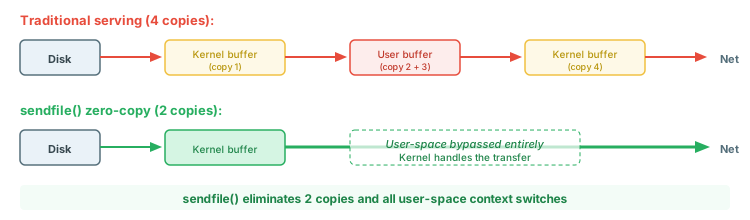
Web servers are dramatically faster at serving static files than application code. The key optimization is sendfile() — a system call that tells the kernel to transfer data directly from file to network socket, bypassing user-space entirely.
sendfile() and Zero-Copy
Caching Headers
# Nginx: Cache static assets aggressively
# Versioned assets (filename contains hash) — cache forever
location ~* \.(js|css)$ {
    expires max;                          # Cache-Control: max-age=31536000
    add_header Cache-Control "public, immutable";
}

# Images and fonts — cache for 30 days
location ~* \.(png|jpg|gif|svg|woff2|ttf)$ {
    expires 30d;
}

# HTML — don't cache (or revalidate)
location ~* \.html$ {
    add_header Cache-Control "no-cache";  # Must revalidate with server
}
Compression
| Algorithm | Compression Ratio | Speed | Browser Support |
|---|---|---|---|
| Gzip | Good (~70% reduction) | Fast | Universal (all browsers) |
| Brotli | Better (~80% reduction) | Slower to compress, fast to decompress | All modern browsers (HTTPS only) |
Pre-compression at build time gives you the best of both worlds: maximum compression without CPU cost at request time. Build tools generate .gz and .br files alongside the originals, and the server serves whichever the client supports.
Cache Busting Strategies
The challenge: you want to cache files forever for performance, but users need to get new versions when you deploy changes.
- Hashed filenames (best):
app.a1b2c3.js— filename changes when content changes. SetCache-Control: max-age=31536000, immutable. - Query strings:
style.css?v=42— simple but some CDNs ignore query strings for caching. - Path versioning:
/v2/style.css— works everywhere but requires path updates.
Cache-Control: max-age=31536000, immutable — cache forever. The browser automatically fetches the new version when the hash changes. Your HTML file (which references the hashed filenames) should use no-cache so it always revalidates.
7. Reverse Proxying
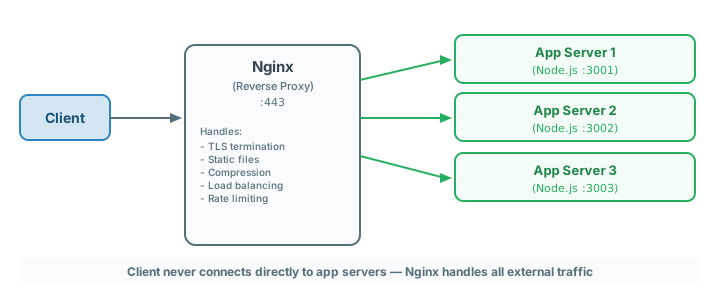
A reverse proxy sits between clients and your application servers. Clients talk to the proxy; the proxy talks to your app. The client never connects directly to your application.
Why Use a Reverse Proxy?
- TLS termination: Handle encryption in one place, not in every app
- Static file serving: Nginx serves files 10-100x faster than application code
- Load balancing: Distribute traffic across multiple app instances
- Security isolation: App servers are never directly exposed to the internet
- Compression: Gzip/Brotli at the proxy level, transparent to the app
Basic Proxy Configuration
# Nginx
location /api/ {
    proxy_pass http://localhost:3000;
    proxy_set_header Host $host;
    proxy_set_header X-Real-IP $remote_addr;
    proxy_set_header X-Forwarded-For $proxy_add_x_forwarded_for;
    proxy_set_header X-Forwarded-Proto $scheme;
}

# Apache
<Location /api/>
    ProxyPass http://localhost:3000/
    ProxyPassReverse http://localhost:3000/
    RequestHeader set X-Real-IP %{REMOTE_ADDR}e
</Location>
Header Forwarding
When a proxy sits between the client and your app, your app sees the proxy's IP, not the client's. Header forwarding fixes this:
| Header | Purpose | Example Value |
|---|---|---|
X-Real-IP |
The client's actual IP address | 203.0.113.42 |
X-Forwarded-For |
Chain of IPs (client, proxies) | 203.0.113.42, 10.0.0.1 |
X-Forwarded-Proto |
Original protocol (http/https) | https |
X-Forwarded-Host |
Original Host header | example.com |
Host |
Pass through the original Host header | example.com |
Load Balancing
# Nginx upstream with multiple backends
upstream app_servers {
    least_conn;                    # Use least-connections algorithm
    server 127.0.0.1:3001;
    server 127.0.0.1:3002;
    server 127.0.0.1:3003 weight=2;  # Gets 2x traffic
    server 127.0.0.1:3004 backup;    # Only used if others are down
}

server {
    location / {
        proxy_pass http://app_servers;
    }
}
| Method | How It Works | Best For |
|---|---|---|
| Round-robin | Requests cycle through servers in order | Equal-capacity servers, stateless apps |
| Least connections | Sends to the server with fewest active connections | Uneven request durations |
| IP hash | Same client IP always goes to same server | Session affinity (sticky sessions) |
| Weighted | Servers get traffic proportional to their weight | Mixed-capacity servers |
X-Forwarded-For, your application sees the proxy's IP for every request — breaking rate limiting, geolocation, access logs, and abuse detection. Every reverse proxy configuration should include header forwarding.
8. TLS/HTTPS Configuration
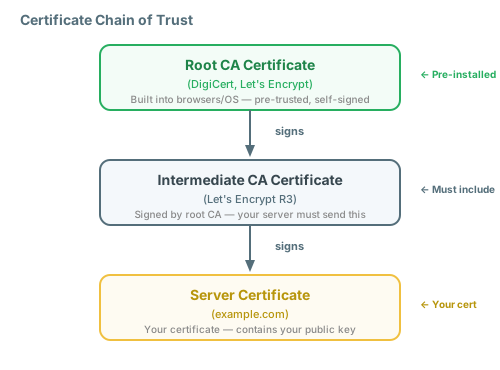
A TLS certificate binds a domain name to a public key and is signed by a Certificate Authority (CA). The certificate chain establishes trust from your server's certificate up to a root CA that browsers trust.
Let's Encrypt and Certbot
# Obtain a certificate
sudo certbot --nginx -d example.com -d www.example.com

# Auto-renewal (certbot installs a cron/systemd timer)
sudo certbot renew --dry-run

# Force renewal
sudo certbot renew --force-renewal
Nginx TLS Configuration
server {
    listen 443 ssl http2;
    server_name example.com;

    # Certificate files
    ssl_certificate     /etc/letsencrypt/live/example.com/fullchain.pem;
    ssl_certificate_key /etc/letsencrypt/live/example.com/privkey.pem;

    # Modern TLS configuration
    ssl_protocols TLSv1.2 TLSv1.3;
    ssl_ciphers ECDHE-ECDSA-AES128-GCM-SHA256:ECDHE-RSA-AES128-GCM-SHA256;
    ssl_prefer_server_ciphers off;

    # HSTS — tell browsers to always use HTTPS
    add_header Strict-Transport-Security "max-age=31536000; includeSubDomains" always;
}

# Redirect all HTTP to HTTPS
server {
    listen 80;
    server_name example.com www.example.com;
    return 301 https://example.com$request_uri;
}
Common TLS Errors
| Error | Likely Cause | Fix |
|---|---|---|
| NET::ERR_CERT_DATE_INVALID | Certificate expired | certbot renew |
| ERR_CERT_COMMON_NAME_INVALID | Certificate doesn't match domain | Reissue cert with correct domain(s) |
| ERR_CERT_AUTHORITY_INVALID | Missing intermediate certificate | Use fullchain.pem, not cert.pem |
| ERR_SSL_VERSION_OR_CIPHER_MISMATCH | Server and client can't agree on TLS version/cipher | Enable TLS 1.2 and modern ciphers |
9. Logging and Monitoring
Web servers produce two types of logs: access logs (what happened) and error logs (what went wrong). Together, they're your primary debugging tool.
Anatomy of an Access Log Entry
93.184.216.34 - jane [10/Oct/2025:13:55:36 -0700] "GET /api/books HTTP/1.1" 200 2326 "https://example.com/" "Mozilla/5.0"
│               │     │                              │                        │   │    │                       │
└─ Client IP    │     └─ Timestamp                   └─ Request line          │   │    └─ Referer              └─ User-Agent
                └─ User (from auth)                                           │   └─ Response size (bytes)
                                                                              └─ Status code
Log Formats
| Format | Fields | Best For | Machine-Parseable? |
|---|---|---|---|
| Common (CLF) | IP, user, time, request, status, size | Basic logging, small sites | Somewhat (regex) |
| Combined | CLF + Referer + User-Agent | General purpose (most common) | Somewhat (regex) |
| JSON | Structured key-value pairs | Log aggregation (ELK, Splunk) | Yes |
Error Log Levels
Error logs use severity levels from most to least critical: emerg → alert → crit → error → warn → notice → info → debug. Setting a level includes all more severe levels above it.
# Nginx log configuration
http {
    # Custom log format with timing
    log_format main '$remote_addr - $remote_user [$time_local] '
                    '"$request" $status $body_bytes_sent '
                    '"$http_referer" "$http_user_agent" '
                    'rt=$request_time';

    access_log /var/log/nginx/access.log main;
    error_log  /var/log/nginx/error.log warn;
}

# Apache log configuration
LogFormat "%h %l %u %t \"%r\" %>s %b \"%{Referer}i\" \"%{User-Agent}i\"" combined
CustomLog /var/log/apache2/access.log combined
ErrorLog /var/log/apache2/error.log
LogLevel warn
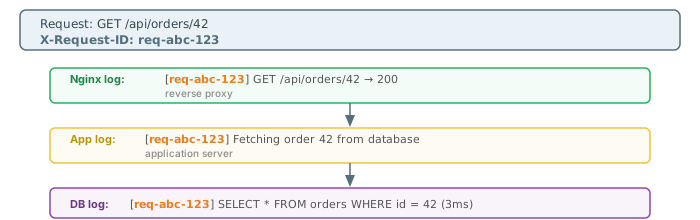
Correlation IDs
When a request flows through multiple services, a correlation ID ties all the log entries together:
Key Metrics to Monitor
| Metric | What It Measures | Warning Sign |
|---|---|---|
| Request rate | Requests per second | Sudden spikes (possible attack) or drops (possible outage) |
| P95 latency | 95th percentile response time | Increasing trend (degrading performance) |
| Error rate (5xx) | Percentage of server errors | Above 1% (something is broken) |
| Active connections | Current open connections | Near configured maximum |
Practical Log Analysis
# Top 10 IP addresses by request count
awk '{print $1}' access.log | sort | uniq -c | sort -rn | head -10

# Top 10 most requested paths
awk '{print $7}' access.log | sort | uniq -c | sort -rn | head -10

# Count of each status code
awk '{print $9}' access.log | sort | uniq -c | sort -rn

# All 5xx errors with timestamps
awk '$9 >= 500' access.log
10. Security Hardening
Security follows the principle of defense in depth: multiple layers, each of which may fail independently. No single measure is sufficient, but together they make exploitation significantly harder.
Hiding Server Information
# Nginx — hide version from headers and error pages
server_tokens off;

# Apache — minimal server header
ServerTokens Prod
ServerSignature Off
Rate Limiting
# Nginx rate limiting
http {
    # Define a zone: 10 requests/second per IP, shared memory for tracking
    limit_req_zone $binary_remote_addr zone=api:10m rate=10r/s;

    server {
        location /api/ {
            limit_req zone=api burst=20 nodelay;
            #                   │          │
            #                   │          └─ Don't queue, reject immediately
            #                   └─ Allow bursts of up to 20 requests
        }

        location /login {
            limit_req zone=api burst=5;    # Stricter for login
        }
    }
}
Security Headers
| Header | Purpose | Recommended Value |
|---|---|---|
Strict-Transport-Security |
Force HTTPS for all future requests | max-age=31536000; includeSubDomains |
Content-Security-Policy |
Control which resources can be loaded | default-src 'self'; script-src 'self' |
X-Content-Type-Options |
Prevent MIME-type sniffing | nosniff |
X-Frame-Options |
Prevent clickjacking via iframes | DENY or SAMEORIGIN |
Referrer-Policy |
Control Referer header leakage | strict-origin-when-cross-origin |
Permissions-Policy |
Restrict browser features (camera, mic) | camera=(), microphone=(), geolocation=() |
# Nginx — add all security headers
add_header Strict-Transport-Security "max-age=31536000; includeSubDomains" always;
add_header Content-Security-Policy "default-src 'self'; script-src 'self'" always;
add_header X-Content-Type-Options "nosniff" always;
add_header X-Frame-Options "DENY" always;
add_header Referrer-Policy "strict-origin-when-cross-origin" always;
add_header Permissions-Policy "camera=(), microphone=(), geolocation=()" always;
Security Checklist
- TLS everywhere (HTTPS only, redirect HTTP)
- HSTS enabled with
includeSubDomains - Rate limiting on authentication and API endpoints
- Security headers configured (HSTS, CSP, X-Content-Type-Options, X-Frame-Options)
- Server version hidden (
server_tokens off) - Least privilege (run as unprivileged user, restrict filesystem access)
- Request size limits configured
- Timeout configuration (defend against Slowloris)
- Log monitoring for anomalies
11. Performance Tuning
Before tuning the server, identify where the bottleneck actually is. A perfectly tuned Nginx won't help if your database query takes 2 seconds.
Key Tunables
| Tunable | Default | Recommended | Why |
|---|---|---|---|
worker_processes |
1 | auto (= CPU cores) |
One worker per core maximizes throughput |
worker_connections |
512 | 1024–4096 | Max simultaneous connections per worker |
keepalive_timeout |
75s | 30–65s | Balance between reuse and freeing resources |
client_body_buffer_size |
8k/16k | 16k–128k | Avoid writing request body to disk |
gzip_comp_level |
1 | 4–6 | Trade-off: higher = better compression, more CPU |
# Performance-oriented Nginx config
worker_processes auto;
worker_rlimit_nofile 65535;

events {
    worker_connections 4096;
    multi_accept on;
    use epoll;                    # Linux optimal event method
}

http {
    sendfile on;
    tcp_nopush on;                # Send headers and file in one packet
    tcp_nodelay on;               # Don't delay small packets

    keepalive_timeout 30;
    keepalive_requests 1000;      # Max requests per keep-alive connection

    gzip on;
    gzip_comp_level 5;
    gzip_min_length 256;
    gzip_types text/plain text/css application/json application/javascript
               text/xml application/xml image/svg+xml;
}
Benchmarking Tools
- ab (Apache Bench): Simple, included with Apache.
ab -n 1000 -c 100 http://localhost/ - wrk: Modern, multi-threaded.
wrk -t4 -c100 -d30s http://localhost/ - k6: Scriptable load testing with JavaScript. Best for realistic user scenarios.
$request_time to identify slow endpoints, then profile those.
12. Common Issues and Debugging
The debugging mindset: reproduce, isolate, read logs, hypothesize, test. 90% of issues are explained in the error log.
502 Bad Gateway
The proxy can't reach the backend application server.
- Common causes: App crashed, wrong port in proxy_pass, socket permissions, firewall blocking
# Debugging 502
# 1. Is the backend running?
systemctl status your-app
ps aux | grep node

# 2. Is it listening on the right port?
ss -tlnp | grep :3000

# 3. Can you reach it directly?
curl -v http://127.0.0.1:3000/

# 4. What does the error log say?
tail -20 /var/log/nginx/error.log
# Look for: "connect() failed (111: Connection refused)"
504 Gateway Timeout
The backend is too slow to respond within the proxy's timeout window.
- Common causes: Slow database query, external API timeout, resource exhaustion, insufficient proxy timeout
403 Forbidden
The server refuses to serve the request.
- Common causes: File permissions too restrictive, directory index disabled (no
index.html), IP-based access control, SELinux blocking access
404 Not Found
- Common causes: Wrong document root, case sensitivity mismatch (developed on macOS, deployed on Linux), missing rewrite rule for clean URLs,
aliasvsrootconfusion
"Address already in use"
# Find what's listening on port 80
ss -tlnp | grep :80

# Or with lsof
lsof -i :80
Configuration Validation
# Always test before reload
nginx -t                    # Test Nginx config syntax
apachectl configtest        # Test Apache config syntax

# Then reload gracefully
nginx -s reload             # Apply without dropping connections
systemctl reload apache2
Essential Debugging Tools
| Tool | Purpose | Example |
|---|---|---|
curl -v |
See full HTTP request/response | curl -v http://localhost/ |
ss -tlnp |
Show listening ports and processes | ss -tlnp | grep :80 |
lsof -i |
List open network connections | lsof -i :3000 |
| Error logs | Server-reported issues | tail -f /var/log/nginx/error.log |
nginx -t |
Validate config before applying | nginx -t && nginx -s reload |
Debugging Checklist
- Check error log:
tail -f /var/log/nginx/error.log - Check access log for the failed request
- Test with
curl -vdirectly to the server - Verify upstream is running:
systemctl status app - Test upstream directly:
curl http://127.0.0.1:3000/ - Check file permissions:
ls -la /var/www/ - Verify config syntax:
nginx -t - Check what's listening:
ss -tlnp - Check disk space:
df -h - Check memory:
free -m - Check for recent config changes
reload to apply config changes gracefully, and use logs and external tools (curl, ss) to investigate. Restarting drops all active connections — every download, WebSocket, and in-flight request.
13. The Node.js Server Model
Node.js is unique among web platforms: the application is the server. There's no Apache or Nginx required — your JavaScript code creates the HTTP server, listens on a port, and handles every request directly.
What This Means
Full control: You handle every aspect of HTTP — routing, headers, status codes, streaming, WebSockets. No configuration files, no server limitations. Everything is programmatic.
Full responsibility: You inherit ALL the tasks that Apache/Nginx handle automatically:
| Responsibility | Apache/Nginx | Raw Node.js | Hybrid (Nginx + Node.js) |
|---|---|---|---|
| Static file serving | Built-in, optimized | Your code (express.static) | Nginx handles it |
| TLS termination | Built-in | Your code (tls module) | Nginx handles it |
| Rate limiting | Config directive | Your code (middleware) | Nginx handles it |
| Access logging | Automatic | Your code (morgan, etc.) | Both (Nginx + app) |
| Crash recovery | Auto-restart workers | Process dies, all gone | PM2/systemd restarts Node |
| Compression | Config directive | Your code (middleware) | Nginx handles it |
14. Serverless and Edge Computing
"Serverless" doesn't mean there are no servers — it means you don't manage them. Your code runs in short-lived containers managed by a cloud provider. You deploy functions, not servers.
Trade-offs
- Gains: No server management, auto-scaling from zero to millions, pay only for actual invocations
- Losses: Cold starts (100ms–2s), execution time limits, no persistent connections (WebSockets), vendor lock-in
| Aspect | Traditional Server | Serverless |
|---|---|---|
| Scaling | Manual (add servers, configure load balancer) | Automatic (provider scales per request) |
| Cost model | Pay for uptime (server runs 24/7) | Pay per invocation (idle = free) |
| Cold starts | None (server is always running) | 100ms–2s for first request after idle |
| Persistent connections | WebSockets, SSE, long-polling | Not supported (request/response only) |
| Debugging | SSH in, check logs, profile | Cloud-based logging, limited visibility |
| Vendor lock-in | Low (standard Linux server) | High (provider-specific APIs and deployment) |
When Serverless Makes Sense
- Sporadic traffic (idle most of the time, occasional bursts)
- Event-driven tasks (image processing, webhooks, file conversions)
- Prototypes and MVPs (no infrastructure to manage)
When Serverless Hurts
- Consistent high-throughput (paying per invocation gets expensive)
- WebSocket / real-time applications (need persistent connections)
- Latency-sensitive operations (cold starts add delay)
- Stateful operations (no local filesystem or persistent memory)
Edge Computing
Edge computing runs your code at CDN edge nodes (Cloudflare Workers, Vercel Edge Functions), closer to users for lower latency. The trade-off: more constraints — limited runtime, no filesystem, restricted APIs, smaller memory/CPU limits.
15. Choosing Your Architecture
There's no single best architecture — it depends on your use case, traffic patterns, team expertise, and budget.
| Use Case | Recommended Architecture | Why |
|---|---|---|
| Static site / blog | CDN + object storage (S3, R2) | No server needed; deploy HTML/CSS/JS to a CDN |
| Traditional web app | Nginx + PHP/Python/Ruby | Proven, simple, well-documented, huge ecosystem |
| API server | Nginx + Node.js/Go | Event-driven for handling many concurrent API calls |
| Real-time (chat, games) | Nginx + Node.js with WebSockets | Persistent connections, event-driven model |
| High-scale | Nginx load balancer + multiple app instances | Horizontal scaling, each instance handles a share |
| Sporadic / event-driven | Serverless (Lambda, Cloud Functions) | Pay only when used, auto-scales from zero |
The debugging principle: Every layer of abstraction you add makes debugging harder. Kubernetes is harder to debug than Docker, which is harder to debug than a single server. Choose the simplest architecture that meets your requirements.
16. Summary
| Concept | Key Points |
|---|---|
| What is a Web Server | Software that listens for HTTP requests and sends responses. Acts as gatekeeper: TLS, routing, access control, logging, compression — all before your code runs. |
| Common Web Servers | Apache (process/thread, .htaccess), Nginx (event-driven, reverse proxy), Node.js (app is the server), Caddy (auto HTTPS). Often used together in production. |
| Architecture Patterns | Process-per-request (isolated, memory-heavy), thread-per-request (lighter, shared memory), event-driven (10K+ connections, zero blocking tolerance). Hybrid is the production answer. |
| Virtual Hosts | One server, many domains via Host header routing. Declarative config: server blocks (Nginx) or VirtualHost (Apache). Document root maps URLs to filesystem. |
| Routing & URL Handling | Location matching (exact > prefix > regex > longest prefix). Redirects (301/302) vs rewrites (internal). Clean URLs, SPA fallback with try_files. |
| Static File Serving | sendfile() zero-copy for performance. Cache-Control headers by file type. Gzip/Brotli compression. Cache busting with hashed filenames. |
| Reverse Proxying | Nginx in front of app servers. Handles TLS, static files, load balancing, security. Forward X-Forwarded-For for real client IPs. Round-robin, least-conn, IP hash, weighted. |
| TLS/HTTPS | Certificate chain: Root CA → Intermediate → Server cert. Let's Encrypt for free certificates. TLS 1.2/1.3. HSTS for enforcement. Use ssl-config.mozilla.org. |
| Logging & Monitoring | Access logs (what happened) + error logs (what broke). Combined format for general use, JSON for aggregation. Correlation IDs across services. Monitor request rate, P95 latency, error rate. |
| Security Hardening | Defense in depth: rate limiting, security headers (HSTS, CSP, X-Frame-Options), server_tokens off, least privilege, request size limits, timeout configuration. |
| Performance Tuning | worker_processes = auto, worker_connections = 1024+, keepalive_timeout = 30s, sendfile + tcp_nopush. Profile the bottleneck first, tune second. |
| Debugging | Always check error log first. 502 = backend unreachable, 504 = backend too slow, 403 = permissions, 404 = wrong path. nginx -t before reload. Never restart to debug. |
| Node.js Server Model | App IS the server — full control but full responsibility. Single-threaded: one crash kills everything. Production answer: Nginx + Node.js hybrid. |
| Serverless & Edge | No server management, auto-scaling, pay-per-invocation. Trade-offs: cold starts, no persistent connections, vendor lock-in. Best for sporadic/event-driven workloads. |
| Choosing Architecture | Start simple (Nginx + app server). Static sites need no server (CDN). Add complexity only for specific problems. Every abstraction layer makes debugging harder. |