Foundational Concepts
The Mental Models That Frame Everything
Before diving into HTTP, URLs, or server-side programming, you need the mental models that frame the topic. Examples of these models include: the Internet vs. the Web; client-server architecture; where rendering occurs; why the client can never be trusted; the components of the web medium; the human participants; and more.
This section establishes the conceptual foundation for the topic. Every protocol, language, and framework you encounter in this course will relate in some way to these ideas.
If you only internalize one thing from this section, make it this: the client is untrusted territory, the network is volatile, and the server and what you as a developer are what you can reasonably control.
1. The Internet vs. the Web
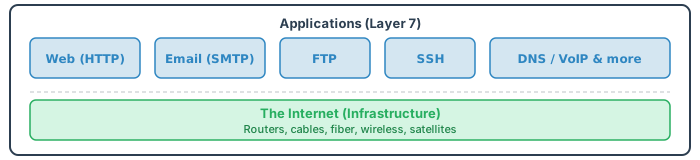
The Internet is a global network of interconnected computer networks — the physical infrastructure of routers, cables, fiber optics, and communication protocols that allow computers to talk to each other. It has existed since the late 1960s (ARPANET).
The Web (World Wide Web) is just one application that runs on top of the Internet. Tim Berners-Lee invented it in 1989 by combining three technologies: HTTP (the protocol), HTML (the content), and URLs (the addresses).
Other applications that run on the Internet:
| Application | Protocol | Purpose |
|---|---|---|
| SMTP / IMAP / POP3 | Sending and receiving messages | |
| File Transfer | FTP / SFTP | Moving files between machines |
| Remote Shell | SSH | Secure command-line access to servers |
| Domain Resolution | DNS | Translating domain names to IP addresses |
| Streaming | RTSP / HLS | Audio/video delivery |
2. The Network Stack: What HTTP Runs On
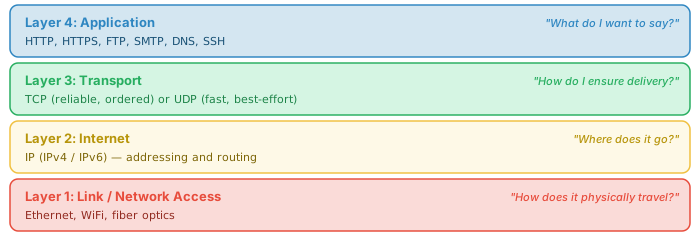
HTTP is an application-layer protocol. It doesn't deal with packets, routing, or reliable delivery — it delegates that to lower layers. Understanding where HTTP sits in the stack helps you debug network issues and understand performance.
The TCP/IP Model (4 Layers)
Key Protocols in the Stack
DNS (Domain Name System) — translates human-readable domain names (example.com) into IP addresses (93.184.216.34). This is the first thing that happens when you type a URL. Without DNS, you'd need to memorize IP addresses.
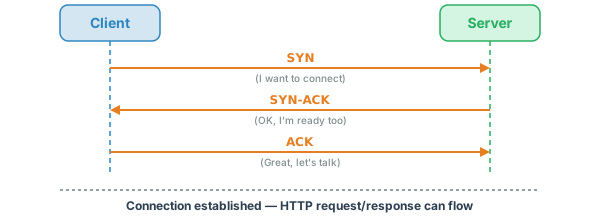
TCP (Transmission Control Protocol) — provides reliable, ordered delivery of data. Before any HTTP data flows, TCP establishes a connection with a three-way handshake:
IP (Internet Protocol) — handles addressing and routing. Every device on the Internet has an IP address. IPv4 addresses look like 192.168.1.1 (32-bit, ~4 billion addresses). IPv6 addresses look like 2001:0db8::1 (128-bit, effectively unlimited).
3. Client-Server Architecture
The client-server model is a fundamental model of the Web. The client initiates a request; the server processes it and sends a response. The server never initiates communication — it only responds.
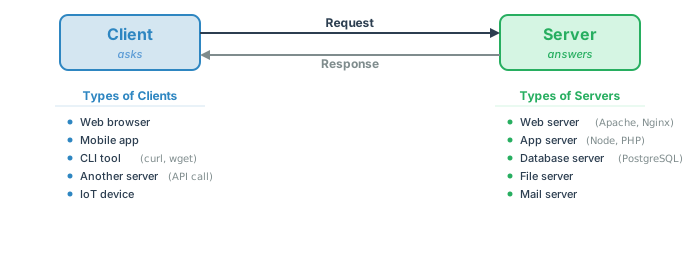
This model has a critical implication: the server is passive. It sits and waits. It generally cannot push data to clients unless a client first establishes a connection. (Technologies like WebSockets upgrade this model, but the initial connection is always client-initiated.)
Why This Matters
- Polling vs Pushing: If the server has new data, it can't tell the client. The client must ask (poll). WebSockets and Server-Sent Events (SSE) are workarounds for this limitation.
- Statelessness: Each request is independent. The server doesn't inherently remember previous requests. State must be managed explicitly (cookies, sessions, databases).
- Scalability: Because the server is stateless, you can put multiple servers behind a load balancer, and any server can handle any request.
4. What Happens When You Type a URL
This is the single most important mental model in the course. When you type a URL and press Enter, approximately 15 things happen in sequence. Understanding this flow connects every topic in this course.
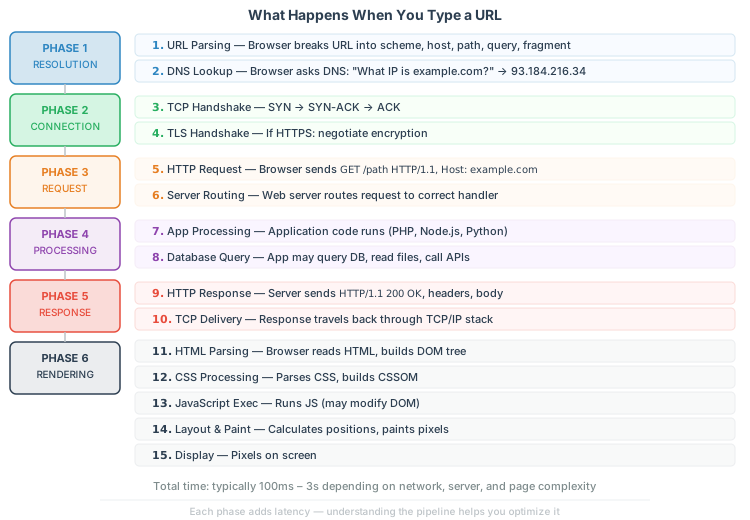
These steps can be grouped into natural phases:
| Phase | Steps | Where It Happens | Course Connection |
|---|---|---|---|
| Resolution | 1–2 | Client + DNS | URL Overview |
| Connection | 3–4 | Client ↔ Server | Section 2 (Network Stack) |
| Request | 5–6 | Client → Server | HTTP Overview |
| Processing | 7–8 | Server | Execution Models |
| Response | 9–10 | Server → Client | HTTP Overview |
| Rendering | 11–15 | Client (Browser) | Section 19 (Architecture Generations) |
5. The Three Protocol Pillars of the Web
Tim Berners-Lee's 1989 invention combined three technologies that, together, create the Web:
| Pillar | What It Does | Analogy | Learn More |
|---|---|---|---|
| HTTP | The protocol — how client and server communicate | The postal system (how mail gets delivered) | HTTP Overview |
| HTML | The content — what gets displayed | The letter itself (the message) | Section 14 below |
| URLs | The addresses — where things are | The mailing address (where to deliver) | URL Overview |
Everything else — CSS, media assets, JavaScript, databases, frameworks, APIs — builds on top of these three. HTML references the included media assets. CSS styles the HTML and media assets. JavaScript adds interactivity. Databases store data. We can go further and add abstractions to hide complexity or frameworks to organize it. But at the core, it's first and foremost HTTP carrying HTML from a URL.
A rush to a result is an obvious short-term gain with a long-term loss. If you skip over foundational details, you likely will pay a price if the software or site lives long enough, generally in maintainability, robustness, performance, or even security. Sadly, such developer rush can even lead to negative user impact.
6. The Web's Resource Model
The three protocol pillars — HTTP, HTML, and URLs — aren't just separate technologies. Together they create a specific model: the web is a system of named, addressable, linked resources. Every URL identifies a resource. HTTP defines the operations you can perform on it. HTML (and other formats) are the representations delivered. Understanding this model is what separates "using the web" from "building for the web."
1 URL = 1 Resource
A resource is any concept worth naming: a document, an image, a user profile, a search result set, a product listing, an API endpoint. The URL is its stable, globally unique address.
This is the web's fundamental unit of organization. Unlike desktop applications (where internal states have no addresses), every meaningful thing on the web can have a URL.
The address is the identity. /products/42 and /products/43 are different resources. /search?q=javascript and /search?q=python are different resources (different result sets).
Addressability — The Web's Superpower
Anything with a URL can be:
- Linked to — another page can point to it
- Bookmarked — a user can save it for later
- Shared — paste the URL in an email, chat, or social media
- Cached — browsers and CDNs store it for faster retrieval
- Indexed — search engines can discover and rank it
| Addressable (has URL) | Non-Addressable (no URL) |
|---|---|
A search results page: /search?q=javascript&page=3 |
A modal dialog that appears on click |
A product detail page: /products/42 |
An in-app state with no URL change |
A filtered view: /catalog?color=red&size=L |
A client-only filter toggle |
When a SPA changes what the user sees without updating the URL, it breaks addressability. The user can't bookmark, share, or navigate back to that state. The History API (pushState, replaceState) exists precisely to fix this — it lets JavaScript update the URL without a page reload, preserving the resource model.
Resources vs Representations
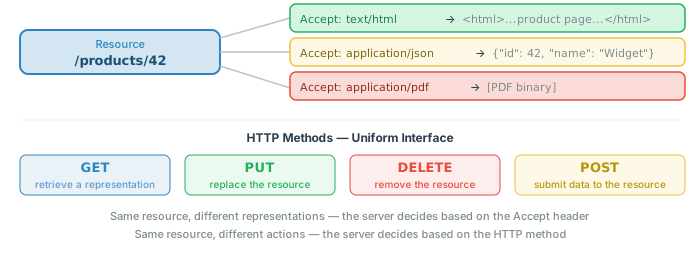
A resource is the concept. A representation is the format delivered. The same resource can have multiple representations:
/users/42→ HTML (browser renders a profile page)/users/42→ JSON (API client gets structured data)/users/42→ PDF (print-friendly version)
The client signals which representation it prefers via the Accept header. The server responds with the appropriate format and declares it via Content-Type. This is content negotiation. This is not limited to encoding; it also applies to the language used, such as English, Spanish, or Chinese. This will be signaled by the Accept-Language header. Given that a single URL could have multiple representations, we may need to employ the HTTP Vary header to distinguish between different cached versions of a URL resource.
Cross-reference: The HTTP Overview covers content negotiation headers; the REST Overview covers how REST APIs formalize this model (resources, representations, uniform interface).
Hypermedia — Links as Navigation
The web isn't just resources — it's linked resources. HTML's <a href="..."> is the fundamental navigation mechanism. A page that links to other pages creates a traversable graph of information.
This is what "HyperText" means — text that links to other text. The web is a hypertext system at scale.
In APIs, the same concept is called HATEOAS (Hypermedia As The Engine Of Application State) — responses contain links to related resources, letting clients navigate the API without hardcoding URLs.
The link is arguably the web's most important invention. Without it, the web would be a collection of isolated documents. With it, the web is a connected graph of knowledge.
7. The Five Pillars of Web Technology
Beyond the three core technologies, the full landscape of web development spans five broad pillars. Understanding where each topic fits helps you see the forest for the trees.
| Pillar | What It Covers | Examples | Course Coverage |
|---|---|---|---|
| Architecture | How systems are structured and how they communicate | Client-server, REST, MVC, microservices, HTTP, TCP/IP | Primary focus |
| Coding | The languages and frameworks used to build applications | PHP, Node.js, Python, SQL, JavaScript, HTML | Primary focus |
| Hosting | Where and how applications are deployed and run | Apache, Nginx, Linux, Docker, cloud (AWS/GCP), DNS | Primary focus |
| Design | How the user interface looks and behaves | CSS, responsive design, UX patterns, accessibility | Mentioned, not deep |
| Content/Visuals | The actual content, media, and visual assets | Images, video, typography, data visualization, copy | Mentioned, not deep |
8. Three Participant Groups
Web technology doesn't exist in a vacuum. Three groups of people (plus a fourth) shape every technology decision:
| Group | Cares About | Common Conflict |
|---|---|---|
| Developers | Clean code, modern tools, developer experience, interesting problems | May over-engineer or choose tools for resume appeal rather than user benefit |
| Owners | Cost, time-to-market, reliability, compliance, ROI | May cut corners, resist upgrades, or choose "safe" legacy technologies |
| Users | Speed, ease of use, accessibility, privacy, getting the task done | Rarely consulted directly; their needs are often assumed rather than measured |
9. Standards Bodies & the Open Web
Every technology in this course — HTTP, HTML, CSS, JavaScript, URLs — is defined by a specification maintained by a standards body. The web is not owned by any single company. It runs on open standards that anyone can implement. Understanding who maintains these standards, and how the process works, explains why the web is the way it is — including why XHTML failed and why "prefer protocols over platforms" is sound engineering advice.
Who Maintains What
| Domain | Standard | Maintained By | How It Works |
|---|---|---|---|
| Transport protocols | HTTP/1.1, HTTP/2, HTTP/3, TLS, TCP, DNS | IETF (Internet Engineering Task Force) | RFCs (Request for Comments) — open, consensus-driven |
| Markup | HTML Living Standard | WHATWG (Web Hypertext Application Technology Working Group) | Continuously updated; browser vendors (Apple, Google, Mozilla, Microsoft) drive it |
| Styling | CSS | W3C (World Wide Web Consortium) | Modular specs (Grid, Flexbox, etc.) at different maturity levels |
| Scripting | ECMAScript (JavaScript) | Ecma International / TC39 | Annual releases (ES2015, ES2016, ... ES2025); proposals go through stages 0–4 |
| Accessibility | WCAG | W3C WAI (Web Accessibility Initiative) | Guidelines (WCAG 2.2) that governments reference in accessibility law |
| Encoding | Unicode / UTF-8 | Unicode Consortium | Character set standard — why <meta charset="UTF-8"> matters |
The IETF defines the plumbing. The WHATWG defines the markup. The W3C defines styling and accessibility. TC39 defines the language. Together they define the platform.
Why Open Standards Matter
- Interoperability — Any browser renders HTML. Any server speaks HTTP. No permission needed.
- No vendor lock-in — You're building on shared protocols, not a proprietary platform. If one vendor disappears, the standards persist.
- Longevity — HTTP from 1991 still works. HTML from 1993 still renders. React from 2015 has already undergone breaking changes. Standards move slowly because they have to — millions of sites depend on them.
- Permissionless innovation — Anyone can build a web server, a browser, or a framework because the standards are public. The web grew fast because no one needed to license it.
The Living Standard Model
HTML used to be versioned: HTML 2.0 (1995), HTML 4.01 (1999), XHTML 1.0 (2000), HTML5 (2014). HTML5 was the last version number. The WHATWG now maintains a "Living Standard" that evolves continuously.
New features are added when at least two browsers implement them. The spec reflects reality rather than dictating it — the opposite of the XHTML approach, which tried to impose XML strictness on a web that didn't want it.
This pragmatism is why XHTML failed: the standard demanded perfection (a single missing closing tag = a broken page), but the web was built on tolerance (browsers guess and recover). The Living Standard embraced that tolerance.
Cross-reference: Section 14 (HTML Fundamentals) discusses browser error tolerance and the HTML vs XHTML strictness spectrum.
Prefer Protocols Over Platforms
A protocol is a shared agreement. A platform is a product. Protocols persist; platforms pivot.
Git over GitHub. HTTP over any particular framework. SQL over any particular ORM. HTML/CSS/JS over any particular component library. OpenTelemetry over any particular monitoring vendor.
When you invest in learning a protocol or standard, that knowledge compounds over decades. When you invest only in a platform, you're on borrowed time — the platform will change, pivot, get acquired, or shut down. Understanding the foundation makes learning any platform built on it far easier.
10. UX vs DX: The Eternal Tension
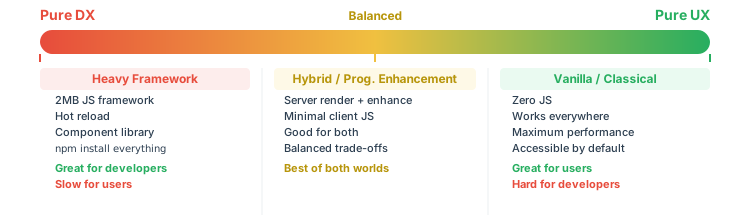
DX (Developer Experience) is what makes the developer's job easier: powerful frameworks, hot module reloading, type systems, component libraries, build tools. UX (User Experience) is what makes the user's experience better: fast page loads, accessibility, working without JavaScript, small download sizes.
These two goals frequently conflict:
| DX Choice | User Impact |
|---|---|
| 2 MB JavaScript bundle for a blog | Slow load, broken without JS, drains mobile battery |
| Client-side rendering for static content | Blank page until JS loads, poor SEO, fails on slow networks |
| Heavy build pipeline (webpack, babel, etc.) | No direct impact, but complexity breeds bugs |
| CSS-in-JS libraries | Larger bundle, slower rendering, flash of unstyled content |
11. Client-Server Trade-offs
One of the most important architectural decisions in web development is where logic runs: on the client (browser) or on the server. This is the "thick client vs thin client" spectrum.
| Aspect | Thick Client (More in Browser) | Thin Client (More on Server) |
|---|---|---|
| Examples | React SPA, Gmail, Google Docs | Wikipedia, Craigslist, traditional forms |
| Initial load | Slow (large JS bundle must download and execute) | Fast (server sends ready-to-render HTML) |
| Navigation | Fast after load (no page reloads) | Each page requires a server round-trip |
| Works without JS | No — blank page without JavaScript | Yes — HTML works in any browser |
| SEO | Difficult (content generated by JS) | Easy (content in HTML from server) |
| Server cost | Lower (client does rendering) | Higher (server renders every page) |
| Security | Business logic exposed in client JS | Business logic stays on server |
| Complexity | High (state management, routing, build tools) | Low (request → process → respond) |
The Security Boundary
The most important line in web architecture is the trust boundary between client and server:
- The client is untrusted. Users can modify any HTML, CSS, or JavaScript. Browser DevTools make this trivial.
- The network is volatile and hostile. Delivery conditions change like the weather, and without HTTPS, anyone can read or modify data in transit.
- The server is where we have control and where truth lives. All validation, authorization, and business logic must run on the server if we are to trust it.
Where to validate: Always on the server. Optionally also on the client for UX (instant feedback for usability), but never only on the client. Simply put, we validate on the client for usability and the server for actual security.
- Request/Response Line
- Headers
- Payload (Data)
See the HTTP Overview for the full breakdown.
12. The Layered Model: Content, Structure, Presentation, Interactivity
The web medium can be understood as four stacked layers, each building on the one below. This model applies to both sides of the client-server divide, and it helps you reason about where a technology fits and what depends on what.
The Four Layers
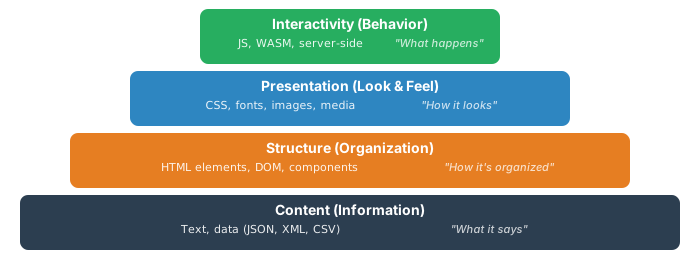
Each layer depends on the one below. Interactivity manipulates structure. Presentation styles structure. Structure organizes content. Remove any layer and the ones above lose their foundation.
Drilling Down Each Layer
Content: Ranges from structured (JSON, XML, CSV) through semi-structured (HTML, Markdown) to unstructured (plain text). This is the raw information — the reason the page exists.
Structure: Ranges from individual HTML elements → components (web components, ad hoc) → page-level views → navigation/flow → full site/app architecture. URLs, routes, and endpoints define the structural addressing.
Presentation: CSS (including preprocessors and CSS-in-JS), fonts (local and custom/web fonts), images (raster: GIF/PNG/JPEG/WebP/AVIF; vector: SVG), and other media (audio, video, VR/AR — downloaded or streamed).
Interactivity: Client-side (JavaScript, libraries, frameworks, WASM binaries) and server-side (PHP, Java, Node.js, Python, C#, etc.). This is where the code lives.
Why the Layers Matter
The layers reveal dependencies. If you break the structure layer, presentation and interactivity fail. If you build interactivity without solid content and structure beneath it, you're building on sand.
The layers also map to the progressive enhancement philosophy (Section 18): start with content, add structure, layer on presentation, enhance with interactivity.
:hover, transitions, animations). HTML has some built-in interactivity (<details>, <dialog>). But the mental model of layered dependencies helps you reason about what breaks when a layer is missing or fails.
13. Sites vs. Apps: Choosing the Right Mental Model
Not everything on the web is the same kind of thing. A blog, a documentation site, and a corporate homepage are fundamentally different from Gmail, Google Docs, or a stock trading dashboard. The distinction between sites and apps — and the vast spectrum between them — is one of the most important framing decisions in web development, because it determines which architectural approach is appropriate.
The Spectrum
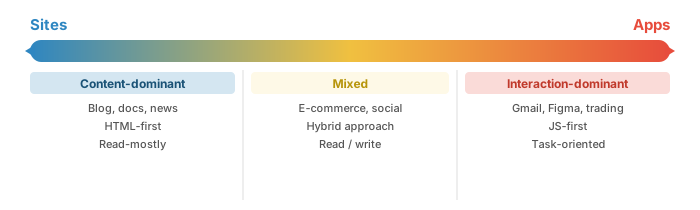
- If something is mostly non-interactive content, it's probably a site. Don't use heavy programming to manage it unless at scale — you're likely overcomplicating it and may introduce adverse side-effects (performance, SEO, accessibility).
- If something is task or interaction-based, it's likely an app. Bending traditional web tech for app-like behavior can be problematic, though it's tried and true.
- The degree of site-ness and app-ness is not absolute. Apps can have site-like features. Sites can have interactive elements. Even video games often embed web tech (HTML, CSS) for UI elements.
Why This Matters for Architecture
| Characteristic | Site-like | App-like |
|---|---|---|
| Primary content | Documents, articles, media | Interactive features, real-time data |
| Navigation model | Page-to-page (1 URL = 1 page) | State-based (views within a shell) |
| JavaScript role | Enhancement (optional) | Essential (app won't work without it) |
| Rendering approach | Server-side / static | Client-side / hybrid |
| SEO importance | High | Often low (behind auth) |
| Caching strategy | Aggressive (content rarely changes) | Complex (real-time data) |
Static vs. Dynamic — A Common Trap
A "dynamic" site is one where the server composes responses on the fly, usually by binding data into templates (the MVC pattern). This appeals to developers, but is it always the right idea?
A "static" dynamic site — a database-driven site that delivers the same content to every visitor — is needless complexity with poor performance. The solution: caching, static site generation (SSG), or publishing patterns.
The JAMstack movement and static site generators (11ty, Hugo, Astro) are a recognition that many "dynamic" sites were never truly dynamic. Site approaches need to fit their purpose.
14. HTML Fundamentals and Browser Forgiveness
HTML (HyperText Markup Language) is the content layer of the Web. It defines the structure and meaning of web content. Here's the minimal correct HTML document:
<!DOCTYPE html>
<html lang="en">
<head>
    <meta charset="UTF-8">
    <meta name="viewport" content="width=device-width, initial-scale=1.0">
    <title>Page Title</title>
</head>
<body>
    <h1>Hello, World!</h1>
    <p>This is a valid HTML5 document.</p>
</body>
</html>
Live demo: /basics/hellohtml5.html — A simple HTML5 page with headings, paragraphs, and an image.
HTML vs. XHTML: The Strictness Spectrum
In the early 2000s, the W3C tried to make HTML stricter by reformulating it as XML (XHTML). The key differences:
| Feature | HTML5 | XHTML |
|---|---|---|
| Tag case | <DIV> and <div> are the same |
Must be lowercase: <div> |
| Closing tags | <br>, <img ...> (optional close) |
Must self-close: <br />, <img ... /> |
| Attributes | checked, disabled (boolean OK) |
Must have values: checked="checked" |
| Error handling | Browser guesses and recovers | Parser stops on first error (yellow screen of death) |
Live demos:
- /basics/helloxhtml5.html — XHTML served as HTML (browser is forgiving)
- /basics/helloxhtml5.xml — XHTML served as XML (browser enforces strict parsing)
Browser Error Tolerance
One of the most remarkable features of HTML is browser forgiveness. Browsers will render almost anything, no matter how malformed:
Live demo: /basics/malformedhtml.html — Missing tags, mismatched case, unclosed elements, non-standard tags — the browser still renders it.
It is my view that under an AI world, employing strict XML-flavored markup (HTML with XML parsing) may provide some safety checks. This is still to be determined, but circa-2026, it seems promising that, like semantic markup, very strict markup may be making a comeback.
15. Forms: How Data Gets to the Server
HTML forms are the original mechanism for sending data from the client to the server. Before fetch(), before XMLHttpRequest, before any JavaScript at all — forms were the only way users could send data. Be careful here this is more about their foundational nature as opposed to be someone how out of date.
GET Forms: Data in the URL
When a form uses method="GET", the form data is appended to the URL as query parameters:
<form action="/search" method="GET">
    <input type="text" name="q" value="javascript">
    <button type="submit">Search</button>
</form>

<!-- Submitting navigates to: /search?q=javascript -->
Live demo: /basics/formget.html — A form that submits data as query parameters.
POST Forms: Data in the Body
When a form uses method="POST", the form data is sent in the HTTP request body, not the URL:
<form action="/signup" method="POST">
    <input type="text" name="firstName">
    <input type="text" name="lastName">
    <select name="size">
        <option value="small">Small</option>
        <option value="medium">Medium</option>
        <option value="large">Large</option>
    </select>
    <button type="submit">Submit</button>
</form>
Live demo: /basics/formpost.html — A form that submits data in the request body.
Common Form Controls
| Control | HTML | Purpose |
|---|---|---|
| Text input | <input type="text"> |
Single-line text entry |
| Password | <input type="password"> |
Masked text entry (but still plaintext in the request!) |
| Hidden | <input type="hidden"> |
Data sent with form but not displayed (but visible in source!) |
| Dropdown | <select> |
Choose from predefined options |
| Textarea | <textarea> |
Multi-line text entry |
| Checkbox | <input type="checkbox"> |
Boolean toggle (only sent when checked) |
fetch(), forms were the only way to send data to a server. They still work without JavaScript — which is why progressive enhancement starts with forms. The HTTP Overview covers the encoding formats (application/x-www-form-urlencoded, multipart/form-data, JSON) that forms and APIs use.
16. Client-Side Security Is an Illusion
This section demonstrates that every client-side "security" measure is trivially bypassable. Open your browser's DevTools (F12) and try it yourself.
Password Fields in GET Requests
A password field (<input type="password">) hides the characters on screen, but if the form uses GET, the password appears in plain text in:
- The URL bar
- Browser history
- Server access logs
- The HTTP
Refererheader when you navigate away
Hidden Fields Are Not Hidden
The <input type="hidden"> element is invisible on the page, but:
- Visible in "View Source"
- Visible and editable in DevTools
- Sent in the HTTP request like any other field
Client-Side Restrictions Are Decorative
maxlength="5", readonly, disabled — all trivially removed via DevTools. These attributes are UX conveniences, not security measures.
Live demo: /basics/formsecurity.html — A form with password fields, hidden fields, maxlength, and readonly. Open DevTools and try modifying everything.
Data Collection Zones
Data on the web exists in four zones, each with different security properties:
| Zone | Who Controls It | Security Level |
|---|---|---|
| Client (browser) | The user (and any extensions/scripts) | Zero trust — user can modify anything |
| Transit (network) | ISPs, routers, proxies | HTTPS encrypts; HTTP is plaintext |
| Server | You (the developer/operator) | Trusted — this is where validation lives |
| Third-party (external scripts, CDNs) | Someone else | You're trusting their code in your page |
Client-Side Storage Is Readable by Any Script
localStorage and sessionStorage let you store data in the browser, but any JavaScript on the page — including third-party scripts — can read it all:
Live demos:
- /basics/storage1.html — Save a "secret message" to localStorage or sessionStorage
- /basics/storage2.html — Navigate here and see your secret is still accessible. Notice the "harmless" third-party script that reads everything.
The "Harmless" Third-Party Script
The storage2.html page includes an external JavaScript file. That script iterates through all localStorage and sessionStorage keys, collects every value, and logs them. In a real attack, it would fetch() them to a remote server. This is how third-party scripts exfiltrate data — and you invited them onto your page.
17. Server-Side & Client-Side Execution Models
When code runs on the server or the client, it runs within a specific execution model. These models have evolved over decades, each with distinct trade-offs in portability, performance, and complexity. Understanding them helps you see why Node.js exists, why PHP works the way it does, and why the browser is effectively an operating system for web applications.
Server-Side Models
| Model | Examples | Portability | Performance | Complexity |
|---|---|---|---|---|
| Fork/Exec (CGI) | CGI scripts, early PHP*, Python (WSGI)*, Ruby (Rack)* | Variable | Variable (Low–Medium) | Variable (Medium–High) |
| Server-Side Scripting | PHP, ColdFusion, Classic ASP, JSP*, Python*, Ruby* | High | Medium | Low |
| Embedded Container | Java Servlets | Medium | Medium–High | Medium–High |
| Embedded Native | Apache Modules, ISAPI | Low | High | High |
| Code-as-Server | Node.js, Python, Perl, Deno, Bun | High | Medium–High | Medium–High |
* Depends on language and architecture
- Fork/Exec (CGI): The server spawns a new process for each request. Simple but expensive — every request pays the process creation cost. The original model.
- Server-Side Scripting: Code is embedded in or invoked by the web server process. PHP's model — the server loads the interpreter once and runs scripts within it. Fast enough, easy to deploy.
- Embedded Container: A runtime (like Java's servlet container) lives inside the server. More complex setup, but the application stays loaded in memory across requests.
- Embedded Native: Code compiled directly into the web server as a module (Apache modules, ISAPI filters). Maximum performance, minimum portability. C/C++ territory.
- Code-as-Server: The application is the server. Node.js is the canonical example — your JavaScript code creates an HTTP server directly. High flexibility, but you own the entire server lifecycle.
Client-Side Models
| Model | Examples | Portability | Performance | Complexity |
|---|---|---|---|---|
| Helpers | External apps for MIME types (Acrobat, Winzip) | Variable | Variable | Variable |
| Client-Side Scripting | JavaScript, VBScript (dead), WASM | High | Medium–High | Low–Medium |
| Applets | Java Applets (dead) | Medium | Medium–High | Medium–High |
| Plug-ins | ActiveX, Netscape Plugins, NaCl (all dead) | Low | High | High |
| Native Wrapping Web View | Electron apps | High | Variable | Medium–High |
| Native Code Calling Web | Swift/Java using HTTP + web tech | Low | High | High |
The history here is a graveyard: Java Applets, ActiveX, Flash, NaCl — all attempted to extend the browser's capability and all died. Client-side scripting (JavaScript) won, and WASM is extending its reach into high-performance territory.
The "native wrapping web view" pattern (Electron, Capacitor, etc.) is today's compromise: write web tech, wrap it in a native shell. It's the app shell pattern. The web view / native app spectrum ranges from fully native apps to thin web wrappers — the real distribution issue between web and native is more economic than technical.
.php file in a directory and it works). Node.js uses code-as-server (you write the HTTP listener yourself). Java uses embedded containers (you deploy into Tomcat/Jetty). The model shapes the developer experience.
18. Progressive Enhancement & Graceful Degradation
Two competing philosophies have shaped how web developers approach building for an unpredictable medium. They represent different starting points — and the choice between them often reveals whether you're building a site or an app.
Progressive Enhancement — Build Up from the Base
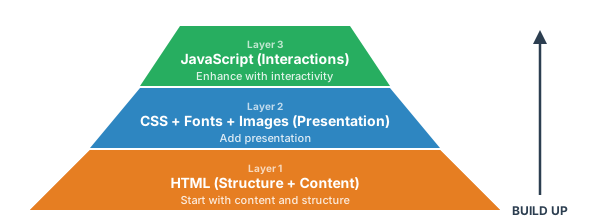
- Start with HTML that works on its own. Add CSS for presentation. Add JavaScript for enhanced interactivity. Each layer is optional — the page works at every level.
- This is the natural fit for sites (Section 13): content is king, and technology should serve it. If CSS fails to load, you still have readable content. If JavaScript fails, you still have a functional page.
- The 1 URL = 1 resource pattern (Section 6) is preserved at every layer.
Graceful Degradation — Build Full, Then Handle Failure
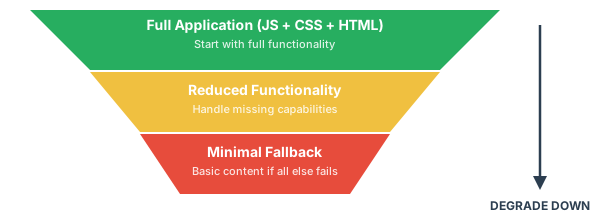
- Start with the full experience, then handle degradation when capabilities are missing. Inform the user about reduced functionality and provide alternatives where possible.
- This is the natural fit for apps (Section 13): the application requires JavaScript and specific APIs to function. The goal is to fail gracefully when those requirements aren't met, not to provide a fully functional alternative.
The Tension Between Them
- Both philosophies appear in every execution. Code, markup, and style exist in every web page. You can loosely couple them, but a full decoupling is impossible.
- The practitioner's comfort level often drives the choice: markup-first developers lean toward progressive enhancement; code-first developers lean toward graceful degradation.
- The right approach depends on: the volume of each layer, the type of problem (site vs. app), and the practitioners involved.
19. Web Architecture Generations
The biggest architectural decision in web development: who builds the HTML that the user sees?
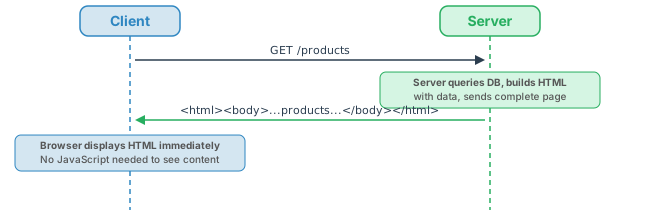
Server-Side Rendering (SSR)
The server generates complete HTML for every request. The browser receives a finished page and just displays it.
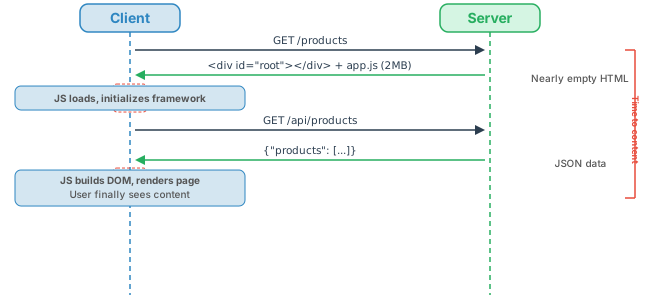
Client-Side Rendering (CSR)
The server sends a minimal HTML shell plus a large JavaScript bundle. The JavaScript fetches data via API and builds the page in the browser.
Hybrid / Progressive Enhancement
The server renders working HTML. JavaScript enhances the experience for browsers that support it. The page works without JS but is better with it.
| Aspect | SSR | CSR | Hybrid |
|---|---|---|---|
| First page load | Fast (HTML ready) | Slow (JS must load + execute + fetch) | Fast (HTML ready, JS enhances) |
| Subsequent navigation | Slow (full page reload) | Fast (client-side routing) | Can be fast (progressive loading) |
| SEO | Excellent | Poor (without SSR pre-rendering) | Excellent |
| Works without JS | Yes | No | Yes (degraded gracefully) |
| Server load | Higher (renders every page) | Lower (serves static files + API) | Moderate |
| Complexity | Low | High (state management, routing, build) | Very High |
The Generational Evolution
Web architecture hasn't evolved in a straight line — it has moved through distinct generations, each solving the problems of the previous one while creating new trade-offs. Critically, all generations remain legitimate. The right choice depends on the problem, not the calendar.
| Generation | Era | Approach | Characteristics |
|---|---|---|---|
| Gen 1: Server-Side Focused | ~1993–1999 | Thin client, server renders everything | 1 URL = 1 page. Simple, but every interaction required a full page reload. |
| Gen 1.5: Enhanced Client | ~1997–2004 | Server-side + progressive enhancement | Client-side form validation, DHTML effects. Server still controls flow. |
| Gen 2: Ajax | ~2005–2012 | XMLHttpRequest, in-place updates | Broke 1 URL = 1 resource (hashbang URLs, then History API fixed it). Gmail, Google Maps as pioneers. |
| Gen 3: Native Apps | ~2008–present | iOS/Android, app store distribution | Web views as hybrid compromise. Native performance, but platform lock-in and distribution friction. |
| Gen 4: PWAs | ~2015–present | Offline-first, service workers | Speed of native + web distribution. Install without app stores. Still maturing. |
| Current: SSR + Hydration | ~2018–present | Send static snapshot fast, then hydrate with JS | Best of SSR and CSR. Frameworks like Next.js, Nuxt, Astro. Complexity is the cost. |
Form Follows Function
The appropriate architectural approach reveals itself from the problem, not from trends. The decision process:
- Is this a site or an app? (Section 13) — Content-dominant or interaction-dominant?
- What degree of dynamism does it need? — Static content? Real-time data? User-generated content?
- What's the context? — Audience, constraints, team capabilities, business requirements.
To believe that only the latest generation is valid is to be too wrapped up with form and not function. A static HTML site is the right answer for many problems. A full SPA with SSR and hydration is the right answer for others. The wrong choice in either direction — over-engineering a brochure site or under-engineering a complex app — creates unnecessary pain.
Maturity-Safety Matrix
When evaluating technologies, consider two axes:
- Maturity: How long has it been used in production? How stable is the API? How large is the community?
- Safety: What's the blast radius if it fails? How well understood are the security implications?
Mature, safe technologies (HTML, CSS, server-rendered pages) are boring but reliable. Immature, risky technologies (the latest JS framework) are exciting but may not survive. For production systems, especially those meant to be long-lived, a boring, mature, and stable solution is critical.
20. The Volume Problem: Mastery vs. Understanding
By this point in the overview, you've encountered dozens of technologies, models, and trade-offs. The web medium is vast — and it's still growing. The natural reaction is to try to master everything. This is a mistake. The better strategy is to understand how everything fits together.
The "Toolbox Overflow" Reality
Consider what's in the modern web toolbox: HTML, CSS, images, fonts, multimedia, binaries, DOM, Fetch, Canvas, APIs, ServiceWorker, JavaScript (ES5, ES6, TypeScript), jQuery, React, Vue, Electron, Apache, SQL, NoSQL, "BigData," REST, GraphQL, Ajax, SPA, PWA, MVC, MVVM, CRUD, "Cloud" (SaaS, PaaS, IaaS), serverless, microservices, SSR... and this isn't even complete.
Each technology interacts with others. The interactions — the joints between technologies — are where trouble tends to happen. HTML + CSS is well-understood. CSS + JavaScript is more fragile. JavaScript + HTTP + server-side framework + database + caching layer + CDN = a complex system where failures emerge from the connections, not the individual parts.
The Medium in Context
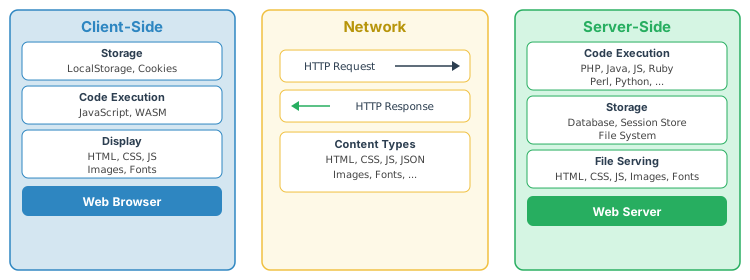
Some things only make sense on one side (localStorage is client-only; database queries are server-only). Some are fluid and work on both sides (JavaScript, rendering, state management). There is a lot.
Understanding Over Mastery
Mastering every technology in the web stack is impossible. The stack is too wide, changes too fast, and the combinatorial explosion of interactions makes deep expertise in all of it unrealistic.
The better strategy: understand everything at a conceptual level and go deep where your work demands it. Know what HTTP does even if you don't memorize every status code. Know what a database index is even if you're not a DBA. Know what CSS Grid does even if you don't write CSS daily.
This is why this foundations page exists: the mental models here let you quickly orient yourself when you encounter a new technology. You know where it fits in the stack, what it depends on, and what trade-offs it represents.
21. Summary
| Concept | Key Takeaway |
|---|---|
| Internet vs Web | The Internet is infrastructure (cables, routers, protocols). The Web is one application on it (HTTP + HTML + URLs). Email, FTP, SSH are other Internet applications. |
| Network Stack | HTTP sits at the application layer, above TCP (reliable delivery), IP (routing), and physical links. DNS translates domain names to IP addresses. |
| Client-Server | Client asks, server answers. The server never initiates. Each request is independent (stateless). This model enables scalability. |
| Typing a URL | ~15 steps from URL parsing to pixels on screen: DNS, TCP, TLS, HTTP request, server processing, HTTP response, HTML parsing, CSS, JS, rendering. |
| The Original Three Web Protocols | HTTP (protocol), HTML (content), URLs (addresses) — everything else builds on these three. |
| The Resource Model | 1 URL = 1 resource. Addressability (bookmark, share, cache, index) is the web's superpower. Resources have multiple representations. Links connect them into a navigable graph. |
| Five Pillars | Architecture, Coding, Hosting (this course), plus Design and Content/Visuals (CSE 134B). |
| Participant Groups | Developers, Business/IT, Users all shape technology decisions with different priorities. Organizational influences also matter especially governmental ones. |
| Standards & the Open Web | IETF, WHATWG, W3C, TC39 maintain the open standards the web runs on. Protocols persist; platforms pivot. The Living Standard model reflects reality rather than dictating it. |
| UX vs DX | Developer convenience and user experience often conflict. When they do, UX should win. Users didn't choose your framework. |
| Client-Server Trade-offs | The client is fast, but dangerous while the server is safe, but slow because of network constraints. These are fundamental medium characteristics that must be respected. |
| The Layered Model | Content → Structure → Presentation → Interactivity. Each layer depends on the one below. This model reveals dependencies and maps to progressive enhancement. |
| Sites vs. Apps | Content-dominant sites and interaction-dominant apps need different architectures. The degree of site-ness vs. app-ness drives the right technical choice. Static dynamic sites are needless complexity. |
| HTML Fundamentals | HTML is generally forgiving but under XHTML can be strict. Browsers generally recover from errors gracefully. This tolerance is why the Web grew so fast, but it is also one of its weaknesses. |
| Forms | GET puts data in the URL; POST puts data in the body. Forms work without JavaScript. Start there and progressively enhance the experience. |
| Client-Side Security | It simply doesn't exist. Hidden fields, maxlength, readonly, password masking — all trivially bypassable. Never trust the client. Validate everything on the server. |
| Execution Models | Server-side: CGI, scripting, containers, native modules, code-as-server. Client-side: helpers, scripting (JS won), applets/plugins (all dead), native wrappers. The model shapes the developer experience. |
| Progressive Enhancement & Graceful Degradation | Build up from HTML (enhancement) or build full and handle failure (degradation). Sites favor enhancement; apps favor degradation. The choice reveals your assumptions about users. |
| Web Architecture Generations | SSR (server builds HTML), CSR (JS builds HTML), Hybrid (server + progressive enhancement). From Gen 1 server-side through Ajax, native apps, and PWAs to SSR + Hydration. All generations remain legitimate — form follows function. |
| Mastery vs. Understanding | The web toolbox is too vast to master. The joints between technologies are where trouble happens. Understand how everything fits together; go deep only where your work demands it. |