HTTP Connections & Real-Time Communication
When the Server Needs to Talk Back
HTTP is a request-response protocol. The client asks, the server answers. But what happens when the server has new data and the client hasn't asked? The server has no way to reach the client — it must sit and wait.
The State Management Overview covers how HTTP forgets (statelessness). This page covers the other half of the problem: HTTP can't initiate (connectionlessness). The server cannot push data to a client that isn't actively asking for it.
Every technique on this page — polling, long polling, Server-Sent Events, WebSockets — is a workaround for this single architectural constraint.
1. The Request-Response Constraint
HTTP's fundamental design is simple: the client sends a request, the server sends a response, and that's it. The server has no channel back to the client. It cannot say "hey, something changed" — it must wait until the client asks.
This was perfectly fine for HTTP's original purpose: fetching documents. A user clicks a link, the browser requests a page, the server returns it. There's no need for the server to reach out because the user drives every interaction.
But modern web applications aren't document viewers. They're chat apps, dashboards, collaborative editors, and live feeds. In these applications, the server frequently has new data that the client doesn't know about.
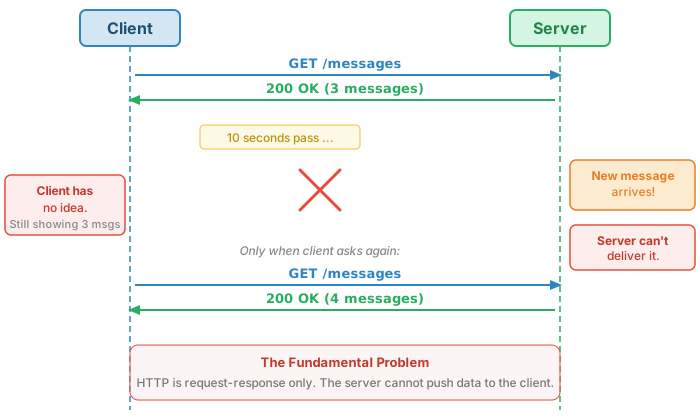
Think of it like postal mail vs. a telephone. A telephone is a persistent, bidirectional connection — either side can speak at any time. HTTP is like postal mail: you send a letter (request), wait for a reply (response), and the post office has no way to deliver a letter you didn't ask for.
2. When You Need More Than Request-Response
Request-response works fine when the user drives every interaction. It breaks down when the server has time-sensitive data that the client needs now.
| Scenario | Why Request-Response Fails | What's Needed |
|---|---|---|
| Chat / messaging | Messages arrive at server from other users; your client doesn't know | Instant delivery of incoming messages |
| Live scores / tickers | Scores change continuously; client shows stale data | Continuous stream of updates |
| Notifications | Server-side events (new email, friend request) happen unpredictably | Push when event occurs |
| Collaborative editing | Multiple users change the same document simultaneously | Bidirectional, real-time sync |
| Progress indicators | Server-side task running (file conversion, deploy); client wants updates | Server pushes progress events |
| Multiplayer games | Other players' actions must appear immediately | Low-latency bidirectional communication |
| IoT / dashboards | Sensor data streams in continuously | Continuous data feed |
| Financial trading | Sub-second price changes; stale data costs money | Lowest possible latency updates |
The common thread: the server knows something the client doesn't, and waiting for the client to ask introduces unacceptable delay.
3. Polling
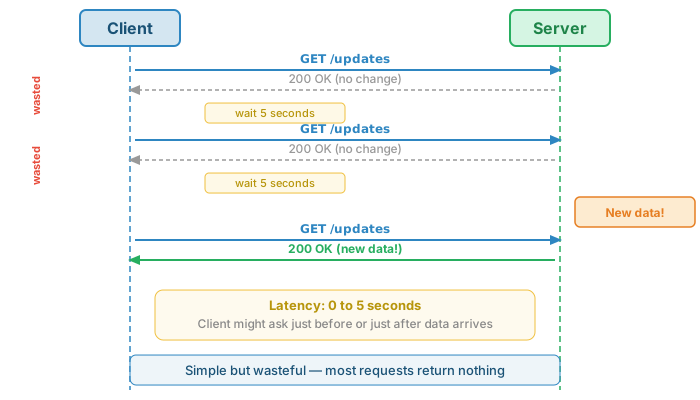
The simplest workaround: have the client ask repeatedly on a timer. If the server has new data, great. If not, it responds with "no change" and the client asks again later.
// Client-side polling with setInterval + fetch
async function pollForUpdates() {
    try {
        const response = await fetch('/api/updates?since=' + lastTimestamp);
        const data = await response.json();
        if (data.updates.length > 0) {
            renderUpdates(data.updates);
            lastTimestamp = data.timestamp;
        }
    } catch (err) {
        console.error('Poll failed:', err);
    }
}

// Poll every 5 seconds
let lastTimestamp = Date.now();
setInterval(pollForUpdates, 5000);
Tradeoffs
- Latency: 0 to N seconds (average N/2). If you poll every 5 seconds, updates appear 2.5 seconds late on average.
- Wasted requests: Most responses return "no change." The server does work for nothing.
- Server load scales linearly: 1,000 users polling every 2 seconds = 500 requests/second, regardless of whether anything changed.
- Simple to implement: Works everywhere. No special server support. Just
setIntervalandfetch.
When polling is fine: Dashboards refreshing every 30–60 seconds, status checks for long-running jobs, low-user-count internal tools, or any scenario where a few seconds of staleness is acceptable.
4. Long Polling
Long polling inverts the approach: instead of the server responding immediately with "no change," it holds the connection open until it has something to say (or a timeout expires). The client gets near-instant notification when events occur.
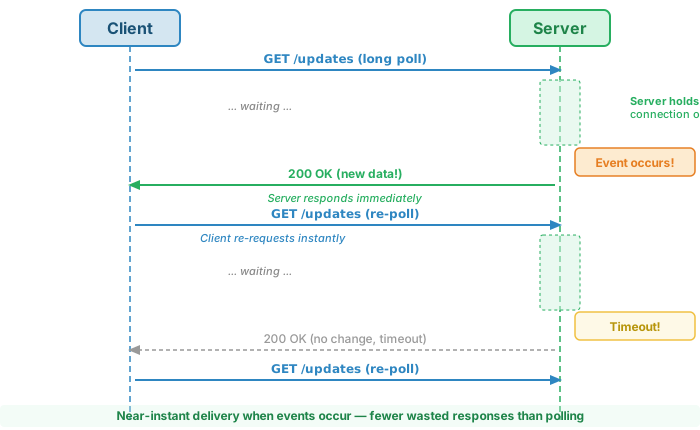
The key difference from regular polling: when an event occurs, the client learns about it almost immediately because the server is already holding an open connection waiting to respond. There are fewer wasted "no change" responses because the server only responds when it has data (or on timeout).
// Client-side long polling with recursive async function
async function longPoll() {
    try {
        const response = await fetch('/api/updates?since=' + lastTimestamp, {
            // Server will hold this for up to 30 seconds
            signal: AbortSignal.timeout(35000)
        });
        const data = await response.json();
        if (data.updates.length > 0) {
            renderUpdates(data.updates);
            lastTimestamp = data.timestamp;
        }
    } catch (err) {
        // Wait a bit before retrying on error
        await new Promise(resolve => setTimeout(resolve, 2000));
    }
    // Immediately re-poll
    longPoll();
}

longPoll(); // Start the loop
// Server-side concept (pseudocode)
app.get('/api/updates', async (req, res) => {
    const since = req.query.since;
    const timeout = 30000; // 30 seconds

    // Check immediately
    let updates = await getUpdatesSince(since);
    if (updates.length > 0) {
        return res.json({ updates, timestamp: Date.now() });
    }

    // Wait for new data or timeout
    const result = await waitForUpdatesOrTimeout(since, timeout);
    res.json(result);
});
Long polling is still just HTTP — it works through firewalls, proxies, and load balancers with no special configuration. Each request is a normal HTTP request; the only difference is the server takes longer to respond.
Limitations
- Each waiting client holds a server connection open. With 10,000 connected users, the server maintains 10,000 open connections.
- Proxy timeouts: Many proxies and load balancers terminate connections after 60–120 seconds. The server must respond before that.
- Thundering herd: If a popular event occurs, all clients receive responses simultaneously and all re-request at once, creating a traffic spike.
Historical note: Long polling powered early AJAX chat applications, the "Comet" pattern, and Facebook's original chat system (circa 2008). It was the dominant real-time technique before Server-Sent Events and WebSockets gained browser support.
5. Server-Sent Events (SSE)
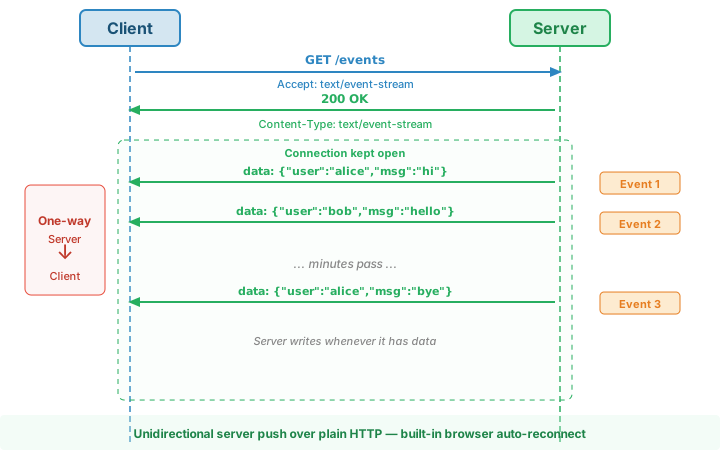
Server-Sent Events is a standardized HTTP streaming protocol: the server pushes events over a single long-lived HTTP connection. Unlike polling and long polling, SSE is a formal standard with built-in browser support via the EventSource API.
The key insight: SSE is just HTTP with Content-Type: text/event-stream and the connection held open. The server writes events to the response body one at a time, and the browser reads them as they arrive. The response never "finishes."
SSE is unidirectional: server → client only. The client still uses regular HTTP requests (via fetch) to send data to the server.
Browser API: EventSource
// Client: EventSource — built-in, no library needed
const source = new EventSource('/api/events');

source.onmessage = (event) => {
    const data = JSON.parse(event.data);
    renderMessage(data);
};

// Listen for named event types
source.addEventListener('notification', (event) => {
    showNotification(JSON.parse(event.data));
});

source.onerror = (err) => {
    console.error('SSE connection error:', err);
    // Browser automatically reconnects!
};
// Server: Node.js Express SSE endpoint
app.get('/api/events', (req, res) => {
    // Set SSE headers
    res.writeHead(200, {
        'Content-Type': 'text/event-stream',
        'Cache-Control': 'no-cache',
        'Connection': 'keep-alive'
    });

    // Send an event whenever data changes
    const onNewMessage = (msg) => {
        res.write(`data: ${JSON.stringify(msg)}\n\n`);
    };

    // Subscribe to data changes
    messageEmitter.on('message', onNewMessage);

    // Clean up when client disconnects
    req.on('close', () => {
        messageEmitter.off('message', onNewMessage);
    });
});
SSE Message Format
SSE messages are plain text with a simple line-based format:
| Field | Purpose | Example |
|---|---|---|
data: |
The event payload (can span multiple lines) | data: {"score": 42} |
event: |
Named event type (triggers specific listeners) | event: notification |
id: |
Event ID for reconnection (browser sends Last-Event-ID) |
id: 1001 |
retry: |
Reconnection interval in milliseconds | retry: 5000 |
Built-in reconnection: If the connection drops, the browser automatically reconnects and sends the Last-Event-ID header. The server can use this to resume from where it left off. No reconnection logic needed on the client.
EventSource API handles reconnection automatically, including resuming from the last event ID. For server-to-client push, SSE is often all you need.
6. WebSockets
WebSockets are a separate protocol that starts as an HTTP request and then upgrades to a full-duplex, bidirectional communication channel. After the handshake, it is no longer HTTP — it's a different protocol with different framing and semantics.
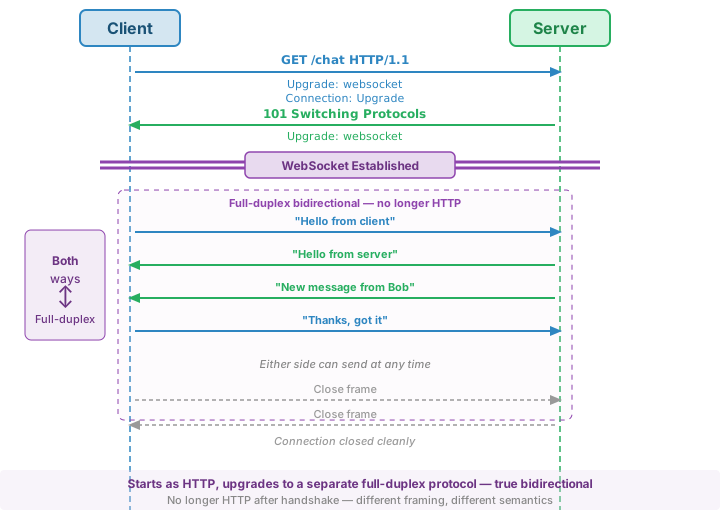
After the 101 Switching Protocols response, the connection is no longer HTTP. Data flows as WebSocket frames — lightweight binary envelopes that carry text or binary payloads in either direction.
// Client: WebSocket API — built-in, no library needed
const ws = new WebSocket('wss://example.com/chat');

ws.onopen = () => {
    console.log('Connected');
    ws.send(JSON.stringify({ type: 'join', room: 'general' }));
};

ws.onmessage = (event) => {
    const msg = JSON.parse(event.data);
    renderMessage(msg);
};

ws.onclose = (event) => {
    console.log('Disconnected:', event.code, event.reason);
    // Reconnect logic goes here
};

ws.onerror = (err) => {
    console.error('WebSocket error:', err);
};
// Server: Node.js with 'ws' library
const WebSocket = require('ws');
const wss = new WebSocket.Server({ port: 8080 });

const clients = new Set();

wss.on('connection', (ws) => {
    clients.add(ws);

    ws.on('message', (data) => {
        const msg = JSON.parse(data);
        // Broadcast to all other clients
        for (const client of clients) {
            if (client !== ws && client.readyState === WebSocket.OPEN) {
                client.send(JSON.stringify(msg));
            }
        }
    });

    ws.on('close', () => {
        clients.delete(ws);
    });
});
WebSocket Frame Types
- Text frames: UTF-8 text data (most common — usually JSON)
- Binary frames: Raw binary data (images, audio, protocol buffers)
- Ping/Pong: Keepalive mechanism. One side sends a ping; the other responds with a pong. Keeps the connection alive through NATs and firewalls.
- Close: Graceful shutdown. Either side can initiate.
When WebSockets shine: Chat applications, multiplayer games, collaborative editing (Google Docs), live trading platforms — anywhere both sides send data frequently and unpredictably.
Cross-reference: The HTTP Overview covers status code 101 Switching Protocols. The URL Overview covers the wss:// scheme.
7. Choosing the Right Approach
| Aspect | Polling | Long Polling | SSE | WebSockets |
|---|---|---|---|---|
| Direction | Client → Server | Client → Server | Server → Client | Bidirectional |
| Protocol | HTTP | HTTP | HTTP | WebSocket (after HTTP upgrade) |
| Connection | New request each time | Held open, then re-established | Single persistent HTTP connection | Single persistent WS connection |
| Latency | 0 to N seconds (avg N/2) | Near-instant | Near-instant | Near-instant |
| Server load | High (constant requests) | Moderate (held connections) | Low (one connection per client) | Low (one connection per client) |
| Bandwidth waste | High (HTTP overhead each poll) | Moderate (fewer empty responses) | Low (lightweight text frames) | Very low (minimal frame overhead) |
| Client complexity | Very low | Low | Very low (EventSource API) | Moderate (reconnection, state) |
| Server complexity | Very low | Moderate (hold connections) | Moderate (streaming response) | High (connection management) |
| Auto-reconnect | N/A (new request each time) | Manual (client re-polls) | Built-in (EventSource) | Manual (must implement) |
| Proxy/firewall | Works everywhere | Works everywhere | Usually works (HTTP) | May be blocked (upgrade) |
| Scalability | Poor at high frequency | Moderate | Good | Good (but stateful) |
| Best for | Low-frequency checks, simple dashboards | Moderate real-time, fallback | Server push: notifications, feeds, progress | Chat, games, collaboration, trading |
Decision Tree
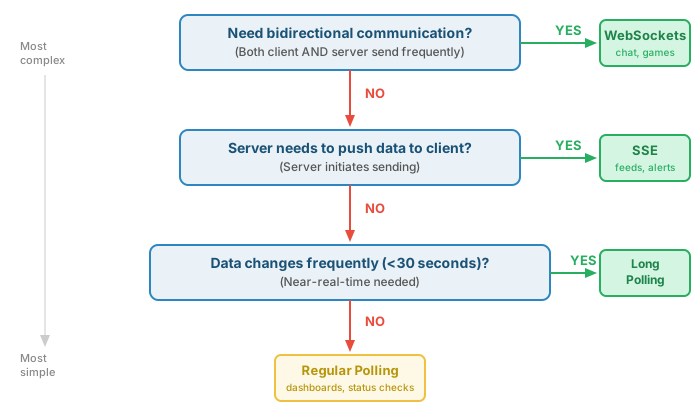
Rule of thumb: Start with the simplest approach that meets your requirements. Upgrade when you hit its limits, not before.
8. Implementation Realities
Tutorials make every technique look clean. Production is messier. Here are the real-world problems that don't appear in code samples.
Proxies and Firewalls
Between your client and server sit proxies, CDNs, load balancers, and firewalls. Each one can interfere with persistent connections.
| Technique | Corporate Proxy | CDN | Mobile Carrier | Load Balancer |
|---|---|---|---|---|
| Polling | Works | Works (cacheable) | Works | Works |
| Long Polling | Works (may timeout) | Works (not cacheable) | Works (may timeout) | Works |
| SSE | May buffer/break | May buffer | May buffer | Works (needs config) |
| WebSockets | May block upgrade | Requires WS support | Usually works | Needs sticky sessions |
Corporate proxies are especially problematic. Many perform SSL inspection (man-in-the-middle), buffer streaming responses, or block the Upgrade header entirely. Some deep packet inspection firewalls strip unfamiliar headers.
Connection Limits and Scaling
- HTTP/1.1: 6 connections per domain. This directly affects SSE — one SSE connection per tab, and 6 tabs exhaust all connections. WebSockets use only 1 connection per tab, so the limit is less impactful.
- WebSocket scaling: Because connections are stateful, a specific client is tied to a specific server instance. Horizontal scaling requires either sticky sessions (the load balancer routes the same client to the same server) or a pub/sub system (like Redis) so servers can broadcast messages to clients connected to other instances.
Mobile Networks
Mobile networks introduce challenges that don't exist on desktop:
- NAT timeout: Mobile carriers kill idle TCP connections after 30–60 seconds to reclaim resources. If your connection sits idle, it silently dies.
- Network switching: Moving from WiFi to cellular (or vice versa) drops all TCP connections. The IP address changes, and every connection must be re-established.
- Battery: Persistent connections prevent the cellular radio from entering sleep mode. Keeping a WebSocket alive drains battery.
Solutions: Send heartbeat/ping frames every 15–30 seconds to keep connections alive through NATs. Implement auto-reconnect with exponential backoff (wait 1s, then 2s, then 4s, then 8s) to avoid hammering the server after a network change.
Fallback Strategies
Libraries like Socket.IO handle these problems automatically: they try WebSocket first, detect when it fails (proxy blocking the upgrade), and fall back to long polling — all transparently. The application code doesn't change.
Always have a degradation path. If your real-time feature requires WebSockets and WebSockets are blocked, users get nothing. If you fall back to long polling, users get a slower but functional experience.
9. Beyond WebSockets
WebSockets solved the bidirectional problem, but they're not the final answer. Several newer technologies address WebSocket limitations or provide higher-level abstractions.
WebTransport: Built on HTTP/3 (QUIC). Provides bidirectional communication like WebSockets, but with multiple independent streams and better loss recovery. A dropped packet on one stream doesn't block others (unlike TCP-based WebSockets). Still experimental, but promising for latency-sensitive applications like gaming.
HTTP/2 and HTTP/3 improvements: HTTP/2 multiplexes many streams over a single TCP connection, eliminating the 6-connection-per-domain limit that plagues SSE on HTTP/1.1. HTTP/3 (built on QUIC/UDP) adds 0-RTT connection setup and removes TCP head-of-line blocking. These improvements make SSE much more practical for server push.
GraphQL Subscriptions: A query language feature that uses WebSockets underneath. You write a subscription query (subscription { newMessage { text, author } }), and the server pushes matching data in real-time. It's an abstraction layer — the transport is still WebSockets (or SSE).
gRPC Streaming: Google's RPC framework supports server streaming, client streaming, and bidirectional streaming over HTTP/2. Common in microservice backends where services need to stream data to each other. Less common in browser-to-server communication (though grpc-web exists).
10. Summary
| Concept | Key Takeaway |
|---|---|
| The Problem | HTTP is request-response only. The server cannot contact the client — it must wait to be asked. Every real-time technique is a workaround for this constraint. |
| Polling | Client asks repeatedly on a timer. Simple and universal, but wastes bandwidth and adds latency. Fine for low-frequency updates. |
| Long Polling | Server holds the connection open until it has data. Near-instant delivery, still just HTTP, but each client holds a connection open on the server. |
| Server-Sent Events | Standardized HTTP streaming. Server pushes events over a single connection. Built-in browser reconnection via EventSource. Unidirectional (server → client). |
| WebSockets | Full-duplex bidirectional protocol. Starts as HTTP, upgrades to WS. The only browser API for true two-way communication. Stateful and harder to scale. |
| Choosing | Start simple. Polling for infrequent checks. SSE for server push. WebSockets only when both sides send data frequently. Don't over-engineer. |
| Infrastructure | Proxies buffer SSE, firewalls block WebSocket upgrades, CDNs need configuration. Polling and long polling work everywhere. Always have a fallback. |
| Mobile | NAT timeouts kill idle connections. Network switching drops everything. Battery suffers from persistent connections. Use heartbeats and exponential backoff. |
| Future | WebTransport, HTTP/3, GraphQL Subscriptions, and gRPC Streaming are all variations on the same theme: letting the server send data without being asked. |
This page solves the "server can't reach the client" problem. The State Management Overview solves the parallel problem: "the server forgets." Together, these two constraints — statelessness and connectionlessness — define the challenges of building interactive applications on top of HTTP.