Authentication & Identity
The Lock Everyone Uses and Thousands Try to Pick
Authentication is the one part of your application that, if wrong, compromises everything else. Your database can be perfectly normalized, your API beautifully RESTful, your front end pixel-perfect — but if an attacker can log in as any user, none of it matters.
This page covers the full spectrum: how passwords should be stored (and how they shouldn't), how login flows get hardened, how OAuth trades privacy for convenience, how multi-factor authentication improves security while creating new surveillance vectors, and how to find the balance between security and usability.
1. The Authentication Problem
Authentication is the process of proving identity to a system. When you type a username and password, you're not just "logging in" — you're presenting evidence that you are who you claim to be, and the system is evaluating that evidence.
The classical framework divides authentication factors into three categories:
| # | Factor | What It Is | Examples |
|---|---|---|---|
| 1 | Something you know | A secret only you should possess | Password, PIN, security question answer |
| 2 | Something you have | A physical object in your possession | Phone, hardware security key, smart card |
| 3 | Something you are | A biometric characteristic | Fingerprint, face scan, retina pattern |
Authentication is deceptively hard because you're building a lock that many people use and many will also actively try to pick. Every decision — how you store credentials, how you handle failures, how you recover accounts — has security implications that compound. A small mistake in one area (say, logging passwords in error messages) can undermine every other precaution you've taken. Like many things in security, there isn't one thing, but many. Security is often more mindset than technology!
The stakes are real: credential stuffing attacks (trying leaked username/password pairs from one breach on other sites) succeed because people reuse passwords. Account takeover leads to fraud, data theft, and breach liability. And once user trust is lost, it's nearly impossible to rebuild.
2. Build or Delegate?
Before writing a single line of authentication code, every team faces a fundamental choice: build the authentication system yourself, or delegate it to a third-party service?
Delegate: Let Someone Else Handle It
Services like Auth0, Firebase Auth, Supabase Auth, and Clerk handle the hard parts: password storage, hashing, multi-factor authentication, compliance, and password reset flows. You integrate their service, redirect users to their login page (or embed their widget), and get back a verified user identity.
This makes sense when:
- You're a small team that can't dedicate engineering time to security infrastructure
- You need compliance certifications (HIPAA, SOC2) that you can't staff for internally (be careful of cost here!)
- You want MFA, social login, and passwordless auth without building each from scratch
- You'd rather pay per-user than maintain the system yourself (this is somewhat a fixed versus variable cost decision, so be cautious!)
Build It Yourself: Full Control
Spinning up your own auth gives you full control, no vendor lock-in, no per-user pricing, and no dependency on a third party's uptime. But you own every vulnerability, every password reset email, every edge case, and every compliance requirement.
Well, I paid them, so it's their responsibility, you may quickly discover those Terms of Service have some points about indemnification has been defined to shift responsibility and even if it isn't that bad they may have clauses that allow them to change their guarantees on you as they like. Legal recourse may be limited as well due to arbitration clauses and, of course, the challenging venue issue. In short, authentication is serious stuff, these vendors aren't going to just take on your liability for $0 or even $20 or $200, it's probably not worth it. Real ownership will cost you one way or another.
You must own it when:
- Privacy is a core requirement, and for project-specific reasons, you can't send user credentials to a third party
- Government, military, or air-gapped environments prohibit external services
- Custom organization requirements don't fit a provider's model
- You need fine-grained control or features that hosted services don't provide
The Honest Middle Ground
Most real-world applications land somewhere in between. You might delegate the hard parts — password hashing, MFA token generation, social login flows — while owning session management, authorization logic, and user data storage. The key is being honest about what you can maintain long-term. A partially maintained authentication system is worse than a fully delegated one.
3. Password Storage Done Right
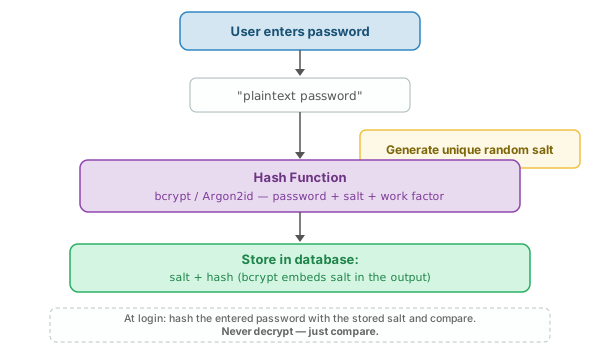
The cardinal rule of password storage: never store actual passwords. Store proof that someone knows the password.
This is the difference between hashing and encryption.
- Encryption - reversible — if you have the key, you can get the original data back.
- Hashing - one-way — if you have the hash, you can't get the original data back.
Given this overview, it would seem in most authentication cases, you are likely to store hashes. This is because hashing is designed to be one-way, meaning that even if an attacker steals your hash database, they cannot easily reverse the hash to obtain the original password. This is a critical security measure to prevent unauthorized access to user accounts. Of course, all that assumes you have done hashing correctly, which is easier said than done.
Why Fast Hashes Are the Enemy
Hash functions like MD5 and SHA-256 were designed to be fast. That's exactly what you don't want for passwords. A modern GPU can compute billions of SHA-256 hashes per second, meaning an attacker who steals your hash database can try every common password in minutes. The basic idea here is that they can do what is called a dictionary attack, trying all sorts of words until they get a match.
Rainbow tables make the situation even worse: precomputed lookup tables that map hashes back to their inputs. If you hash password123 with plain SHA-256, the result is the same every time, and it's almost certainly already in a rainbow table. Assume that for common hash algorithms a random table exists, we need to fix that by making our own hash variation via a process called salting.
Salting
A salt is a unique random value generated for each password and stored alongside the hash. Before hashing, the salt is combined with the password, ensuring that even if two users choose the same password, their stored hashes are different. This defeats rainbow tables entirely — you'd need a separate table for every possible salt.
Extra Salty:A really fun idea is to make a unique salt per user. Imagine if I use the keyword "yummy fried pork buns" as my salt then my hash might be MD5(user_password + "yummy fried pork buns"). I could really up the strength by adding in their user_id somewhere as well like MD5(user_id + "yummy fried pork buns" + user_password).
I could even make random salt values and store them with each user_id and look them up. You can make some really strong salts even with fast hashing, but now it is about secrets. That salt and the way you mix your security special sauce together has to be kept very secret!
The Right Algorithms
| Algorithm | Key Property | Status |
|---|---|---|
| bcrypt | Built-in salt, configurable work factor (cost), intentionally slow | Battle-tested, widely supported, still good |
| scrypt | Memory-hard — requires significant RAM, not just CPU time | Good alternative, used by some cryptocurrency systems |
| Argon2id | Memory-hard, resistant to both GPU and side-channel attacks | Current recommendation (winner of the Password Hashing Competition) |
The work factor (or cost parameter) controls how slow the hash is to compute. As hardware gets faster (Moore's Law), you increase the work factor. A typical bcrypt cost of 12 takes about 250ms on modern hardware — imperceptible to a user logging in, devastating to an attacker trying billions of guesses.
4. What NOT to Do (A Hall of Shame)
Every item on this list has been found in production systems. Some at companies with millions of users.
Interestingly, over the years, the classes I have taught used various message boards and support apps, many of which had these very exploits! Part of why I think that happened was that often in an academic setting we lean towards free services or software, so in a way we got what we paid didn't pay for.
Login failed for user admin with password hunter2, you have a critical vulnerability. This is a general problem in logging where Personal Identifiable Information (PII) or plain sensitive info is found in logs. We will see the same issues even in basic analytics.
GET /login?password=secret leaks the password to every system that sees the URL.
5. Password Policies: What Actually Works
The authoritative standard for password policies is NIST Special Publication 800-63B (originally published 2017, updated 2024). It overturned decades of conventional wisdom, and many organizations still haven't caught up.
Length Over Complexity
A 20-character or more passphrase like angry purple unicorn battery powered by 7 is dramatically harder to crack than P@ssw0rd!, even though the latter satisfies every traditional complexity rule. NIST now discourages mandatory complexity rules (requiring mixed case, numbers, and special characters) because they produce predictable patterns: users capitalize the first letter, add 1! at the end, and substitute @ for a. Attackers know these patterns.
No More Forced Rotation
NIST now discourages mandatory password expiration. When forced to change passwords every 90 days, users create sequences: Password1!, Password2!, Password3!. This is worse than a single strong password kept indefinitely. Change passwords when there's evidence of compromise, not on a calendar.
Check Against Breach Databases
At registration (and optionally at login), check the password against known-compromised databases like the Have I Been Pwned API. If a user chooses a password that appeared in a breach, reject it — even if it meets all other requirements. The HIBP API uses a k-anonymity model: you send the first 5 characters of the SHA-1 hash, and the API returns all matching suffixes, so you never send the actual password.
Sensible Limits
| Policy | NIST Recommendation | Common (Bad) Practice |
|---|---|---|
| Minimum length | 8 absolute minimum, 12+ recommended | 6 characters (far too short) |
| Maximum length | At least 64 characters | 16-character cap (inexcusable — you're hashing it anyway) |
| Complexity rules | Don't require them (if you can) | Must have uppercase, lowercase, number, symbol |
| Expiration | Don't expire unless compromised | Every 90 days |
| Breach check | Yes, at registration | Not done at all |
The usability cost of bad policies is real: users write passwords on sticky notes, reuse passwords across sites, and use password managers solely to satisfy arbitrary rules rather than for genuine security.
6. Hardening the Login Flow
A correct password hash is necessary but not sufficient. The login flow itself must be hardened against brute-force attacks, credential stuffing, and account enumeration. In some situations, we may also worry about password sharing.
Rate Limiting and Tarpitting
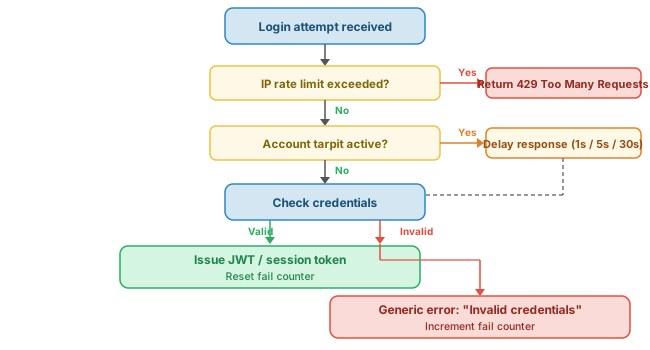
Rate limiting caps the number of login attempts per account and per IP address within a time window. But a hard cutoff (e.g., "5 attempts then locked") creates a denial-of-service vector — an attacker can lock any account by deliberately failing five times.
Tarpitting (progressive delays) is more elegant: add increasing delays after failed attempts. 1 second after 3 failures, 5 seconds after 5, 30 seconds after 10. This makes brute force computationally expensive for the attacker without locking out legitimate users who mistyped their password.
Account Lockout
Temporary lockout (15 minutes after N failures) is reasonable. Permanent lockout (until admin intervention) is a denial-of-service vulnerability — an attacker can lock every account on your site without knowing a single password.
CAPTCHA
CAPTCHAs should be a last resort. They have accessibility problems, they're increasingly solvable by AI, and they degrade the user experience. Use them only after rate limiting and tarpitting have been exhausted — for example, after 10+ failed attempts from a single IP.
Account Enumeration Prevention
Your error messages should never reveal which credential was wrong. "Invalid username or password" — always, even if the username doesn't exist. If you say "No account found for that email," an attacker can enumerate valid accounts. Similarly, registration and password reset flows should not reveal whether an email is already registered — always respond with "If an account exists, we've sent a reset link." This is generally the idea of information disclosure again - in short, don't disclose information that can be useful to potential intruders. This might range from HTTP headers, session names, error pages, and, of course, user information.
Use constant-time comparison when checking passwords to prevent timing attacks. If your code returns faster for "username not found" than for "password wrong," an attacker can measure the difference to enumerate accounts.
7. Account Recovery: Reset, Never Recover
If a service can send you your password, it stored your password wrong. The only secure approach is password reset, never password recovery.
The Secure Reset Flow
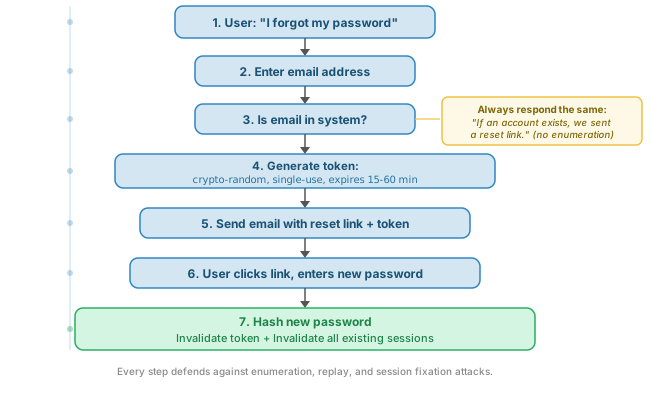
- User requests a reset (enters their email)
- System generates a cryptographically random, single-use token
- Token is sent to the user's verified email address as part of a link
- User clicks the link, enters a new password
- System hashes the new password, invalidates the token
Token Requirements
- Cryptographically random — not sequential, not derived from user data, not a timestamp
- Single-use — once used or expired, it's gone
- Short-lived — 15 to 60 minutes maximum
- Hashed in the database — store a hash of the token, not the token itself (if the database is breached, raw tokens would allow password resets)
Common Recovery Mistakes
The recovery flow is often the weakest link in the entire authentication chain. It's a parallel authentication path — an alternative way to prove identity — and if it's weaker than the primary path, it undermines everything. This is a common problem in security where we harden one thing only to leave another thing wide open. Defense in depth is a common phrase uttered, but I prefer to think about security as a mindset and approach it from a risk point of view as really the amount of care taken will vary based upon the situation.
8. GeoIP, Device Fingerprinting & Risk-Based Authentication
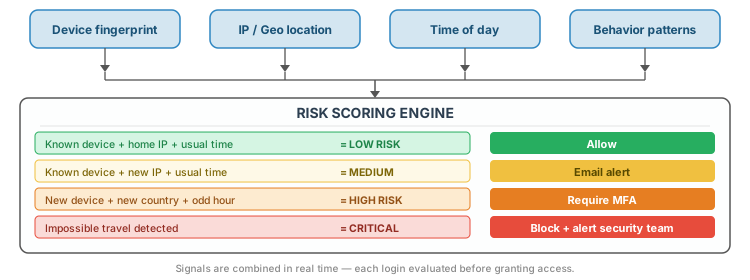
Beyond username and password, modern authentication systems evaluate contextual signals to assess risk. A login from your usual laptop in San Diego is very different from a login from an unknown device in a country you've never visited.
GeoIP Monitoring
By mapping IP addresses to geographic locations, systems can flag suspicious patterns. The classic check is impossible travel: if a user logs in from New York, then 30 minutes later from Beijing, one of those logins isn't legitimate. GeoIP monitoring can trigger additional verification (MFA prompt, email notification) for logins from new countries or unusual locations.
Device Fingerprinting
A device fingerprint combines browser, OS, screen resolution, installed fonts, WebGL renderer, timezone, and other attributes into a nearly unique identifier. When a user logs in from a recognized device, the system can reduce friction; when the device is new, it can increase verification requirements.
Machine Registration
"Remember this computer" stores a long-lived token on the device. Future logins from that device are treated as lower risk. This is the trusted device model — common in banking, email, and enterprise applications.
Risk Scoring
No single signal is definitive. Risk-based authentication combines multiple signals into a score:
9. Sessions, Tokens & Maintaining Auth State
Authentication happens once — at login. But HTTP is stateless: every request is independent. After a user authenticates, how do you remember that they're logged in for subsequent requests?
Server-Side Sessions
The traditional approach: the server generates a random session ID, stores it in a cookie, and maintains session data on the server (in memory, in a file, in Redis, or a database). Every request includes the cookie, and the server looks up the session.
- Pros: Easy to revoke (delete the session on the server), server controls all state, session data isn't exposed to the client
- Cons: Requires server-side storage, harder to scale across multiple servers (need shared session store like Redis), every request requires a lookup
JWT (JSON Web Tokens)
JWTs are self-contained, signed tokens. The server creates a token containing user claims (user ID, roles, expiration), signs it with a secret key, and sends it to the client. The client includes the token in subsequent requests (usually in the Authorization header). The server verifies the signature without needing to look anything up.
- Pros: Stateless (no server-side session store needed), scales easily, works well for APIs and microservices
- Cons: Cannot be revoked before expiration (unless you add a blacklist, which reintroduces server state), token size is larger than a session ID, clock skew can cause issues
Secure Cookie Flags
Whether you use sessions or JWTs, cookies (or tokens) must be protected:
| Flag | Purpose | Omitting It |
|---|---|---|
HttpOnly |
Cookie cannot be accessed by JavaScript | XSS attacks can steal the cookie |
Secure |
Cookie only sent over HTTPS | Cookie transmitted in plaintext over HTTP |
SameSite=Strict or Lax |
Cookie not sent on cross-origin requests | Vulnerable to CSRF attacks |
Token Expiration and Refresh
Best practice uses two tokens: a short-lived access token (15 minutes to 1 hour) for API requests, and a longer-lived refresh token (days to weeks) used solely to obtain new access tokens. This limits the window of exposure if an access token is stolen, while keeping the user logged in.
10. Implementation Patterns: Node.js & PHP
Both Node.js and PHP provide the tools to implement authentication correctly, but they take different approaches. PHP bundles auth primitives into the language; Node requires assembling libraries.
Node.js
The typical Node.js auth stack:
bcryptorbcryptjsfor password hashingexpress-session+connect-redisfor server-side sessionsjsonwebtokenfor JWT-based authpassportfor strategy-based auth (local, OAuth, SAML)
// Registration: hash and store
const bcrypt = require('bcrypt');
const saltRounds = 12;

async function register(username, password) {
  // bcrypt generates the salt automatically
  const hash = await bcrypt.hash(password, saltRounds);
  // Store username + hash in your database
  await db.query(
    'INSERT INTO users (username, password_hash) VALUES ($1, $2)',
    [username, hash]
  );
}

// Login: compare hash
async function login(username, password) {
  const user = await db.query(
    'SELECT * FROM users WHERE username = $1', [username]
  );
  if (!user) return false; // don't reveal "user not found"

  const match = await bcrypt.compare(password, user.password_hash);
  return match ? user : false;
}
PHP
PHP has had secure password hashing built into the language since very early versions:
// Registration: hash and store
$hash = password_hash($password, PASSWORD_BCRYPT);
// or: PASSWORD_ARGON2ID (PHP 7.2+)

$stmt = $pdo->prepare(
  'INSERT INTO users (username, password_hash) VALUES (:user, :hash)'
);
$stmt->execute(['user' => $username, 'hash' => $hash]);

// Login: verify
$stmt = $pdo->prepare(
  'SELECT * FROM users WHERE username = :user'
);
$stmt->execute(['user' => $username]);
$user = $stmt->fetch();

if ($user && password_verify($password, $user['password_hash'])) {
  session_start();
  $_SESSION['user_id'] = $user['id'];
  // Regenerate session ID to prevent fixation
  session_regenerate_id(true);
}
password_hash() and password_verify() are built-in — no packages to install, no version conflicts, no supply-chain risk. Node.js requires npm install bcrypt, which includes native C++ bindings (or bcryptjs for a pure-JS alternative). Both produce correct bcrypt hashes — but PHP's approach like most things in NodeJS is simpler to get right. It may be ugly, but PHP can be very productive!
11. OAuth & Federated Identity: The Promise
The idea behind OAuth is compelling: let Google, GitHub, Apple, Microsoft, or whatever big tech you trust handle passwords. They have larger security teams, dedicated infrastructure, and more experience defending against attacks than most application teams will ever have. Sounds good, but is it?
OAuth 2.0
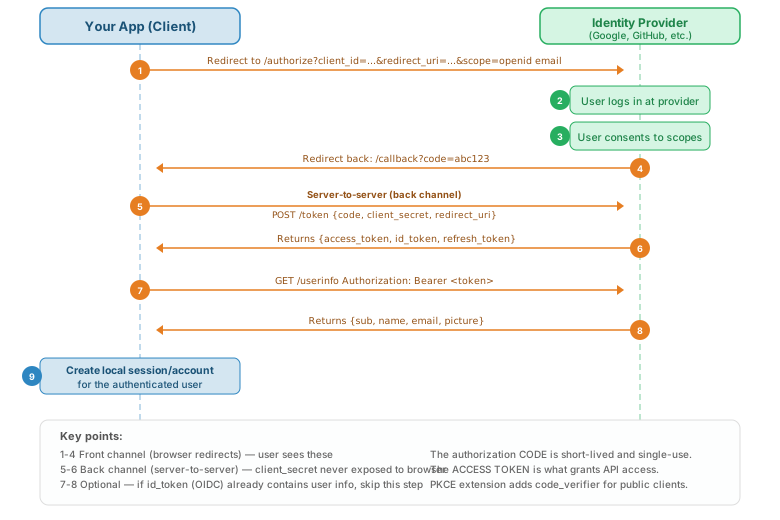
OAuth 2.0 is an authorization framework — it was designed to grant limited access to resources, not to verify identity. It answers "can this app access my photos?" not "who is this person?" The identity layer is added by OpenID Connect (OIDC), which sits on top of OAuth 2.0 and adds ID tokens containing user claims (name, email, profile picture).
The Authorization Code Flow
Single Sign-On (SSO)
SSO extends this further: log in once with your identity provider, and you're authenticated across all services that trust that provider. Enterprise SSO (via SAML or OIDC) means employees log in once and access email, Slack, GitHub, and internal tools without separate passwords for each.
Genuine Benefits
- No password to store — you never see the user's password; the provider handles authentication
- No reset flow to build — the provider handles "forgot my password"
- Fewer credentials to manage — users have one fewer password to remember
- Built-in MFA — if the user has MFA on their Google account, your app gets that protection for free
- Reduced attack surface — you can't leak passwords you never had
12. The Trust Problem with OAuth
OAuth's benefits are real, but they come with costs that are rarely discussed honestly in "add social login in 5 minutes" tutorials.
Surveillance by Design
When you add "Sign in with Google," you're giving Google a log of every time your user visits your site. The identity provider sees every authentication event — when, from where, how often. For a company whose business model is advertising, this is valuable behavioral data you're handing over for free.
Scope Creep
OAuth scopes define what data your app can access. You might start with openid email, but providers make it easy to request more: profile information, contacts, calendar, drive files. The consent screen becomes a checkbox that users click through without reading. Over time, apps accumulate permissions they don't need.
Vendor Lock-In
When your users' identities are owned by the provider, you're dependent on that provider's policies. If Google bans a user's account (rightly or wrongly), that user loses access to your service. If the provider changes their API, raises prices, or deprecates a feature, you scramble to adapt. If the provider has an outage, your users can't log in.
The "Free" Illusion
Social login costs nothing in dollars. But the currency is your users' privacy. The provider knows which services each person uses, when they use them, and how often. This data has value, and you're giving it away on your users' behalf — often without them understanding the trade-off.
Trust Asymmetry
You trust the provider with your users' identity, but the provider has no obligation to your users. The provider's terms of service protect the provider. Your users are not the provider's customers — they're the product. If a provider decides to change authentication requirements, raise prices, or shut down a service, you have no recourse.
The Self-Hosted Alternative
Self-hosted identity providers like Keycloak, Ory, and Authentik give you OAuth and OIDC capabilities without sending user data to a third party. You get the protocol benefits (standardized flows, token-based auth, SSO) without the surveillance trade-off. The cost is infrastructure and maintenance — which may be worth it if privacy is a genuine requirement.
13. Multi-Factor Authentication (2FA / MFA)
Multi-factor authentication requires two or more factors from different categories. The genuine security improvement is significant: even if an attacker obtains the password (through phishing, breach, or brute force), they still need the second factor to gain access.
Factor Types
| Method | How It Works | Strength | Weakness |
|---|---|---|---|
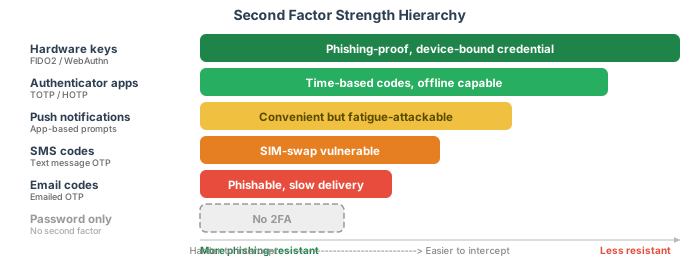
| Hardware keys (FIDO2 / WebAuthn) | USB or NFC device; cryptographic challenge-response; nothing to type | Phishing-resistant, no shared secrets | Cost (~$25-50), can be lost |
| TOTP apps (authenticator apps) | Shared secret + current time = 6-digit code; works offline | No network needed, widely supported | Phishable (user can be tricked into entering code on fake site) |
| Push notifications | "Was this you?" prompt on your phone; tap to approve | Convenient, low friction | MFA fatigue attacks (spam approvals until user taps "yes") |
| SMS codes | 6-digit code sent via text message | Familiar, no app needed | SIM swapping, SS7 interception, social engineering at carrier stores |
| Email codes | Code or link sent to email | Universal (everyone has email) | Email accounts are themselves targets; adds latency |
| Backup codes | Single-use recovery codes, generated at setup | Work when all else fails | Must be stored securely (offline, printed) |
The Factor Hierarchy
14. The 2FA Surveillance Paradox
Multi-factor authentication improves security. That's not in question. But the most common implementations also create new surveillance vectors that are worth examining honestly.
Phone Number as Universal Identifier
When you register a phone number for 2FA, you've linked your online identity to a physical device and a carrier account. A phone number is far more identifying than an email address — it's tied to a government-issued ID (in most countries), a billing address, and a physical SIM card. An adversary with carrier access (law enforcement, intelligence agencies, or a social-engineered carrier employee) can now correlate your online accounts with your physical identity.
Biometric Leakage and Weakness
When using a finger scan or face scan we might find that can be leaked and used for other purposes. Recently, folks have begun to discover the danger of face unlocks and how face information is being shared into systems well outside of authentication. Like many topics in this space we see technology simply cannot solve societal abuses. Pure technosolutionism does not work full stop, so stop pushing that belief and get to work on the mixed technical and social solution that works!
Location Tracking
Your phone connects to cell towers, and cell towers know where you are. Binding authentication to a phone means someone with access to carrier data can correlate your authentication events with your physical location. When you approve a push notification for your corporate VPN, your employer now knows you were awake, near your phone, and (through the carrier) roughly where you were standing.
Device Binding
Authenticator apps and push notifications bind your identity to a specific device. Lose the device, lose access. But also: track the device, track the person. If your 2FA is on your phone, your phone becomes something you must carry at all times — and something that always knows where you are.
Cross-Service Correlation
If you use the same phone number for 2FA on ten different services, an adversary with carrier access can correlate all ten identities. Your banking 2FA, your social media 2FA, your work VPN 2FA — all linked by a single phone number. This is a privacy concern that's rarely discussed in 2FA advocacy.
The Irony
Security measures designed to protect you create new vectors for surveillance. Mandatory 2FA policies (especially SMS-based) require you to give an organization a phone number — a personal identifier with far more tracking potential than an email address. An employer requiring MFA for the corporate VPN now has a piece of information that can reveal when you're awake, where you are, and that you're carrying a specific device.
15. Security vs. Usability: The Fundamental Tension
Every security measure has a usability cost. The question is never "is this more secure?" but "is the security improvement worth the usability cost?"
Friction Budgets
Users have a finite tolerance for security friction. Every additional step — entering a code, solving a CAPTCHA, answering a security question — uses some of that budget. Once the budget is spent, users find workarounds: they reuse passwords, share accounts, write credentials on sticky notes, or simply stop using the service. Wise security design spends the friction budget on measures that actually matter.
Risk-Based / Adaptive Security
Not every action requires the same level of security. Viewing a dashboard is low-risk. Changing a password, transferring money, or deleting an account is high-risk. Progressive security starts with basic authentication (username/password) and escalates to additional verification (MFA, re-authentication) only when the risk warrants it. This keeps the common path fast while protecting critical actions.
Security Theater
Some measures feel secure but provide little actual protection:
- Security questions — answers are guessable, publicly findable, or easily social-engineered
- Password expiration — produces predictable password sequences, not stronger passwords
- CAPTCHAs for every login — annoying to users, increasingly solvable by bots
- Password complexity rules — produce
P@ssw0rd!not genuinely strong passwords
These measures waste the friction budget without improving security. They're security theater — the appearance of protection without the substance.
The Password Manager Paradox
The most secure option — a unique, randomly generated, 30+ character password for every site — requires a tool (a password manager) that most users don't have, don't understand, or don't trust. The security community recommends password managers, but the adoption rate is still relatively low. The most secure path isn't the easiest path for most users.
Passkeys: The Emerging Answer
Passkeys represent the convergence of security and usability. They're device-bound cryptographic credentials that replace passwords entirely. No password to remember, no password to steal, no password to phish. The user authenticates with a biometric (fingerprint, face) or a device PIN, and the device handles the cryptographic proof.
Passkeys are backed by Apple, Google, and Microsoft. They're built on the FIDO2/WebAuthn standard. They sync across devices (via iCloud Keychain, Google Password Manager, etc.). And critically, they make the secure path the easy path — the user taps their fingerprint instead of typing a password. That's the balance point: when security and convenience align, adoption follows.
Summary
| Concept | Key Takeaway |
|---|---|
| The Authentication Problem | Three factors (know, have, are); authentication = proving identity; deceptively hard because you're building a lock millions use and thousands attack |
| Build or Delegate? | Hosted services (Auth0, Firebase) reduce risk but add dependency; DIY gives control but you own every vulnerability; most teams should delegate the hard parts |
| Password Storage | Never store passwords — store hashes; use bcrypt or Argon2id with unique salts and a configurable work factor; speed is the enemy |
| Hall of Shame | Plaintext storage, reversible encryption, fast hashes, single salts, logged passwords, passwords in URLs, emailed passwords — all still happen in production |
| Password Policies | NIST 800-63B: length over complexity, no forced expiration, check against breach databases; bad policies produce predictable workarounds |
| Hardening the Login Flow | Rate limiting, tarpitting (progressive delays), generic error messages, constant-time comparison; never reveal which credential was wrong |
| Account Recovery | Reset, never recover; cryptographically random, single-use, time-limited tokens; the recovery flow is often the weakest link |
| GeoIP & Risk-Based Auth | Combine device, location, time, and behavior signals into a risk score; same techniques as ad-tech tracking — the line between security and surveillance is thin |
| Sessions & Tokens | Server-side sessions (revocable, stateful) vs. JWTs (stateless, not revocable); always use HttpOnly, Secure, and SameSite cookie flags |
| Implementation Patterns | PHP: built-in password_hash() / password_verify(); Node: bcrypt package; both produce correct results, PHP is simpler |
| OAuth & Federated Identity | Authorization Code flow: redirect → consent → code → token → user info; genuine security benefits: no password to store, built-in MFA |
| The Trust Problem | OAuth gives the provider a log of every login; vendor lock-in, scope creep, privacy costs; self-hosted alternatives (Keycloak, Ory) exist |
| Multi-Factor Authentication | Hardware keys > TOTP apps > push > SMS > nothing; MFA fatigue and SIM swapping are real attack vectors |
| The 2FA Surveillance Paradox | Phone-based 2FA creates tracking vectors: location, cross-service correlation, device binding; hardware keys are the privacy-preserving alternative |
| Security vs. Usability | Friction budgets are finite; risk-based/adaptive security; passkeys make the secure path the easy path — that's the design principle |