OpenTelemetry (OTel) Overview
Observability for Modern Web Systems
As web applications grow from single-server pages to distributed architectures with microservices, APIs, databases, caches, and queues, understanding what is happening inside your system becomes exponentially harder. A user reports that "it's slow" — but where? The browser? The CDN? The API gateway? The database query? A downstream service?
OpenTelemetry (OTel) is the open-source, vendor-neutral standard for generating, collecting, and exporting telemetry data — traces, metrics, and logs — so you can answer these questions without being locked into any single vendor's tooling.
1. What is Observability?
Observability is a term borrowed from control theory which focuses on control of dynamic systems. A system is observable if you can determine its internal state from its external outputs. For software, this means: can you figure out what went wrong (and where) just from the data your system emits?
Observability is often distinguished from monitoring:
| Monitoring | Observability |
|---|---|
| Answers known questions ("Is the server up?") | Answers unknown questions ("Why is checkout slow for users in Brazil?") |
| Predefined alerts | Ad hoc investigation |
| Explanatory Dataviz | Exploration Dataviz |
| Works well for monoliths | Essential for distributed systems |
| Focuses on symptoms | Focuses on root causes |
2. The Three Pillars of Observability
Modern observability rests on three complementary signal types, often called the "three pillars":
Pillar 1 - Logs
Discrete, timestamped records of events. The oldest and most familiar signal. Every console.log() or error_log() is a log entry.
2026-02-24T10:15:32Z [INFO]  User 4821 logged in from 203.0.113.42
2026-02-24T10:15:33Z [ERROR] Payment gateway timeout after 5000ms - order #9912
2026-02-24T10:15:33Z [WARN]  Retrying payment for order #9912 (attempt 2/3)
Strengths: Can provide rich context, machine-readable (sometimes) and human-readable (sometimes), great for debugging specific events.
Weaknesses: High volume can be expensive to store. Can get hard to correlate across services without a shared identifier.
Pillar 2 - Metrics
Numerical measurements aggregated over time. Metrics are compact and cheap to store because they are pre-aggregated — you record a count or a histogram bucket, not every individual event.
http_requests_total{method="GET", status="200", route="/api/users"}  148239
http_request_duration_seconds{quantile="0.99"}                      0.847
node_memory_usage_bytes                                             734003200
Strengths: Low overhead because it is distilled, ideal for dashboards and alerts, good for spotting trends.
Weaknesses: Aggregation loses detail — you know the p99 latency spiked, but not which request or why. Generally a loss of context and easy to fall into single-number/factor explanations
Pillar 3 - Traces
Records of a request's journey through a distributed system. A trace is a tree of spans, where each span represents a unit of work (an HTTP call, a database query, a function invocation). Spans carry timing data, status, and arbitrary attributes.
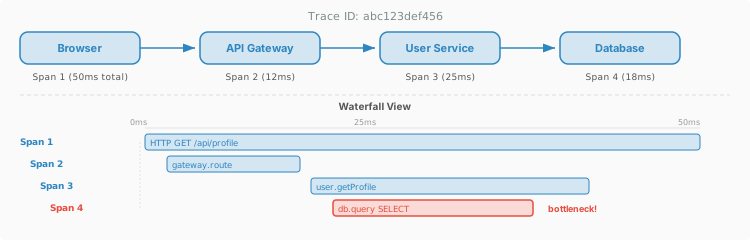
Strengths: Maps system flow (possibly user flow) and can shows causality and latency breakdown across services to help pinpoint bottleneck or root error cause.
Weaknesses: More complex to instrument and store than logs or metrics; high-cardinality data. Humans generally get overwhelmed by many dimensions shown at once.
3. The Problem OTel Solves
Before OpenTelemetry, the observability landscape was fragmented:
- Vendor-specific agents: Datadog, New Relic, Dynatrace, and others each had proprietary SDKs. Instrumenting your code for one meant lock-in — switching vendors meant re-instrumenting everything.
- Competing open standards: OpenTracing (tracing API) and OpenCensus (tracing + metrics) both existed as CNCF projects, splitting the community.
- Inconsistent telemetry: Even within a single organization, different teams might use different libraries, formats, and conventions, making cross-service correlation difficult or impossible.
- Framework blind spots: Libraries and frameworks rarely shipped with built-in observability because they did not want to choose a vendor. So instrumentation was always an afterthought.
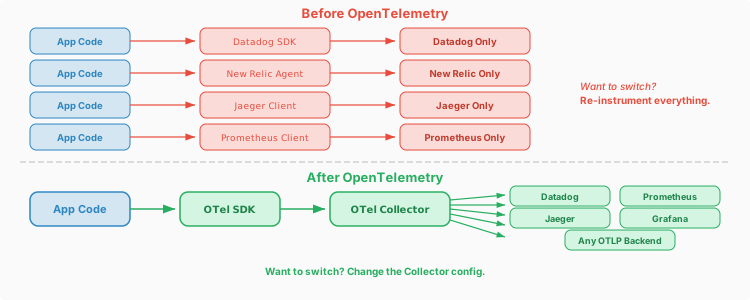
In 2019, OpenTracing and OpenCensus merged to form OpenTelemetry under the Cloud Native Computing Foundation (CNCF). The goal: a single, vendor-neutral standard for all telemetry.
You'll see this lesson over and over in your career, and you see here how the DevOps community found its way there because of the headaches felt when they didn't have it.
4. What is OpenTelemetry?
OpenTelemetry is not a backend or a dashboard. It is a collection of specifications, APIs, SDKs, and tools for generating and managing telemetry data. Specifically:
| Component | What It Is |
|---|---|
| Specification | Language-agnostic definitions of how signals (traces, metrics, logs) are structured, propagated, and exported |
| API | Interfaces that library authors instrument against — zero-dependency, safe to call even if no SDK is configured |
| SDK | The implementation that application owners install to actually collect and export data |
| Instrumentation Libraries | Pre-built integrations for popular frameworks (Express, Flask, Spring, etc.) that auto-generate spans and metrics |
| Collector | A standalone binary that receives, processes, and exports telemetry — acts as a pipeline between your apps and your backends |
| OTLP | The OpenTelemetry Protocol — a wire format (gRPC or HTTP/protobuf) for transmitting telemetry to any compatible backend |
5. OTel Architecture
The overall flow of telemetry in an OTel-instrumented system:
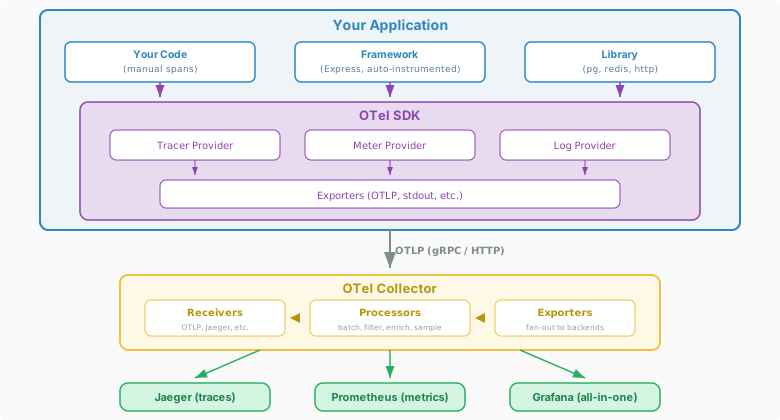
Key architectural principle: The collector decouples your application from your backend. Your app speaks OTLP to the Collector; the Collector speaks whatever protocol your backends need.
6. Traces in Depth
Distributed tracing is often the most impactful signal for understanding web application behavior. Let's look at the key concepts:
Trace
A trace represents a complete request lifecycle. It has a globally unique Trace ID (typically a 128-bit hex string like 4bf92f3577b34da6a3ce929d0e0e4736). Every service that participates in handling that request shares the same Trace ID.
Span
A span is a single unit of work within a trace. Every span has:
| Field | Description |
|---|---|
traceId | Links this span to its trace |
spanId | Unique identifier for this span |
parentSpanId | The span that caused this span (creates the tree structure) |
name | Human-readable operation name (e.g., GET /api/users) |
startTime / endTime | When the work began and ended |
status | OK, ERROR, or UNSET |
attributes | Key-value pairs: http.method=GET, db.system=mysql, etc. |
events | Timestamped annotations within the span (e.g., "cache miss") |
A Concrete Example
A user loads /dashboard. Here is the trace, visualized as a waterfall (this is the Jaeger UI style):
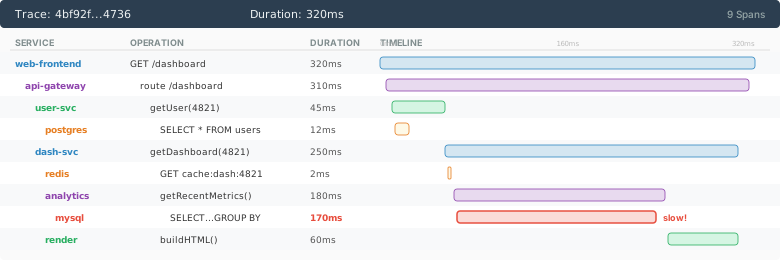
From this single trace, you can immediately see that the analytics service's MySQL query is the bottleneck, consuming over half the total request time. Without tracing, you might spend hours guessing.
7. Metrics in Depth
OTel defines three core metric instruments:
| Instrument | What It Records | Example |
|---|---|---|
| Counter | Monotonically increasing value | http.requests.total — always goes up |
| Histogram | Distribution of values (automatically bucketized) | http.request.duration — see p50, p95, p99 |
| Gauge | Point-in-time value that goes up and down | system.memory.usage — current memory |
Attributes and Cardinality
Metrics become powerful when you attach attributes (labels) — but there is a trap. Every unique combination of attribute values creates a new time series:
// Good: low-cardinality attributes
http_requests_total{method="GET", status="200"}    ← finite combinations
http_requests_total{method="POST", status="500"}

// Dangerous: high-cardinality attributes
http_requests_total{user_id="4821"}                ← millions of unique series!
http_requests_total{request_id="abc123"}           ← every request = new series
user_id with 1 million users? Now you have 5 billion series. Your Prometheus server will run out of memory. Use high-cardinality data in traces and logs, not metrics.
Again we see a key point about data the course aims to talk about. Having too much data can be just as much of a problem as too little. It also can have costs and negative impacts in terms of creating certainity where you shouldn't have it.
Exemplars: Bridging Metrics and Traces
OTel supports exemplars — attaching a trace ID to a metric data point. When you see a p99 latency spike on a dashboard, you can click through to the exact trace that caused it. This is one of the most powerful features of a unified observability system.
8. Logs in OTel
Logs are the oldest observability signal, and OTel's approach is pragmatic: rather than replacing existing logging libraries (Winston, Pino, Log4j, Monolog), OTel provides a Log Bridge API that connects existing log output to the OTel pipeline.
Structured vs. Unstructured Logs
// Unstructured (traditional) — hard to parse, search, correlate
console.log("User 4821 payment failed: timeout after 5000ms");

// Structured (OTel-enriched) — machine-parseable, correlated
{
  "timestamp": "2026-02-24T10:15:33.421Z",
  "severity": "ERROR",
  "body": "Payment failed: timeout",
  "attributes": {
    "user.id": 4821,
    "payment.gateway": "stripe",
    "timeout.ms": 5000,
    "order.id": "9912"
  },
  "traceId": "4bf92f3577b34da6a3ce929d0e0e4736",
  "spanId": "a1b2c3d4e5f60718"
}
The critical addition is traceId and spanId. When OTel's context propagation is active, every log entry emitted during a traced request automatically includes these IDs. This means you can jump from a trace to its logs and vice versa.
9. Context Propagation
Context propagation is the mechanism that makes distributed tracing work. When Service A calls Service B, how does Service B know it is part of the same trace?
The answer: propagators inject trace context into the carrier (usually HTTP headers), and the receiving service extracts it.
W3C Trace Context
The W3C traceparent header is the standard propagation format, endorsed by OTel. See the specification at https://www.w3.org/TR/trace-context/. A simple example of the header are below.
traceparent: 00-4bf92f3577b34da6a3ce929d0e0e4736-a1b2c3d4e5f60718-01
             ││ │                                │                 │
             ││ │                                │                 └─ flags (01=sampled)
             ││ │                                └─ parent span ID (16 hex = 8 bytes)
             ││ └─ trace ID (32 hex = 16 bytes)
             │└─ version
             └─ (literal)

tracestate: vendor1=value1,vendor2=value2
When, for example, your NodeJS Express middleware receives this header, the OTel SDK automatically:
- Extracts the trace ID and parent span ID
- Creates a new child span linked to the parent
- When making outgoing HTTP calls, injects the updated
traceparentwith the new span as parent
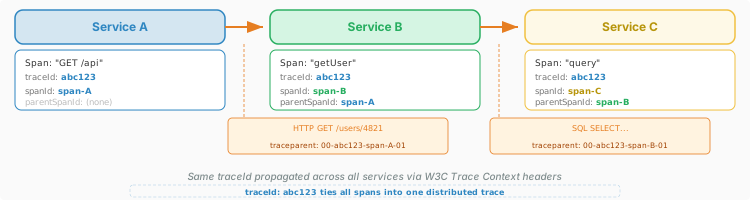
traceparent header, the trace breaks. This is why OTel's auto-instrumentation is so valuable — it handles propagation automatically for common HTTP clients and frameworks. You see a strong familiarity here with the challenges of sessioning with HTTP here! Remember at the bottom of most web tech explorations is a core protocol - in this case HTTP with its stengths (simplicity) and weaknesses (statelessness) effecting everything.
10. Instrumentation: Auto vs. Manual
There are two approaches to adding OTel to your application:
Approach 1: Auto-Instrumentation
Auto-instrumentation patches popular libraries at load time to emit spans and metrics without code changes. In Node.js:
// tracing.js — loaded before your app
const { NodeSDK } = require('@opentelemetry/sdk-node');
const { getNodeAutoInstrumentations } = require('@opentelemetry/auto-instrumentations-node');
const { OTLPTraceExporter } = require('@opentelemetry/exporter-trace-otlp-http');

const sdk = new NodeSDK({
  traceExporter: new OTLPTraceExporter({
    url: 'http://localhost:4318/v1/traces',
  }),
  instrumentations: [getNodeAutoInstrumentations()],
});

sdk.start();
# Run your app with the tracing module preloaded
node --require ./tracing.js app.js
This automatically creates spans for:
- Incoming HTTP requests (Express, Fastify, Koa)
- Outgoing HTTP requests (
http,fetch,axios) - Database queries (pg, mysql2, mongodb, redis)
- gRPC calls, DNS lookups, filesystem operations
Approach 2: Manual Instrumentation
Auto-instrumentation handles infrastructure, but it does not know about your business logic. Manual spans capture domain-specific operations and can be configured for your particular needs:
const { trace } = require('@opentelemetry/api');

const tracer = trace.getTracer('checkout-service');

async function processCheckout(cart, user) {
  // Create a span for the business operation
  return tracer.startActiveSpan('checkout.process', async (span) => {
    try {
      span.setAttribute('user.id', user.id);
      span.setAttribute('cart.items', cart.items.length);
      span.setAttribute('cart.total', cart.total);

      const inventory = await checkInventory(cart);   // auto-instrumented DB call inside
      const payment = await chargePayment(cart, user); // auto-instrumented HTTP call inside

      span.setAttribute('payment.status', payment.status);
      span.setStatus({ code: SpanStatusCode.OK });

      return { orderId: payment.orderId };
    } catch (err) {
      span.setStatus({ code: SpanStatusCode.ERROR, message: err.message });
      span.recordException(err);
      throw err;
    } finally {
      span.end();  // Always end the span
    }
  });
}
11. The OTel Collector
The Collector is a vendor-agnostic proxy that sits between your applications and your backends. It is arguably the most operationally important component of OTel.
Why Use a Collector?
- Decoupling: Your app sends OTLP to localhost; the Collector handles routing, retries, and authentication to backends
- Processing: Batch, filter, sample, enrich, and transform telemetry before it leaves your infrastructure
- Fan-out: Send the same data to multiple backends simultaneously (Jaeger for traces, Prometheus for metrics)
- Protocol translation: Accept data in Jaeger format, export in OTLP; accept OTLP, export to Datadog's proprietary format
Collector Configuration
The Collector uses a YAML pipeline model with three stages: receivers, processors, and exporters.
# otel-collector-config.yaml
receivers:
  otlp:
    protocols:
      grpc:
        endpoint: 0.0.0.0:4317
      http:
        endpoint: 0.0.0.0:4318

processors:
  batch:
    timeout: 5s
    send_batch_size: 1024
  memory_limiter:
    check_interval: 1s
    limit_mib: 512
  attributes:
    actions:
      - key: environment
        value: production
        action: upsert

exporters:
  otlp/jaeger:
    endpoint: jaeger:4317
    tls:
      insecure: true
  prometheus:
    endpoint: 0.0.0.0:8889
  logging:
    loglevel: debug

service:
  pipelines:
    traces:
      receivers: [otlp]
      processors: [memory_limiter, batch, attributes]
      exporters: [otlp/jaeger, logging]
    metrics:
      receivers: [otlp]
      processors: [memory_limiter, batch]
      exporters: [prometheus]

12. Sampling Strategies
In a large scale production situation, you cannot export every single trace — the volume is too high and the storage cost too great. Sampling determines which traces to keep.
| Strategy | Where | How It Works | Tradeoff |
|---|---|---|---|
| Head-based | SDK (at trace start) | Decide to sample before the trace begins — e.g., keep 10% of traces randomly | Simple and consistent, but may discard interesting traces (errors, slow requests) |
| Tail-based | Collector (after trace completes) | Collect all spans, then decide which complete traces to keep based on their content | Keeps all errors and outliers, but requires buffering complete traces in memory |
| Priority / Rule-based | SDK or Collector | Always keep traces matching rules (e.g., errors, latency > 2s, specific endpoints) | Best of both worlds but more complex to configure |
# Tail-based sampling in the Collector
processors:
  tail_sampling:
    decision_wait: 10s
    policies:
      - name: errors-always
        type: status_code
        status_code: {status_codes: [ERROR]}
      - name: slow-traces
        type: latency
        latency: {threshold_ms: 2000}
      - name: sample-rest
        type: probabilistic
        probabilistic: {sampling_percentage: 5}
13. Semantic Conventions
For telemetry to be useful across tools and teams, everyone needs to use the same attribute names. OTel defines semantic conventions — standardized names for common attributes:
| Category | Attribute | Example Value |
|---|---|---|
| HTTP | http.request.method | GET |
| HTTP | http.response.status_code | 200 |
| HTTP | url.full | https://api.example.com/users |
| Database | db.system | mysql |
| Database | db.statement | SELECT * FROM users WHERE id=? |
| RPC | rpc.system | grpc |
| Messaging | messaging.system | kafka |
| Cloud | cloud.provider | aws |
| Service | service.name | user-service |
| Service | service.version | 2.1.0 |
These conventions mean that a dashboard that supports OTel can show you "all database queries across all services" because every OTel-instrumented library uses db.system and db.statement consistently. Without conventions, one library might call it database_type and another dbSystem — making cross-service queries impossible.
14. Resources and Service Identity
A Resource in OTel represents the entity producing telemetry. It answers: "Where did this data come from?" Resources are attached to every span, metric, and log.
// Typical resource attributes
{
  "service.name": "checkout-service",
  "service.version": "2.1.0",
  "deployment.environment": "production",
  "host.name": "web-prod-03",
  "cloud.provider": "aws",
  "cloud.region": "us-west-2",
  "container.id": "a1b2c3d4e5f6"
}
Resources are set once at SDK initialization and do not change during the process lifetime. They let you filter and group telemetry — "show me all errors from checkout-service version 2.1.0 running in us-west-2."
service.name is the most important attribute in OTel. If you set nothing else, set this. It is how every backend identifies your application. If you forget it, your service shows up as unknown_service in a dashboard, which makes traces nearly useless.
15. OTel for the Web Browser
OTel is not server-only. The @opentelemetry/sdk-trace-web package brings tracing to the browser, enabling end-to-end traces that start at the user's click and flow through your entire backend.
What Browser OTel Can Capture
- Document load: DNS, TCP, TLS, TTFB, DOM content loaded, full load — using the Navigation Timing API
- Resource loading: Every CSS, JS, image, and font fetch — using the Resource Timing API
- User interactions: Clicks, form submissions, route changes in SPAs
- Fetch/XHR: Outgoing API calls with automatic
traceparentheader injection - Errors: Uncaught exceptions and unhandled promise rejections
import { WebTracerProvider } from '@opentelemetry/sdk-trace-web';
import { BatchSpanProcessor } from '@opentelemetry/sdk-trace-base';
import { OTLPTraceExporter } from '@opentelemetry/exporter-trace-otlp-http';
import { ZoneContextManager } from '@opentelemetry/context-zone';
import { registerInstrumentations } from '@opentelemetry/instrumentation';
import { getWebAutoInstrumentations } from '@opentelemetry/auto-instrumentations-web';

const provider = new WebTracerProvider();

provider.addSpanProcessor(
  new BatchSpanProcessor(
    new OTLPTraceExporter({ url: 'https://collector.example.com/v1/traces' })
  )
);

provider.register({
  contextManager: new ZoneContextManager(),  // enables async context in browsers
});

registerInstrumentations({
  instrumentations: [getWebAutoInstrumentations()],
});
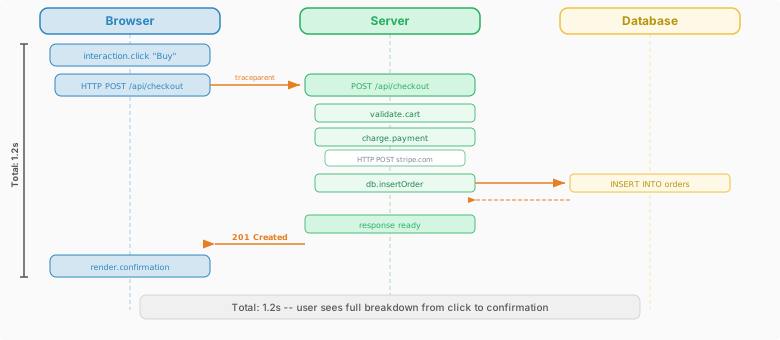
traceparent as a custom header. If your API does not include traceparent in its Access-Control-Allow-Headers response, the browser will strip it and the trace will break at the browser-server boundary. Similarly, the Timing-Allow-Origin header must be set for the Resource Timing API to expose detailed timing to JavaScript on cross-origin resources.
16. OTel vs. Custom Analytics
In this course, we build a custom analytics pipeline — a JavaScript collector, a server endpoint, a database, and a dashboard. That last section seemed like why bother and you might wonder how does all this relate to OTel? In theory we could use OpenTel for the technical points and just skip that part. The point of the course is to learn about the landscale of online analytics not just one thing. So we don't just focus on technical traces, but we also emphasize behavior analytics as well!
| Behavioral Analytics (Google Analytics) | Technical Analytics (OTel) | |
|---|---|---|
| Purpose | Product analytics: what users do (pageviews, clicks, funnels) | Operational observability: how the system behaves (latency, errors, resource usage) |
| Primary audience | Product managers, designers, marketers | Developers, SREs, DevOps engineers |
| Key questions | "Where do users drop off?" "Which features are used?" | "Why is this request slow?" "Where did this error originate?" |
| Data model | Events with user-centric attributes (user ID, session, page) | Traces/spans with system-centric attributes (service, host, latency) |
| Collection | Client-side JS sends data to your server or 3rd party analytics service | SDK auto-instrumentation + Collector pipeline |
| Standards | No universal standard (each tool defines its own schema) though GA tends to be thought of as standard | OTLP protocol, semantic conventions, W3C Trace Context |
17. OTel in Production: Practical Concerns
Running OTel in production introduces real-world considerations that go beyond "add the SDK":
Performance Overhead
OTel is designed to be low-overhead, but it is not zero-cost:
- CPU: Span creation, attribute setting, and context propagation add single-digit microseconds per span
- Memory: Spans are buffered before export; the batch processor controls buffer size
- Network: Exporting is async and batched, but high-throughput services can generate megabytes of telemetry per second
- Mitigation: Use head-based sampling to reduce volume before spans are even created; tune batch sizes and export intervals
Reliability
- The Collector should never crash your application — if the Collector is down, the SDK drops telemetry (it does not block your app)
- Use the
memory_limiterprocessor to prevent the Collector from consuming unbounded memory - In critical paths, consider using the
sending_queueexporter helper for disk-backed buffering
Security and Privacy Considerations
Telemetry data can contain sensitive information. OTel gives you tools to handle this, but you need to think about it deliberately
What Telemetry Can Leak includes:
- Database queries:
db.statementmay contain user data in WHERE clauses - URLs: Query parameters may contain tokens, emails, or PII
- Headers: Authorization headers, cookies, API keys
- Error messages: Stack traces may reveal internal architecture or user data
Mitigation in the Collector
processors:
  attributes:
    actions:
      # Redact sensitive URL parameters
      - key: url.full
        action: hash       # Replace with SHA-256 hash
      # Remove auth headers entirely
      - key: http.request.header.authorization
        action: delete
      # Sanitize DB statements
      - key: db.statement
        action: update
        value: "[REDACTED]"   # Or use a regex processor for smarter redaction
18. The OTel Ecosystem
OTel is not just a library — it is a broad ecosystem that is governed by the Cloud Native Computing Foundation (CNCF) and maintained by a community of contributors including Google, Microsoft, Splunk, Datadog, and hundreds of others. Given the broad support the question is no longer "should we use OTel?" but often more "how do we use OTel?" Students looking for useful experience when pursing a career in DevOps may find learning about OTel quite helpful!
19. Key Takeaways
| Concept | Summary |
|---|---|
| Observability | Understanding system internals from external outputs — goes beyond monitoring to answer "why" |
| Three pillars | Traces (request flow), Metrics (aggregated numbers), Logs (discrete events) — use all three together |
| OpenTelemetry | Vendor-neutral standard for generating, collecting, and exporting telemetry; second most active CNCF project |
| Architecture | App → OTel SDK → OTel Collector → Backend(s); instrument once, export anywhere |
| Context propagation | W3C traceparent header carries trace/span IDs across service boundaries; makes distributed tracing possible |
| Auto-instrumentation | Get spans for HTTP, DB, and RPC calls with zero code changes; add manual spans for business logic |
| Collector | Vendor-agnostic pipeline (receivers → processors → exporters) that decouples apps from backends |
| Sampling | Head-based (fast, random), tail-based (smart, expensive) — keep errors and outliers, sample the rest |
| Semantic conventions | Standardized attribute names (http.request.method, db.system) enable cross-service querying |
| OTel vs. Behavioral Analytics | OTel = operational observability (how the system behaves); Behaviorial Analytics = product intelligence (what users do) — complementary |
| Privacy | Telemetry can leak PII — use Collector processors to redact, filter, and hash sensitive attributes |