Behavioral Analytics Overview
From Clicks to Decisions
The Analytics Overview covers how to collect data. OpenTelemetry covers how to observe systems. This page covers what comes next: understanding why users do what they do, how organizations measure and optimize user behavior, and — critically — how this understanding can be abused.
Behavioral analytics sits at the intersection of engineering, product management, marketing, and business strategy. Because of all these intersections, it also often collides with regulation and ethics. The same infrastructure that helps a developer discover a confusing checkout flow can also enable surveillance advertising that may make us quite uncomfortable. Things are rarely clear-cut, so you need to understand both sides.
This page is organized as a journey from foundational measurement concepts (what is a session? what is a conversion?) through the tools and techniques organizations use (attribution, A/B testing, session replay) to the harder questions about data quality, privacy, and abuse.
1. The Site Visitation Model
Before you can measure user behavior, you need a shared vocabulary for what you are measuring. This is a great example of the idea of ubiquitous language from domain-driven design. Web analytics organizes user activity into a hierarchy of increasing abstraction:
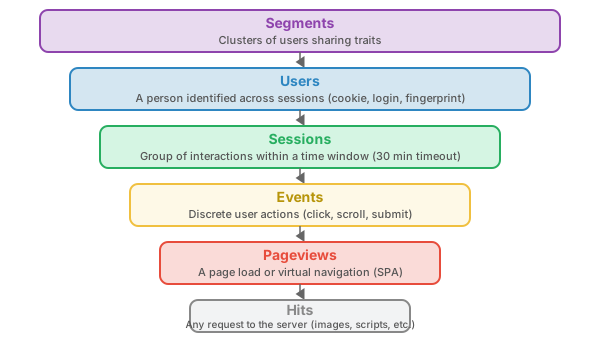
A simple example might be the choice of discussing hits or page views as opposed to actual outcomes on a site or app. As an example, you might inform the boss that the site had 1.5 million hits last month. If each page had ~75 assets on it for say images, fonts, CSS, JavaScript, and so on where the average visitor consumed 5 pages per visit and visited 3 times in a month. That would mean that each visitor on average generated (5 * 75)*3 = 1,125 hits in a month, which is a mere 1,133 visitors! Having just ~1000 visitors might get you fired, but over a million hits, why you need a raise!
Digging into data and letting the multitude of "truths" to be revealed is what you should do, but don't be surprised if motivated reasoning and political pressures can tempt you to shape narratives.
Let's walk through each level of this hierarchy from the bottom up, since each layer builds on the one below it.
Hits
A hit is the most granular unit of measurement — any single request from a client to a server. Every image, stylesheet, script, font, favicon, and HTML document generates a hit. In the early days of the web, hits were the only metric available because web server access logs recorded every request. Hits are easy to count (just parse the log) but almost entirely useless as a measure of user activity because a single page load can generate dozens or hundreds of hits depending on how many assets it references. In short, how you build can juice your hits up, but you also might find it to go download if you bundle for performance reasons.
Hits don't matter much for user behavior analysis, but they may still matter in one context: server capacity planning. If your server handles 10,000 hits per second before degrading, you need to know total hit volume. However, even there it may not be useful because a small object and a large object will result in vastly different capacity numbers.
Pageviews
A pageview is one level up from a hit — it represents the loading of a single HTML document (page). In traditional server-log analytics with multipage applications (MPA), a pageview is identified by filtering hits for HTML content types. In client-side analytics (like GA or our course project), a pageview is explicitly fired by the tracking script when a page loads.
Pageviews are more meaningful than hits because they approximate "a user looked at something," but they have their own problems:
- SPAs break the model: Single-Page Applications load one HTML document and then update content dynamically via JavaScript. A user navigating through 10 "pages" in a React app generates only 1 server-side pageview. Client-side analytics must fire "virtual pageviews" on route changes to compensate.TL;DR - this is fixable with work, but another example of the site versus app metaphor problems that plague the web.
- Pre-rendering and prefetching: Browsers may preload pages the user never actually views, inflating pageview counts. This is a great example of trade-offs where a performance optimization might have unintended analytical side effects.
- Bots and crawlers: Search engine crawlers, uptime monitors, and scrapers generate pageviews that look identical to human ones in server logs. The bot problem isn't limited to this and is something that is more and more important to address.
Events
An event is a discrete user action that occurs within a page: a click, a scroll, a form submission, a video play, a file download, a hover that triggers a tooltip. Events are where behavioral analytics gets interesting, because they capture what the user actually did, not just which pages they loaded.
The challenge with events is taxonomy — deciding what to track and what to name it. Without a consistent naming convention, you end up with click_button, button_click, btn_clicked, and Click - Button all meaning the same thing. Event taxonomies are a data governance problem, not a technical one. However, to be reaslistic that is jumped ahead as you probably could say that the events at the lowest level start with the events that HTML-JavaScript have defined (click, scroll, load,mouseover, etc.) and then go to custom events that the developer could define (chart:update, grid:sort, etc.) which ultimately are mapped to user experience ideas like add_to_cart, cta_clicked, etc. as mentioned above.
page_view. I do worry that letting GA beliefs drive things is a platform > protocol or standard idea and that the W3C or other standards body really ought to straigten out this jargon issue.Sessions
A session groups a user's pageviews and events into a single concept of a visit. Interestingly this session/visit concept has a bit of a challenge when it intersects with HTTP.
You should recall that HTTP is stateless, but it is also connectionless. It is difficult to know that the user is still around or not without building our own stateful mechanism, often using polling or a socket. The general approach is that the session times out, so to speak, if the user has not performed some activity within some given time period. The standard session timeout is 30 minutes of inactivity — if a user reads an article for 45 minutes without interacting, their next click starts a new session.
Session length defaults are simply a convention dating back to the early days of web analytics (Urchin/Google Analytics), and not a law of nature or formerly agreed upon concept Notice how session rules vary by tool:
- Google Analytics (GA4): 30 minutes of inactivity, or midnight, or new campaign parameter
- Adobe Analytics: Configurable (default 30 min), does not break at midnight
- Custom implementations: Whatever you code — our course project uses server-side sessionization with configurable timeouts
It is also possible to shape narrative with session length, tuning timeout to be short will of course up session counts!
Users
A user represents a person (ideally) identified across multiple sessions. The concept seems straightforward — "how many people use our site?" — but the technical reality is anything but. A "user" in analytics is not a person; it is an identifier: a cookie value, a login ID, a device fingerprint, or some combination. The gap between "identifier" and "person" is where most analytics data quality problems live. (I generally talk about this as an aspect of what he dubs the "identity problem of the internet" and something that is felt in many other ways online beyond analytics accuracy)
New vs. Returning Users
A new user is one whose identifier (cookie, user ID) was not previously seen. A returning user is one whose identifier was previously recorded. This sounds simple but is deeply unreliable:
- Clearing cookies makes a returning user appear "new"
- Using a different browser or device creates a second "new" user
- Private/incognito mode creates a "new" user every time
- ITP (Intelligent Tracking Prevention) which is used by Safari caps first-party cookie lifetime at 7 days in some contexts
Segments
A segment is a subset of users filtered by shared characteristics: device type, geographic location, traffic source, behavior pattern, or any combination. Segments are where analytics becomes actionable — aggregate numbers hide the story; segment-level analysis reveals it. If done well, we see analytics tying back to user-centered design thinking, where the segments map to the personas and their activities, as captured by user stories, hopefully will map to the next topic output.
Connecting the Hierarchy to Outcomes
This measurement hierarchy tells you what happened, but not whether it mattered to the organization (and hopefully the user). The missing piece is outcomes — the conversions, goals, and KPIs (Key Performance Indicators) that give meaning to the activity data. A million pageviews means nothing if none of them lead to a signup, a purchase, or a support question answered. Section 3 covers how organizations define and measure outcomes, but the connection is worth noting here: every level of the hierarchy becomes more useful when paired with an outcome metric.
- Hit-level: Rarely useful for outcomes (except: did the tracking beacon itself fire?)
- Pageview-level: Which pages appear in converting sessions vs. non-converting ones?
- Event-level: Did the user click "Add to Cart"? Did they complete the form? Events are the micro-conversions.
- Session-level: What is the conversion rate per session? How many sessions does it take before a user converts?
- User-level: What is the lifetime value of a user? Which acquisition channel produces users who convert?
- Segment-level: Which segments convert at higher rates? Where should you invest?
2. Engagement Metrics
How do you know if users are actually engaging with your content, or just loading pages and leaving? Engagement metrics attempt to measure the quality of a visit, not just the quantity.
Scroll Depth
Scroll depth measures how far down the page a user scrolls, typically reported as percentage quartiles (25%, 50%, 75%, 100%). The modern way to track this is with the Intersection Observer API, which fires callbacks when elements enter or leave the viewport:
// Track scroll depth with Intersection Observer
const markers = [25, 50, 75, 100];
markers.forEach(pct => {
  const el = document.getElementById(`scroll-${pct}`);
  if (!el) return;

  const observer = new IntersectionObserver((entries) => {
    entries.forEach(entry => {
      if (entry.isIntersecting) {
        // Send scroll depth event
        navigator.sendBeacon('/collect', JSON.stringify({
          event: 'scroll_depth',
          depth: pct,
          page: location.pathname
        }));
        observer.unobserve(entry.target); // Fire once
      }
    });
  }, { threshold: 0.5 });

  observer.observe(el);
});
The old approach — listening to the scroll event and calculating position with scrollTop / scrollHeight — is a performance disaster. The scroll event can fire hundreds of times per second. Intersection Observer is asynchronous and does not block the main thread. Understand that today the browser shares a single thread with user-level JavaScript, so it is a good idea to understand the impact of your code on the user's performance and experience. Poor or too much JavaScript that negatively impacts the user is a self-inflicated problem for too many modern web developers.
Time Metrics
Time-based engagement has multiple definitions, and confusing them leads to bad analysis:
| Metric | Definition | Measurement Method |
|---|---|---|
| Time on Page | Time between pageview and next navigation | Difference between consecutive page timestamps |
| Dwell Time | Time from SERP (Search Engine Results Page) click to return to SERP | Search engine measurement (not available to site owners). Interestingly, some of this data used to be available, but the retention of this data by Google and other search vendors is a concern for privacy and data protection regulations. |
| Attention Time | Time the page is visible and the user is active | Page Visibility API + interaction heartbeat |
These distinctions suggest the idea of an "engaged session" as opposed to just a session. Consider opening a tab, looking for a second, and moving to focus on another tab is quite different from a session where the user is engaged with the site or application.
In Google Analytics and engaged session is defined as a session that lasts more than 10 seconds, has a conversion event, or has 2+ pageviews. This is Google's attempt to replace bounce rate with something more meaningful.
Time Troubles
While time and engagement seem straightforward enough in practice, things can get a little confusing. To illustrate this, consider the following example of a session:
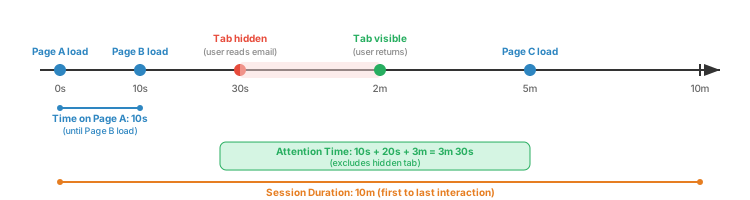
Notice the fundamental problem with time on page: it is measured as the gap between consecutive pageviews. For the last page in a session, there is no next pageview, so time on page is undefined (or zero). This means the most important page — the one where the user found what they wanted and left satisfied — often has no time measurement at all. Again, we are seeing strong awareness of the domain, and critical thinking is absolutely required to understand the meaning of the metrics. The next example, is one of the most notoriously abused metrics
Bounce Rate
Bounce rate is the percentage of sessions in which the user viewed only a single page and triggered no additional interaction events before leaving. In the older versions of Google Analytics, a "bounce" was strictly defined as a single-pageview session — the user arrived, saw one page, and left without clicking anything else. The formula was simple:
Bounce Rate = Single-page sessions / Total sessions
The new version of Google Analytics (GA4) changed the definition by inverting it. Instead of tracking bounces, GA4 tracks engaged sessions (sessions lasting >10 seconds, or with a conversion, or with 2+ pageviews). Bounce rate now is simply the inverse: 1 − engagement rate. This means the same user behavior can produce different bounce rates depending on which tool you use.
The concept matters because bounce rate was historically one of the most-reported metrics in web analytics — and one of the most misinterpreted. A high bounce rate is often treated as evidence that a page is "bad," but this conflates two very different scenarios:
- Satisfied bounce: User searches "what time does the pharmacy close," lands on your page, sees "closes at 9pm," leaves. One pageview, zero further interaction, 100% task success.
- Dissatisfied bounce: User clicks an ad promising a sale, lands on a page with no visible sale, leaves in frustration. One pageview, zero further interaction, 100% task failure.
Both register as identical bounces. Without additional signals (scroll depth, time thresholds, satisfaction surveys), bounce rate cannot distinguish success from failure. We return to this problem in detail in Section 12: Data Interpretation Pitfalls.
Click and Tap Patterns
Tracking where users click reveals navigation preferences, content interest, and usability problems. Click tracking records coordinates (for heatmaps), element identifiers, and timing. The analytically interesting patterns are not individual clicks but clusters: rage clicks (rapid repeated clicking on unresponsive elements), dead clicks (clicks on non-interactive elements users expected to be clickable), and ghost clicks (accidental taps on mobile from scrolling).
The key to moving on from sounding cool to knowing what we talk about requires us to be ok not knowing and be patient to find out why something is the way it is? Think about dead clicks are they dead or is this a touch device and the click is the user scrolling the page? Think about bounce it sounds reasonable that someone coming and bouncing away is a bad thing, but is it?
Sadly style slogan engineering and now analytics is somewhat the norm, not the exception. Viscreal slogans like rage click or technical posturing with acronyms (ITP, SERP, etc.) might feel cool or make one sound technical, but does everyone in the room know what it all means? If not, we are LARPing data-driven decisions, not living the idea of it.
3. Measuring Outcomes
Engagement metrics tell you what users do. Conversion metrics tell you whether what they did mattered to the organization.
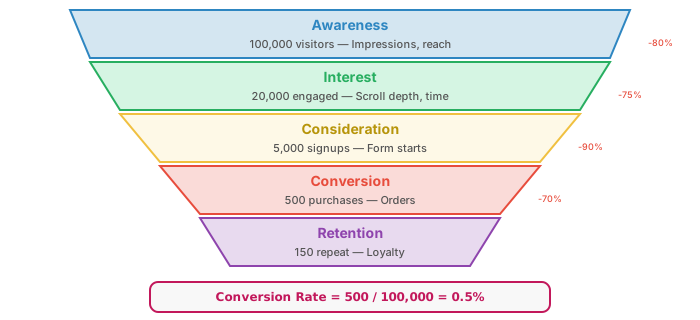
Conversions
A conversion occurs when a user completes a desired action. Conversions come in two flavors:
- Macro conversions: Primary business objectives — purchase, sign-up, subscription, application submission
- Micro conversions: Steps that indicate progress toward a macro conversion — adding to cart, watching a demo video, downloading a whitepaper, creating an account
KPIs vs. Vanity Metrics
A Key Performance Indicator (KPI) is a metric that is directly tied to a business objective and is actionable — you can change your behavior in response to it. A vanity metric feels good but does not inform decisions.
| Vanity Metric | Actionable KPI |
|---|---|
| Total pageviews | Pageviews per session (engagement depth) |
| Total registered users | Monthly active users (MAU) |
| Social media followers | Conversion rate from social traffic |
| App downloads | Day-7 retention rate |
| Email list size | Email click-through rate |
The point here is to point out that vanity metrics are required in some organizations where management is simply not tolerant of things that go against their predispositions. This type of motivated thinking is a bit too common even in some of the most powerful technical companies, so much so that you may hear about HiPPO issues and other stories of how data can't survive contact with management. It's a sad state of affairs when we try to bend measured reality to people's beliefs or feelings, but in my view, the (dis)allowance of this is a way to gauge the data maturity of an organization and should be something you look out for in your career.
Dark Patterns and Analytics Manipulation
A dark pattern (Wikipedia)) is a user interface design that deliberately manipulates users into taking actions they did not intend or would not choose if they fully understood what was happening. Dark patterns are relevant to behavioral analytics for two reasons:
- they are used to inflate analytics metrics
- analytics data can obscure their effects by making manipulated outcomes look like genuine user interest.
Common dark patterns that directly juice analytics numbers:
| Dark Pattern | How It Works | Metric It Inflates |
|---|---|---|
| Confirmshaming | The decline option is worded to make the user feel guilty: "No thanks, I don't want to save money" | Email signups, conversion rate |
| Forced continuity | Free trial silently converts to paid subscription; cancellation is deliberately difficult to find | Subscription count, retention rate |
| Roach motel | Easy to sign up, extremely hard to delete account or unsubscribe (multi-step, phone call required, hidden settings) | Registered users, MAU |
| Misdirection | Visual hierarchy draws attention to the option the company wants; the user's preferred option is grayed out or smaller | Upsell conversion, add-on attachment rate |
| Trick questions | Double negatives or confusing checkbox language: "Uncheck this box if you prefer not to not receive emails" | Opt-in rate, email list size |
| Sneak into basket | Additional items (insurance, warranties, donations) pre-added to cart during checkout | Average order value, attachment rate |
| Disguised ads | Ads styled to look like content or navigation links; "Download" buttons that are ads, not the actual download | Click-through rate, pageviews |
| Infinite scroll / pagination games | Content split across unnecessary pages, or auto-loading prevents the user from ever reaching the footer | Pageviews per session, time on site, scroll depth |
The analytics problem is that these patterns produce metrics that look like success. An email list that grows 40% in a quarter looks impressive in a dashboard — but if it grew through confirmshaming and pre-checked boxes, the list is full of disengaged subscribers who will never open an email. The conversion rate went up; the actual business value did not.
4. Attribution
Users rarely convert on their first visit. They might see a social media post, search up your brand a week later, click a retargeting ad, and finally convert after receiving an email coupon. Attribution is the process of assigning credit for a conversion to the touchpoints that influenced it.
UTM Parameters
The foundation of campaign attribution is somewhat de facto based upon UTM parameters These URL query parameters tag inbound links so you can identify which campaigns drive traffic:
utm_source— Where the traffic comes from (google, newsletter, facebook)utm_medium— The marketing medium (cpc, email, social)utm_campaign— The specific campaign name (spring_sale, product_launch)utm_term— Paid search keywordutm_content— Differentiates ad variants (banner_a, sidebar_link)
Attribution Models
When a conversion follows multiple touchpoints, how do you distribute credit? Each model tells a different story:
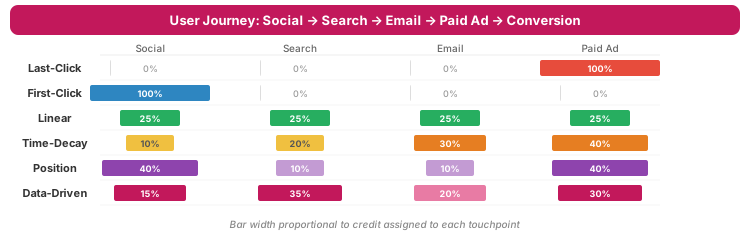
Google moved GA4 to data-driven attribution as the default in 2023, using machine learning to estimate each touchpoint's contribution. This sounds sophisticated, but it is a black box — you cannot inspect or validate the model's reasoning. This is a sad problem with 3rd party analytics in general, where there is a bit of secret sauce behind that data that guides your online efforts. My general belief is that assumptions are usually required in life, but knowing what assumptions are in play is essential.
5. Attribution Challenges
Even if you accept that attribution models are imperfect, the practical reality is worse than the theoretical limitations suggest.
Cross-Device Tracking
A user browses on their phone during lunch, researches on their work laptop in the afternoon, and then goes home and purchases on their home desktop. Without a login-based identity, these are three separate "users" in your analytics. Cross-device tracking requires either:
- Deterministic matching: User logs in on multiple devices (only works for authenticated sites)
- Probabilistic matching: Statistical inference from IP addresses, device fingerprints, and behavioral patterns (inherently fuzzy and privacy-invasive)
ITP and Cookie Restrictions
Apple's Intelligent Tracking Prevention (ITP) in Safari limits first-party cookies set via JavaScript to a 7-day lifetime (24 hours when the referring domain is classified as a tracker). Firefox's Enhanced Tracking Protection and Chrome's evolving restrictions create a landscape where analytics cookies are increasingly ephemeral. This starts to cross over into regulatory and social concerns.
Walled Gardens
Facebook, Google, Amazon, and other platforms each operate their own measurement systems in isolation. When a user sees a Facebook ad and then clicks a Google ad before converting, both platforms may claim full credit for the same conversion.
The Third-Party Cookie Apocalypse
Third-party cookies — the backbone of cross-site tracking and retargeting — are being phased out. Safari and Firefox already block them. Chrome has wavered but is restricting them. The advertising industry is scrambling for alternatives:
- Privacy Sandbox / Topics API: Browser categorizes user interests locally, shares topics (not identity) with advertisers
- Server-side tracking: Moves tracking from client to server (see Section 7), bypassing browser restrictions
- First-party data strategies: Encouraging logins and email collection to build deterministic identity
- Contextual advertising: Targeting based on page content rather than user identity (a return to pre-cookie methods). Recall the Professor's discussion of magazine ad concepts and how that worked to see the cyclical nature of advertising approaches.
Incrementality Testing
The gold standard for measuring whether a channel actually causes conversions (rather than just being present before them) is an incrementality test: randomly withhold ads from a holdout group and compare conversion rates. If the holdout group converts at 4% and the ad-exposed group at 4.2%, the ad's true incremental lift is only 0.2 percentage points — not the 4.2% the ad platform claims. Very few organizations run these tests because the results are often sobering.
6. Google Analytics Dominance
Google Analytics (GA) holds approximately 85% market share among websites using an analytics tool. Understanding why this monopoly exists and what it means is essential context for anyone working with web analytics.
History: From Urchin to GA4
Google acquired Urchin Software in 2005 (A San Diego firm!) and rebranded it as Google Analytics. The "UTM" in UTM parameters stands for Urchin Tracking Module — a relic of this origin. The free tier was a deliberate strategy to (1) make web analytics ubiquitous, (2) train a generation of marketers on Google's terminology, and (3) feed data into Google's advertising ecosystem.
The evolution tells a story about data ownership:
- Urchin (pre-2005): Software you installed on your server — you owned the data
- GA Classic (2005–2012): SaaS model — Google hosts and processes your data
- Universal Analytics (2012–2023): Session-based model, deep Google Ads integration
- GA4 (2020–present): Event-based model, machine learning, even deeper Ads integration, controversial forced migration
The Conflict of Interest
Google is simultaneous:
- the largest seller of online advertising
- the most popular analytics platform for measuring ad effectiveness
- the dominant search engine that controls organic traffic.
This triple role creates inherent conflicts:
- GA4's attribution modeling defaults favor Google Ads touchpoints
- Google controls how organic search data is reported (or not reported — keyword data has been "(not provided)" since 2011)
- The free tier creates switching costs that benefit Google's ad business
Given some abuses in the space, the observation of online system enshitificationpopularized by Cory Doctorow, and most importantly the effects of "splinternet" from political and regulatory realities such as Europe's enforcement of GDPR some organizations are looking more seriously at GA alternatives. A few are listed here.
Alternatives
| Tool | Model | Key Differentiator |
|---|---|---|
| Matomo | Open source, self-hosted or cloud | Full data ownership, GDPR-friendly, GA feature parity |
| Plausible | Open source, cloud-first | Privacy-first, no cookies, lightweight (<1KB script), simple UI |
| PostHog | Open source, self-hosted or cloud | Product analytics + session replay + feature flags, developer-oriented |
| Amplitude | SaaS (free + paid) | Product analytics focus, behavioral cohorts, strong event modeling |
| Fathom | SaaS (paid) | Privacy-focused, simple, EU-hosted option |
| Adobe Analytics | Enterprise SaaS | Deep segmentation, data warehouse integration, enterprise scale |
7. Tag Managers & Instrumentation
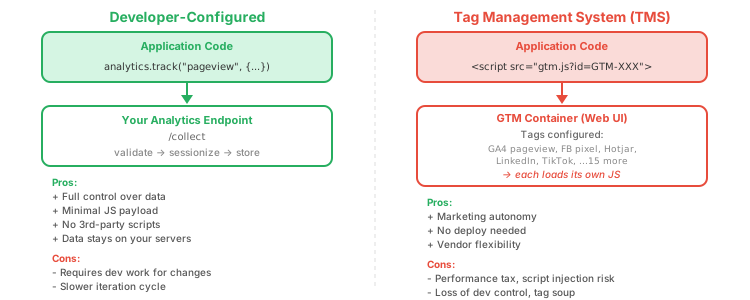
A tag manager is a tool that lets non-developers add, modify, and remove tracking scripts ("tags") on a website without deploying code. Google Tag Manager (GTM) is the most popular, but many others exist.
The Appeal
Marketing teams want to track new events, add conversion pixels, and instrument A/B tests now — not after the next sprint and they certainly would prefer not to go talk to the tech team to get it done. Tag managers solve this by decoupling tracking instrumentation from application deployment. A marketer can log into GTM, add a Facebook pixel, configure a trigger for button clicks, and publish — all without a developer touching code.
Developer-Configured vs. TMS
Server-Side Tag Management
A newer approach moves tag execution from the browser to a server-side container. The browser sends a single request to your server, which then fans out to vendor APIs. This improves client performance and gives you data control, but adds infrastructure complexity and cost. It also has a privacy implication: server-side tracking can bypass browser privacy protections like ITP and ad blockers, which is precisely why privacy advocates are concerned about it.
8. A/B Testing & Optimization
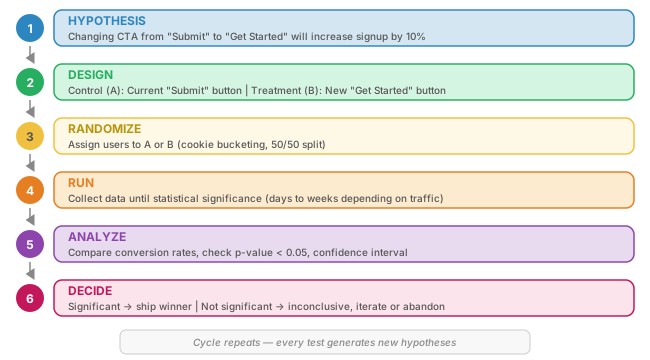
A/B testing attempts to apply the scientific method
to web design and product decisions. Instead of debating whether a green or blue button converts better, you show each version to a random subset of users and measure the outcome. The winner is what leads to the most outcomes! It's just science?
The Process
Client-Side vs. Server-Side Splitting
Client-side: JavaScript modifies the DOM after page load. Fast to set up, but may cause a "flicker problem" — users see the original version flash before the test variation loads. Examples: Optimizely, Google Optimize (deprecated), VWO.
Server-side: The server decides which variant to render before sending HTML. No flicker, full control, but requires developer integration. Tools: LaunchDarkly, Split.io, custom feature flag systems.
Cookie-Based Bucketing
The simplest A/B implementation assigns users to groups using a cookie:
// Simple A/B bucketing
function getVariant(testName) {
  const cookieKey = `ab_${testName}`;
  const existing = document.cookie
    .split('; ')
    .find(c => c.startsWith(cookieKey + '='));

  if (existing) return existing.split('=')[1];

  // Assign randomly
  const variant = Math.random() < 0.5 ? 'control' : 'treatment';
  document.cookie = `${cookieKey}=${variant}; path=/; max-age=${30 * 86400}`;
  return variant;
}

// Usage
const variant = getVariant('cta_text');
if (variant === 'treatment') {
  document.querySelector('.cta-button').textContent = 'Get Started';
}
Multivariate Testing (MVT)
MVT tests multiple elements simultaneously (headline, image, button color). A full factorial MVT with 3 headlines × 2 images × 2 buttons = 12 combinations, each needing sufficient sample size. MVT requires enormous traffic volumes and is generally impractical outside high-traffic sites. It also begs some very careful experiment design lest you jump to the wrong conclusions.
9. Session Replay Up Close
Session replay tools (FullStory, Hotjar, LogRocket, PostHog) let you "watch" recordings of user sessions. But these are not screen recordings — they are DOM reconstructions built from serialized page state and mutation events. This section builds on the Analytics Overview introduction to session replay in Section 13.
How Replay Works
The replay pipeline has three stages:
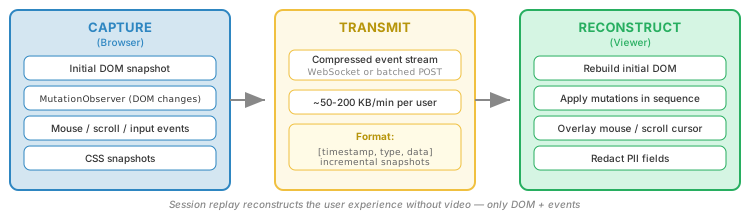
The core technology is the MutationObserver API. Libraries like rrweb (open source) serialize the initial DOM as a virtual DOM tree, then record every mutation (element added, removed, attribute changed, text changed) with timestamps. On playback, mutations are replayed in sequence to reconstruct the visual experience.
Fidelity Challenges
- CSS-in-JS: Frameworks like styled-components generate class names at runtime — replay must capture computed styles, not just class names
- Shadow DOM: Web components with shadow roots are invisible to standard DOM observation; replay tools need explicit shadow DOM support
- Canvas/WebGL: Drawing operations cannot be reconstructed from DOM mutations; some tools take periodic canvas snapshots instead
- Iframes: Cross-origin iframes are sandboxed and cannot be observed; same-origin iframes require separate observation
From Replay to Heatmaps
Individual session replays is more qualitative data. Aggregating interaction data across thousands of sessions produces quantitative visualizations:
- Click heatmaps: Overlay of click density on a page screenshot
- Scroll maps: Color gradient showing how far users scroll (100% at top fading to 0%)
- Attention maps: Combination of scroll position and time, showing where users actually spend attention
- Rage click detection: Highlighting elements that receive rapid repeated clicks — strong signal of user frustration
- Dead click detection: Identifying non-interactive elements that users click expecting interactivity
10. Analytics for Usability
Behavioral analytics is not just for marketing. It is a powerful tool for verifying usability — confirming (or contradicting) what qualitative UX research suggests.
The HEART Framework
Google's HEART framework provides a structured approach to measuring user experience at scale:
| Dimension | What It Measures | Example Signals | Example Metric |
|---|---|---|---|
| Happiness | User satisfaction, attitudes | Survey responses, NPS, ratings | CSAT score after task completion |
| Engagement | Depth and frequency of use | Session duration, pages/session, return visits | 7-day active users / total users |
| Adoption | New users picking up a feature | Feature first-use events, signup rate | % of users who tried feature X within 7 days |
| Retention | Users coming back over time | Return visits, churn rate, cohort curves | Day-30 retention rate |
| Task Success | Can users accomplish their goals? | Task completion rate, error rate, time-to-complete | % of checkout starts that result in purchase |
Before/After Redesign Measurement
When you redesign a page or flow, analytics provides objective evidence of improvement (or regression):
- Baseline period: 2–4 weeks of data before the change
- Post-launch period: Same duration after the change
- Control for seasonality: Compare same day-of-week patterns
- Watch for regressions: A redesign that improves conversion rate but increases support tickets may have created a new usability problem
11. Voice of the Customer
Behavioral analytics captures what users do. Voice of the Customer (VoC) captures what they think and feel. Together they form a complete picture — the quantitative "what" and the qualitative "why."
The Quant/Qual Matrix
User research methods can be mapped along two axes: behavioral vs. attitudinal, and quantitative vs. qualitative.
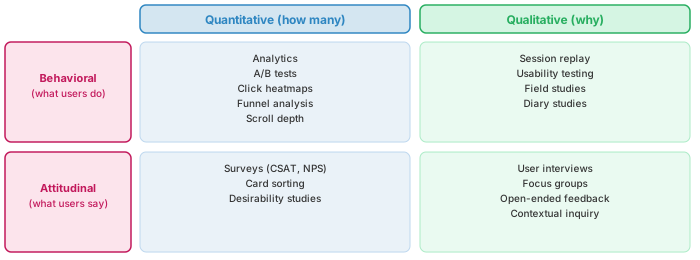
The most common mistake is staying in one quadrant. Organizations that only look at analytics (top-left) know what happened but not why. Organizations that only interview users (bottom-right) know what users say but not what they actually do. The strongest insights come from combining quadrants.
VoC Methods
| Method | Timing | Scale | What It Reveals |
|---|---|---|---|
| On-page survey | During visit | High (1000s) | "Did you find what you were looking for?" — task success from user's perspective |
| Exit survey | On exit intent | Medium (100s) | Why users leave without converting; abandonment reasons |
| NPS (Net Promoter Score) | Post-interaction | High (1000s) | "Would you recommend?" — loyalty proxy (0–10 scale) |
| CSAT (Customer Satifisfaction Score) | Post-task | High (1000s) | Satisfaction with specific interaction (1–5 scale) |
| Feedback widget | Any time | Low (10s–100s) | Self-selected issues; biased toward extremes (very happy or very angry) |
| User interview | Scheduled | Low (5–15) | Deep understanding of mental models, workflows, unmet needs |
| Diary study | Longitudinal | Low (10–30) | Behavior over time; habits, context, emotional journey |
| Session + survey hybrid | During visit | Medium | Links subjective feedback to objective behavior for the same session |
The internet has only amplified this problem. For example, the rise of social media has led to a proliferation of metrics that are often used inappropriately or without proper context. Additionally, the rise of big data and the rise of machine learning and AI has led to a proliferation of metrics that are often used to make decisions without proper understanding of the underlying algorithms.
12. Data Interpretation Pitfalls
Collecting behavioral data is the easy part. Interpreting it correctly is where organizations consistently fail. The following pitfalls are not edge cases — they are the default mistakes that most analytics practitioners make.
The Unique Visitor Illusion
The same person routinely appears as multiple "unique" users: different browser at work, phone on the commute, tablet at home, private browsing session for gift shopping, and a fresh identity after clearing cookies. Studies consistently show that cookie-based unique visitor counts are inflated by 20–40%. When someone reports "we have 100,000 monthly unique visitors," the actual number of people is more likely far less 80k, 60k, 40k, it could be quite different!
Inferring Intent from Clickstream
A user clicks on a product page. Did they want to buy it? Maybe. Or maybe they:
- Clicked by accident (especially on mobile)
- Were looking for something else and thought this link might lead there
- Wanted to check the price for comparison, with no intent to buy
- Clicked and immediately hit Back — a signal of disinterest, not interest
Clicks are ambiguous. Treating every click as a signal of interest is a category error.
Single-Metric Thinking
Optimizing one metric in isolation almost always degrades others:
- Reducing bounce rate by forcing users through interstitial pages — bounce rate drops, but user satisfaction plummets
- Increasing pageviews by splitting articles across multiple pages ("slideshows") — pageviews rise, but attention time per page drops. This is often strongly associated with trying to juice view counts and is an example of a dark UX pattern
- Maximizing time-on-site by making navigation confusing — time goes up because users cannot find what they need, again a dark UX pattern (think Netflix screens)
Averages Hiding Distributions
Hopefully, we know the danger of averages as opposed to distribution. Recall the Prof's average net worth joke (Gates, him, and a student). The average issue is alive and well in behavioral analytics. For example, an average session duration of 2 minutes and 30 seconds sounds reasonable. But the actual distribution is often bimodal: 60% of sessions are under 10 seconds (bouncers), and 40% are 5+ minutes (engaged users). The "average" of 2:30 describes nobody. Always look at distributions, not averages.
Correlation vs. Causation
Pages with high time-on-page are not necessarily "good" pages. They might be confusing pages where users struggle to find information. Pages with high exit rates are not necessarily "bad" pages — they might be the page that successfully answered the user's question. Without additional context (task completion, satisfaction surveys), behavioral metrics are ambiguous.
The Denominator Problem
Conversion rate depends entirely on who you count in the denominator. A checkout conversion rate of 3% could be:
- 3% of all visitors (including blog readers who never intended to buy)
- 15% of product page viewers (a more meaningful denominator)
- 65% of cart additions (measuring checkout friction specifically)
The same conversion event produces wildly different rates depending on the denominator. When comparing conversion rates across companies or benchmarks, the denominator is rarely the same.
Simpson's Paradox
A metric can go up in every segment but down overall. This sounds impossible but happens regularly when segment sizes shift:
| Segment | Week 1 Conv Rate | Week 2 Conv Rate | Trend |
|---|---|---|---|
| Mobile (small volume) | 2% (of 1,000) | 3% (of 8,000) | Up |
| Desktop (large volume) | 8% (of 9,000) | 9% (of 2,000) | Up |
| Overall | 7.4% (of 10,000) | 3.6% (of 10,000) | Down |
Both segments improved, but overall conversion dropped because the mix shifted toward the lower-converting segment (mobile). Aggregate metrics without segment decomposition are misleading.
13. JavaScript Availability
Behavioral analytics overwhelmingly depends on client-side JavaScript. What happens when JavaScript is not available?
The Facts
The UK Government Digital Service (Gov.uk) conducted a widely-cited study finding that approximately 1.1% of users did not receive JavaScript-enhanced pages. But the reasons are critical — and routinely mischaracterized:
| Cause | Frequency | Nature |
|---|---|---|
| Network interruption (JS failed to download) | Most common | Delivery failure |
| Corporate proxy/firewall stripping scripts | Common in enterprise | Delivery failure |
| Content Security Policy blocking inline/external JS | Varies | Configuration failure |
| Prior script error breaking subsequent scripts | Common | Cascading failure |
| Browser extension blocking scripts (ad blocker) | ~15–30% of desktop users | Deliberate (potentially more common than believed) |
| User deliberately disabled JS | Negligible (<0.1%) | Deliberate |
Implications for Analytics
- Client-side analytics never captures 100% of traffic. Server-side logs (access logs, application logs) remain necessary for completeness.
- Ad blockers affect analytics tools too. uBlock Origin blocks Google Analytics, Facebook Pixel, and most tracking scripts by default. First-party analytics endpoints (like our course project's
/collect) are much harder to block. - Progressive enhancement applies to analytics. Start with server-side measurement (you always have access logs), layer on client-side for richer behavioral data, and accept that the two will never fully agree.
14. Behavioral Data Quality
Every data source has blind spots. Behavioral analytics data is particularly susceptible to quality issues because it deeply depends on client-side collection, user identity, and consent. This section builds on the data quality discussion in Analytics Overview Section 16.
Identity Resolution Failures
Connecting multiple sessions to the same user requires identity resolution. Common approaches and their failure modes:
- Cookie-based: Fails when cookies are cleared, expire (ITP), or are blocked. A single user becomes multiple "new" users.
- Login-based: Only works when users are authenticated. Anonymous browsing before login creates orphaned sessions.
- Fingerprinting: Unstable (browser updates change fingerprints), privacy-hostile (banned under GDPR in many interpretations), and increasingly blocked by browsers.
Session Stitching
When a user logs in mid-session, you need to retroactively connect their anonymous pre-login activity to their authenticated identity. This is called session stitching. It sounds simple, but it creates data pipeline complexity: you must rewrite historical records, update aggregations, and handle the case where the anonymous session was already attributed to a different user.
Consent-Biased Sampling
Under GDPR and similar regulations, analytics often requires consent. Users who accept cookies are systematically different from users who reject them. Consent-accepting users tend to be:
- Less privacy-conscious (and therefore may behave differently online)
- More likely to accept defaults (less engaged with the page)
- From demographics that skew toward consent acceptance
Survivorship Bias in Funnels
Funnel analysis only shows users who entered the funnel. It cannot show users who should have entered but were blocked by a bug, a confusing CTA, or a page that failed to load. The most important drop-off might be before step 1.
Client Clock Unreliability
Client-side timestamps depend on the user's device clock, which can be wrong by minutes, hours, or even days. This affects:
- Session duration calculations
- Event ordering (did the click happen before or after the page load?)
- Time-based analysis (hour-of-day patterns corrupted by timezone and clock errors)
Server-side timestamps are more reliable but measure arrival time, not interaction time. Best practice: record both and use server time for ordering, client time for duration calculations.
15. GDPR & Behavioral Privacy
Behavioral analytics collects detailed records of what people do online. Privacy regulation exists because this data, in aggregate, creates a surveillance infrastructure. This section builds on the privacy discussion in Analytics Overview Section 9.
Consent Banner Reality
GDPR requires informed, specific, freely-given consent for non-essential cookies and tracking. In practice, consent banners have become a dark pattern battlefield:
- "Accept All" button is prominent and colored; "Reject" is hidden or absent — violates GDPR's requirement for equally easy acceptance and rejection
- Pre-checked boxes — explicitly illegal under GDPR but still common
- Cookie walls ("accept tracking or leave") — prohibited in most EU interpretations
- Confusing language — "We value your privacy" followed by 47 "legitimate interest" toggles
- Consent theater — banner appears, user clicks "reject," tracking fires anyway
Depth vs. Data Minimization
GDPR's principle of data minimization requires collecting only what is necessary for a stated purpose. This directly conflicts with behavioral analytics' desire for maximum depth:
| Analytics Goal | Data Needed | Minimization Tension |
|---|---|---|
| Page popularity | Page URL + count | Low — no personal data needed |
| User journeys | Session-level page sequence | Medium — requires session identity |
| Cross-session behavior | Persistent user ID | High — requires persistent tracking |
| Session replay | Full DOM + interactions | Very high — captures everything on screen |
Privacy-Preserving Alternatives
- Cookie-less analytics: Tools like Plausible and Fathom use daily-rotating hashes of IP + User-Agent to count unique visitors without persistent identifiers. No cookie banner required in most EU interpretations.
- Differential privacy: Adding calibrated noise to aggregated data so individual records cannot be extracted. Apple uses this for keyboard and emoji analytics.
- On-device processing: Chrome's Privacy Sandbox / Topics API categorizes user interests on the device, sharing only aggregated topics with advertisers instead of browsing history.
- Aggregation thresholds: Only reporting data when the group size exceeds a minimum (e.g., no metrics for segments smaller than 50 users).
Server-Side Tracking: The Privacy End-Run
As browsers restrict client-side tracking, organizations are moving tracking server-side. Instead of the browser sending data to 15 vendor endpoints, it sends one request to your server, which forwards data to vendors via server-to-server API calls. This bypasses ITP, ad blockers, and CSP restrictions — which is precisely why privacy advocates see it as an end-run around user protections.
16. Data Lakes, Warehouses, CDPs
When analytics outgrows a single tool — when you need to combine web analytics with CRM data, transaction data, support tickets, and advertising spend — you need data infrastructure.
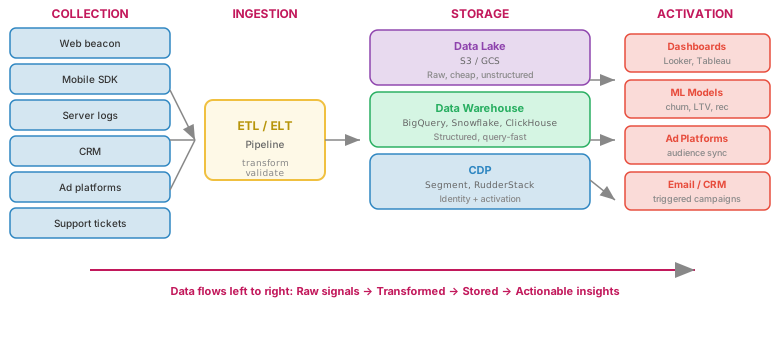
The Modern Analytics Data Flow
Key Concepts
- Data Lake: Stores raw, unstructured data cheaply (S3, Google Cloud Storage, Azure Blob). Schema-on-read — you define the structure when you query, not when you store. Good for archival and exploration; bad for fast queries.
- Data Warehouse: Stores structured, processed data optimized for fast analytical queries (BigQuery, Snowflake, ClickHouse, Redshift). Schema-on-write — data is cleaned and structured on ingestion. This is where analysts and dashboards live.
- ELT (Extract, Load, Transform): The modern approach: extract data from sources, load it raw into the warehouse, and transform it with SQL inside the warehouse. Replaced older ETL (transform before loading) because warehouse compute is now cheap enough to handle transformation.
- CDP (Customer Data Platform): Collects data from all touchpoints, resolves user identity, and provides a unified user profile that can activate across channels (email, ads, site personalization). Segment and RudderStack are examples. The promise is a "360-degree customer view"; the reality is identity resolution remains hard.
The "360-Degree View" Promise
Every CDP and data platform vendor promises a single, unified view of each customer. The reality:
- Identity resolution across channels is 60–80% accurate at best
- Data freshness varies by source (real-time web data vs. daily CRM exports vs. weekly ad reports)
- Privacy regulations may prohibit joining certain data sets
- The infrastructure cost of maintaining a real-time unified profile is substantial
17. The Privacy Abuse Trajectory
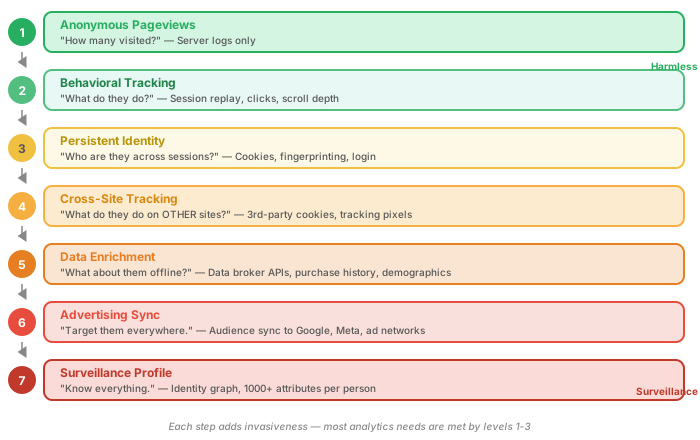
This section is the capstone cautionary tale. The same technologies that enable product analytics — event tracking, identity resolution, data warehousing — also enable a surveillance advertising infrastructure that most users do not understand and did not meaningfully consent to.
The Escalation Ladder
The Data Broker Ecosystem
Data brokers aggregate information from public records, purchase histories, loyalty programs, app SDKs, and web tracking into profiles that are sold to advertisers, insurers, employers, landlords, and law enforcement:
- Acxiom (now LiveRamp): Profiles on ~2.5 billion people globally, with thousands of data points per person
- Oracle Data Cloud (Bluekai): Tracks browsing behavior across millions of sites via tracking pixels
- Clearview AI: Scraped billions of social media photos for facial recognition, sold to law enforcement
- Location data brokers: Buy GPS data from weather apps, prayer apps, and games to track physical movements
"Creepy Ads"
The most visible symptom of this infrastructure is the experience of seeing an ad for something you only discussed verbally, or searched for once in a private browser. The explanation is rarely "your phone is listening" and almost always "the data broker ecosystem is more extensive than you realized." Retargeting pixels, email-based audience matching, and household-level IP targeting combine to create an uncanny tracking experience that erodes user trust in the entire web.
18. Choosing Your Analytics Stack
There is no single "best" analytics tool. The right choice depends on your context:
| Factor | Simple / Privacy-First | Product Analytics | Enterprise / Full Stack |
|---|---|---|---|
| Site type | Blog, marketing site, docs | SaaS app, marketplace | Large e-commerce, media |
| Tool examples | Plausible, Fathom, Umami | PostHog, Amplitude, Mixpanel | Adobe Analytics, GA4 + BigQuery, custom |
| Budget | $0–$20/mo | $0–$2,000/mo | $10,000+/mo |
| Setup complexity | Single script tag | Event taxonomy + SDK integration | Data warehouse + ETL + team |
| GDPR stance | Cookie-free, no consent needed | Consent required for full features | DPA + legal review + consent management |
| Key capability | Pageviews, referrers, basics | Funnels, cohorts, retention, feature usage | Attribution, segmentation, data integration |
Build vs. Buy
The CSE 135 course project occupies a useful position in this spectrum: you build a minimal analytics pipeline from scratch (collector, sessionizer, storage, API, dashboard). This is not because building your own analytics tool is practical for production use — it is because building it teaches you what the commercial tools do and where their limitations lie.
navigator.sendBeacon() drops data silently if the payload is too large. When you build a sessionizer, you confront the arbitrary nature of the 30-minute timeout. When you build a dashboard, you realize how easy it is to present misleading aggregations. This understanding makes you a more critical consumer of commercial analytics tools — and a more honest presenter of data.
19. LLMs and the Possibility of a Zero-Click Future
Everything on this page assumes a user visits your site. But what happens when they never arrive at all?
The Zero-Click Problem
A zero-click interaction occurs when a user gets their answer without clicking through to any website. This is not new — Google has been providing direct answers in search results (featured snippets, knowledge panels, "People also ask") for years. But LLM-powered interfaces (ChatGPT, Google AI Overviews, Claude, etc.) have dramatically accelerated the trend by synthesizing answers from multiple sources and presenting them as conversational responses.
The behavioral analytics implications are severe:
- No pageview, no event, no session. If the user's question is answered by an LLM that synthesized your content, you have zero visibility into that interaction. Your analytics shows nothing — not a bounce, not a short visit, literally nothing.
- Referrer data disappears. Even when an LLM provides a citation link, users rarely click it. Your referral reports show declining organic search traffic, but you cannot tell whether that is because fewer people need your content or because an LLM is serving it on your behalf without attribution.
- The funnel's top vanishes. Awareness and interest — the broad upper stages of the marketing funnel — are the stages most affected. Users who would have discovered your brand through informational searches now get their answer from an AI and never learn you even exist.
- Content ROI becomes unmeasurable. Organizations invest in content (blog posts, documentation, guides) partly because it drives organic traffic that can be measured and attributed. When LLMs consume that content and serve it directly, the investment still has impact — but no analytics system can measure it.
Precedent: Google News and Journalism
This dynamic is not hypothetical — it has already played out in journalism. Google News and similar aggregators display headlines, summaries, and sometimes substantial excerpts from news articles. Users scan the summary, get the gist, and move on without clicking through to the publisher's site. The result:
- Publishers see traffic from aggregators, but it is shallow — high bounce rates, low engagement, minimal ad revenue per visit
- The aggregator captures the user's attention and the advertising opportunity; the publisher bears the cost of producing the content
- Over time, publishers lose the direct audience relationship that their analytics was built to measure
LLMs repeat this pattern at larger scale. The difference is that Google News at least sent some click traffic. An LLM that synthesizes your content into a conversational answer may send none.
What This Means for Behavioral Analytics
The entire behavioral analytics apparatus described on this page — the visitation model, engagement metrics, conversion funnels, attribution — assumes that user interest manifests as a visit. When interest is satisfied off-site by an LLM, the model has a structural blind spot:
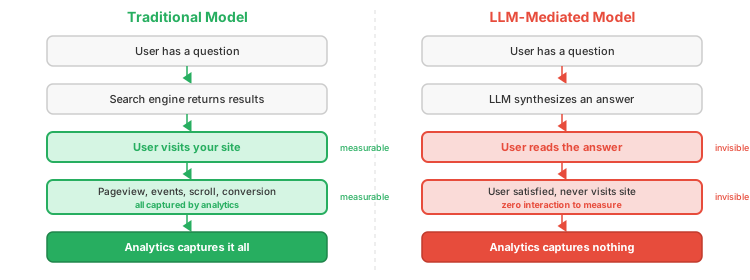
This creates a troubling asymmetry: the users you can measure are increasingly an unrepresentative sample. They are the users who needed something an LLM could not provide — a transaction, an interactive tool, a complex multi-step process. The informational users, the ones in the awareness and consideration stages, are disappearing from your data entirely.
Emerging Responses
The industry is grappling with this shift, but solutions are nascent:
- LLM referral tracking: Some AI search products (Perplexity, Bing Chat) include source links. Monitoring referral traffic from these sources is a start, but click-through rates are low.
- Brand mention monitoring: Tracking whether your brand, product, or content is cited in LLM responses — essentially PR/media monitoring adapted for AI outputs.
- Server-side content access logs: Monitoring crawler and AI bot access patterns in server logs. If an LLM's training or retrieval system fetches your pages, you can at least measure that access, even though the end user never arrives.
- Direct relationship building: Email lists, logged-in experiences, and community membership create measurement opportunities that do not depend on organic search. This is partly why every site now aggressively pushes email signups — it is a hedge against disappearing referral traffic.
- Rethinking attribution entirely: If "awareness" happens inside an LLM, traditional first-touch attribution is meaningless. New models may need to account for "AI-mediated awareness" as a channel — one that is, by definition, unmeasurable with current tools.
20. Summary
This page covered the behavioral and product side of web analytics — the practices, tools, and pitfalls of measuring what users do and acting on that understanding.
Key Terms & Concepts
| Term | Definition |
|---|---|
| Hit | Any single HTTP request from client to server (images, scripts, HTML). The most granular and least useful behavioral unit. |
| Pageview | The loading of one HTML document. In SPAs, must be fired as a "virtual pageview" on route change. |
| Event | A discrete user action within a page (click, scroll, form submit, video play). GA4 treats everything — including pageviews — as events. |
| Session | A group of interactions within a time window, typically ending after 30 minutes of inactivity. |
| User (analytics) | An identifier (cookie, login ID, fingerprint) intended to represent a person. The gap between "identifier" and "person" is where data quality problems live. |
| Segment | A subset of users filtered by shared characteristics (device, location, behavior, source). Where analytics becomes actionable. |
| Bounce rate | Percentage of single-page sessions with no further interaction. GA4 redefines it as 1 − engagement rate. Widely reported, widely misunderstood. |
| Engaged session | GA4 concept: a session lasting >10s, or with a conversion event, or with 2+ pageviews. Intended to replace bounce rate. |
| Scroll depth | How far down a page a user scrolls, typically measured in quartiles (25/50/75/100%) via Intersection Observer. |
| Time on page | Time between consecutive pageview timestamps. Undefined for the last page in a session. |
| Dwell time | Time from SERP click to SERP return. Measured by the search engine, not available to site owners. |
| Attention time | Time the page is visible and the user is active. Measured via Page Visibility API + interaction heartbeat. |
| Rage click | Rapid repeated clicking on an unresponsive element. Strong signal of user frustration. |
| Dead click | Click on a non-interactive element the user expected to be clickable. Signals a design/affordance problem. |
| Conversion | Completion of a desired user action. Macro conversions are primary objectives (purchase); micro conversions are progress indicators (add to cart). |
| KPI | Key Performance Indicator — a metric tied to a business objective that is actionable. Contrast with vanity metrics. |
| Vanity metric | A metric that feels good but does not inform decisions (e.g., total pageviews, total registered users). |
| Funnel | A sequence of steps a user takes toward a conversion. Each step narrows the population; drop-off rates reveal friction points. |
| UTM parameters | Query parameters (utm_source, utm_medium, utm_campaign, etc.) that tag inbound links for campaign attribution. "UTM" = Urchin Tracking Module. |
| Attribution model | A rule or algorithm for distributing conversion credit across marketing touchpoints (last-click, first-click, linear, time-decay, position-based, data-driven). |
| Incrementality test | A holdout experiment that measures the causal impact of a channel by comparing conversion rates between exposed and unexposed groups. |
| ITP | Intelligent Tracking Prevention — Apple Safari's system that limits cookie lifetimes and restricts cross-site tracking. |
| Walled garden | A closed measurement ecosystem (Facebook, Google, Amazon) that reports conversions independently, often resulting in double-counting. |
| Third-party cookie | A cookie set by a domain other than the one the user is visiting. Backbone of cross-site tracking; being phased out by all major browsers. |
| Tag manager (TMS) | A tool (GTM, Adobe Launch, Tealium) that lets non-developers inject tracking scripts without code deploys. Enables marketing autonomy; risks performance and security. |
| Tag soup | The accumulation of dozens of unaudited, overlapping tracking scripts in a tag manager container. |
| A/B test | A controlled experiment showing two (or more) variants to random user subsets to measure which performs better on a target metric. |
| Statistical significance | The threshold (typically p < 0.05) at which an observed difference is unlikely to be due to chance. Requires sufficient sample size. |
| Flicker problem | In client-side A/B testing, the original content flashes before JavaScript swaps in the variant. Solved by server-side splitting. |
| Session replay | DOM reconstruction of a user session from serialized page state and MutationObserver events — not a screen recording. |
| Heatmap | Aggregated visualization of click density, scroll depth, or attention across thousands of sessions overlaid on a page screenshot. |
| HEART framework | Google's UX measurement structure: Happiness, Engagement, Adoption, Retention, Task Success. |
| NPS | Net Promoter Score — "Would you recommend us?" on a 0–10 scale, collapsed into detractor/passive/promoter buckets. Widely used, methodologically controversial. |
| CSAT | Customer Satisfaction Score — a post-task survey measuring satisfaction with a specific interaction (typically 1–5 scale). |
| Voice of the Customer (VoC) | Qualitative methods (surveys, interviews, feedback widgets) that capture what users think and feel, complementing behavioral data. |
| Simpson's paradox | A statistical phenomenon where a trend in aggregate data reverses when broken into segments. Caused by shifting segment sizes. |
| Survivorship bias | Analyzing only users who made it through a process, ignoring those who dropped off before entering. Common in funnel analysis. |
| Consent bias | Systematic sampling error from only measuring users who accept tracking cookies. The consenting population differs from the full population. |
| Identity resolution | The process of connecting multiple sessions and identifiers to a single user. Approaches: cookie-based, login-based, fingerprinting. All have significant failure modes. |
| Session stitching | Retroactively connecting anonymous pre-login activity to an authenticated identity when a user logs in mid-session. |
| Data minimization | GDPR principle requiring collection of only what is necessary for a stated purpose. Directly conflicts with behavioral analytics' desire for depth. |
| Dark pattern | A UX design that manipulates users into unintended actions (e.g., making "Accept All" cookies prominent while hiding "Reject"). |
| Progressive enhancement | Building from a baseline HTML experience and layering on JS capabilities. Applies to analytics: start with server logs, add client-side for richer data. |
| Data lake | Raw, unstructured data storage (S3, GCS). Schema-on-read — cheap to store, slow to query. |
| Data warehouse | Structured, optimized analytical data store (BigQuery, Snowflake, ClickHouse). Schema-on-write — fast to query. |
| ELT | Extract, Load, Transform — load raw data into the warehouse, then transform with SQL. Replaced older ETL because warehouse compute is now cheap. |
| CDP | Customer Data Platform (Segment, RudderStack) — resolves identity across touchpoints and activates unified profiles to downstream tools. |
| Data broker | A company that aggregates personal data from public records, purchases, apps, and web tracking into profiles sold to advertisers, insurers, and others. |
| Identity graph | A data structure maintained by identity companies (LiveRamp, Oracle) that links multiple identifiers (cookies, emails, device IDs) to a single person. |
| Retargeting | Showing ads to users based on their previous browsing behavior (e.g., "you looked at these shoes — here they are again on another site"). |
| Privacy Sandbox / Topics API | Chrome's replacement for third-party cookies — categorizes user interests on-device and shares only coarse topics with advertisers. |
| Confirmshaming | A dark pattern where the decline option is worded to guilt the user ("No thanks, I don't want to save money"). |
| Roach motel | A dark pattern where signing up is easy but cancelling or deleting an account is deliberately difficult (hidden settings, phone calls, multi-step flows). |
| Zero-click interaction | A user gets their answer from a search result, featured snippet, or LLM response without clicking through to any website. Invisible to site analytics. |
| AI Overview / LLM answer | An LLM-generated summary that synthesizes content from multiple sources and presents it directly, reducing or eliminating click-through to source sites. |
Section Summary
| Section | Key Takeaway |
|---|---|
| 1. Visitation Model | Hits, pageviews, events, sessions, users, and segments form a measurement hierarchy — but "unique user" is a fiction |
| 2. Engagement Metrics | Scroll depth, time on page, and click patterns measure quality of interaction — but high engagement can mean frustration |
| 3. Measuring Outcomes | Conversions and KPIs connect behavior to business value; vanity metrics feel good but do not inform decisions |
| 4. Attribution | Attribution models assign credit across touchpoints, but all models are simplifications — correlation, not causation |
| 5. Attribution Challenges | Cross-device, cookie limits, walled gardens, and double-counting make attribution data unreliable |
| 6. Google Analytics | ~85% market share creates a monoculture; free tier subsidized by advertising data extraction |
| 7. Tag Managers | TMS enables marketing autonomy but introduces performance and security risks; ungoverned containers are dangerous |
| 8. A/B Testing | Scientific method for the web, but requires statistical rigor — most sites lack traffic for valid tests |
| 9. Session Replay | DOM reconstruction via MutationObserver, not video; value is in automated aggregation, not watching individual replays |
| 10. Usability Verification | HEART framework structures UX measurement; analytics detects problems, qualitative research diagnoses them |
| 11. Voice of the Customer | VoC methods (surveys, NPS, interviews) provide the "why" that behavioral data cannot; combine quant and qual |
| 12. Interpretation Pitfalls | Unique visitor inflation, single-metric thinking, averages hiding distributions, Simpson's paradox — the default is to misread data |
| 13. JavaScript Availability | ~1% of users do not get JS, mostly from delivery failures — analytics has a systematic blind spot for broken experiences |
| 14. Data Quality | Identity resolution, consent bias, survivorship bias, and clock drift corrupt behavioral data systematically |
| 15. Privacy | Dark pattern consent banners, data minimization tension, and server-side tracking as a privacy end-run |
| 16. Data Infrastructure | Data lakes, warehouses, CDPs, and ELT pipelines power analytics at scale; the "360-degree view" is aspirational |
| 17. Privacy Abuse | Anonymous analytics escalates to surveillance through individually reasonable steps — this is what makes it insidious |
| 18. Choosing a Stack | Match tool complexity to your needs; the course project teaches you what commercial tools hide |
| 19. LLMs & Zero-Click | LLM-powered answers satisfy users without a site visit, creating a structural blind spot in all visit-based analytics; the journalism precedent shows this is not hypothetical |
| 20. Summary | Behavioral analytics is powerful, flawed, and ethically fraught — understanding its mechanics is the first defense against its misuse |